Integrate AutoMQ with AWS S3 Table for streaming data lake analysis without ETL. Achieve cloud-native scalability and Kafka compatibility with AutoMQ’s Table Topic feature.
AutoMQ Table Topic integrates with Iceberg for streaming data analytics in lakes, removing the necessity for ETL configuration and upkeep. This article guides you through configuring the integration of Table Topic with the AWS S3 Table Bucket in an AWS environment.
To utilize the AutoMQ Table Topic feature in an AWS environment, the following conditions must be fulfilled:
Version Constraint: The AutoMQ instance version must be >= 1.4.1.
Instance Constraint: The Table Topic feature needs to be enabled during the creation of the AutoMQ instance, as it cannot be enabled retrospectively once the instance is established.
Resource Requirements: On AWS, when using the Table Topic feature, you can leverage AWS Glue as the Data Catalog or utilize an AWS S3 Table Bucket for the Data Catalog.
To integrate AutoMQ with the S3 Table Bucket, you need to first create a Table Bucket through the AWS S3 console. Ensure it’s in the same deployment region as AutoMQ. This Table Bucket will be configured when you create the AutoMQ instance.
Step 2: Create an AutoMQ Instance and Enable the Table Topic Feature
The AutoMQ Table Topic feature must be enabled during the creation of the instance to support streaming data into the lake. Therefore, follow the instructions below when configuring the instance:
Enable Table Topic.
Select S3 Table as the Catalog type.
Set the S3 Table Bucket used by the Catalog. We recommend selecting the Table Bucket created in Step 1.
Note:After enabling Table Topic in an AutoMQ instance, not all Topics will automatically activate stream tables. You still need to configure each Topic individually to facilitate streaming data into the lake.To use Table Topic, you must enable it while creating the instance. Once the instance is created, this configuration cannot be altered.
Once Table Topic functionality is enabled in the AutoMQ instance, you can configure stream tables as needed during the Topic creation process. The specific steps are as follows:
Access the instance in Step 2, find the Topic list, and click Create Topic.
In the Topic creation configuration, enable Table Topic conversion and configure the following parameters:
Namespace: The namespace is used to isolate different Iceberg tables and corresponds to the Database in the Data Catalog. It is recommended to set this parameter based on business affiliation.
Schema Constraint Type: Specifies whether Topic messages comply with schema constraints. By selecting Schema, you activate schema constraints, which necessitate that message schemas be registered with the AutoMQ built-in SchemaRegistry. Any subsequent message sent must strictly conform to the schema, and the Table Topic will then utilize the fields from this schema to populate the Iceberg table. If Schemaless is chosen, it signifies that the message content lacks explicit schema constraints; in this scenario, the message Key and Value are collectively used to populate the Iceberg table.
Click Confirm to create a Topic that supports streaming to tables.
Step 4: Produce Messages and Query Iceberg Table Data in Real-Time
After configuring the AutoMQ instance and creating Table Topics, you can test data production and query data in the Iceberg table.
Click to enter the Topic details, navigate to the Produce Messages tab, input the test message Key and message Value, and send the message.
Visit the AWSS3 Console to view the Iceberg database and tables written by AutoMQ.
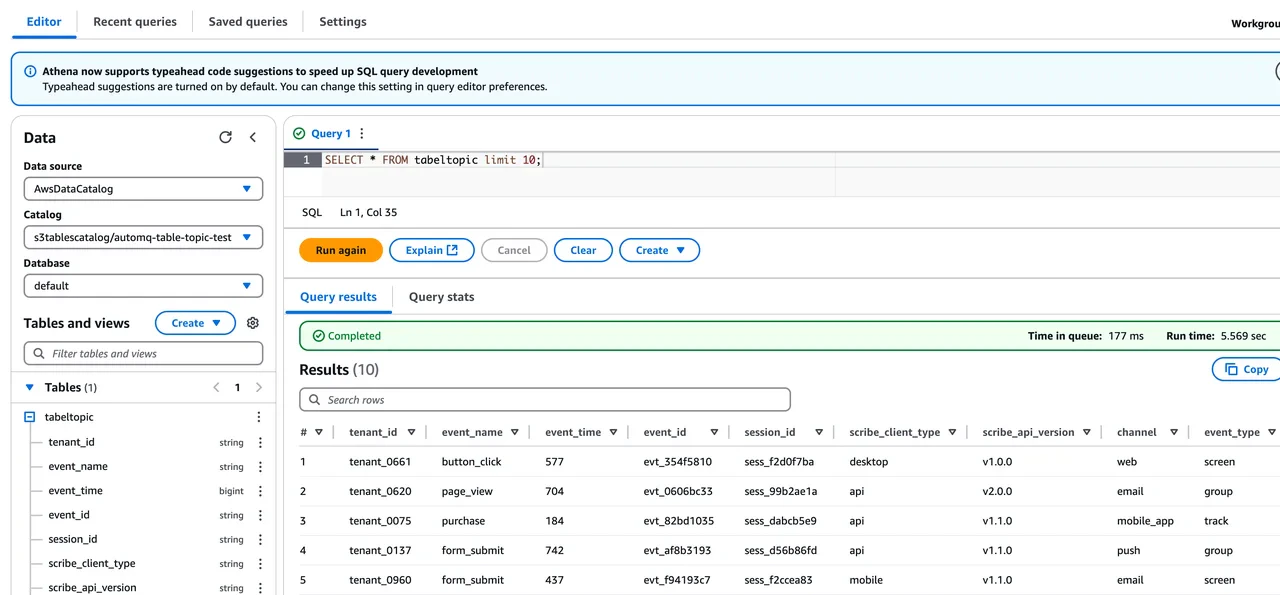
Click Query Table from Athena to enable AWS Athena to query the table data in the Table Bucket. You can observe how AutoMQ converts Kafka messages into corresponding data table records in real-time. Users can also utilize other query engines for analysis and computation.
Was this page helpful?
{"docsConfig":{"theme":"mint","$schema":"https://mintlify.com/docs.json","name":"AutoMQ Documentation","colors":{"primary":"#2449D4","light":"#2449D4","dark":"#2449D4"},"logo":{"light":"https://mintcdn.com/automq/s9vNxeyMGZ1r1DRV/logo/automq-black.svg?fit=max\u0026auto=format\u0026n=s9vNxeyMGZ1r1DRV\u0026q=85\u0026s=bcc93ae74a4143ae2b7602497b7b354b","dark":"https://mintcdn.com/automq/s9vNxeyMGZ1r1DRV/logo/automq-white.svg?fit=max\u0026auto=format\u0026n=s9vNxeyMGZ1r1DRV\u0026q=85\u0026s=209c336f52b4021f2e991e10d07613ae"},"favicon":"https://mintcdn.com/automq/s9vNxeyMGZ1r1DRV/logo/favicon.svg?fit=max\u0026auto=format\u0026n=s9vNxeyMGZ1r1DRV\u0026q=85\u0026s=d736b0934a674250c9dbe95a5f642fb9","appearance":{"default":"light","strict":true},"navbar":{"links":[{"icon":"github","href":"https://github.com/automq/automq","label":"Github"}],"primary":{"type":"button","label":"automq.com","href":"https://www.automq.com"}},"footer":{"socials":{"slack":"https://go.automq.com/slack","telegram":"https://t.me/+VgqhN9wqBGIzYmU1","x":"https://x.com/AutoMQ_Lab","github":"https://github.com/automq/automq","linkedin":"https://linkedin.com/company/automq"}},"icons":{"library":"lucide"},"integrations":{"ga4":{"measurementId":"G-4F3BX9DFG9"}},"contextual":{"options":["copy","view","chatgpt","claude","perplexity","mcp","cursor","vscode"],"display":"header"},"styling":{"latex":true},"navigation":{"global":{"anchors":[{"anchor":"Github","icon":"github","href":"https://github.com/automq/automq"},{"anchor":"Slack","icon":"slack","href":"https://go.automq.com/slack"},{"anchor":"Telegram","icon":"Telegram","href":"https://t.me/+VgqhN9wqBGIzYmU1"},{"anchor":"Blog","icon":"newspaper","href":"https://www.automq.com/blog"}]},"languages":[{"language":"en","href":""},{"language":"cn","href":"zh/automq/what-is-automq/overview"}]}},"deployment":{"deploymentMetadataValue":{"subdomain":"automq","hasAudioNarration":false,"actualSubdomain":"automq","customDomains":["docs.automq.com"],"gitSource":{"type":"github","owner":"automq","repo":"sitebox","deployBranch":"main","contentDirectory":"docs","isPrivate":true,"mountPath":"","label":""},"chroma":{"liveDeploymentHistoryId":"6ad735a93eabd17c66250d4b","collectionId":"54500605-320d-46b3-b896-c0d1e0d9a573","schemaVersion":"v3","latestBuiltDeploymentHistoryId":"6ad735a93eabd17c66250d4b"},"feedback":{"thumbs":true,"edits":false,"issues":false},"entitlements":{"AI_CHAT":{"status":"DISABLED"},"WEB_MCP":{"status":"DISABLED"},"NARRATION":{"status":"DISABLED"}},"buildId":"6ad735a93eabd17c66250d4b","clientVersion":"0.0.3902","searchFilterCounts":[{"language":"cn","tag":"AutoMQ BYOC","count":124},{"language":"en","tag":"AutoMQ BYOC","count":113},{"language":"en","tag":"AutoMQ Open Source","count":61},{"language":"cn","tag":"AutoMQ Open Source","count":57},{"language":"en","tag":"Kafka Connect","count":48},{"language":"cn","tag":"Kafka Connect","count":48},{"language":"en","tag":"Sink Connectors","count":26},{"language":"cn","tag":"Sink Connectors","count":26},{"language":"en","tag":"Source Connectors","count":19},{"language":"cn","tag":"Source Connectors","count":19},{"language":"cn","tag":"快速开始","count":16},{"language":"en","tag":"Integrations","count":14},{"language":"en","tag":"Getting Started","count":12},{"language":"cn","tag":"生态集成","count":12},{"language":"en","tag":"Architecture","count":11},{"language":"cn","tag":"管理环境","count":11},{"language":"cn","tag":"技术架构","count":11},{"language":"cn","tag":"安装 BYOC 环境","count":9},{"language":"en","tag":"Eliminate Inter-Zone Traffics","count":8},{"language":"en","tag":"Manage Environments","count":8}]},"assistantConfig":{"deflection":{"enabled":true,"email":"support@automq.com"}},"hasChatPermissions":false,"hasWebMcpPermissions":false,"toggles":[{"name":"kill-isr","enabled":true,"variant":{"name":"disabled","enabled":false,"feature_enabled":true},"impressionData":false},{"name":"agent-mintlify-slack","enabled":true,"variant":{"name":"disabled","enabled":false,"feature_enabled":true},"impressionData":false},{"name":"editor-v7-file-tree","enabled":true,"variant":{"name":"disabled","enabled":false,"feature_enabled":true},"impressionData":false},{"name":"agent-integrations-settings","enabled":true,"variant":{"name":"disabled","enabled":false,"feature_enabled":true},"impressionData":false},{"name":"automations-pr-grouping","enabled":true,"variant":{"name":"disabled","enabled":false,"feature_enabled":true},"impressionData":false},{"name":"custom-prefix","enabled":true,"variant":{"name":"disabled","enabled":false,"feature_enabled":true},"impressionData":false},{"name":"analytics-v7","enabled":true,"variant":{"name":"disabled","enabled":false,"feature_enabled":true},"impressionData":false},{"name":"user-flows-analytics","enabled":true,"variant":{"name":"disabled","enabled":false,"feature_enabled":true},"impressionData":false},{"name":"no-publish-flow","enabled":true,"variant":{"name":"disabled","enabled":false,"feature_enabled":true},"impressionData":false},{"name":"workos-onboarding","enabled":true,"variant":{"name":"disabled","enabled":false,"feature_enabled":true},"impressionData":false},{"name":"llms-txt-v2","enabled":true,"variant":{"name":"disabled","enabled":false,"feature_enabled":true},"impressionData":false},{"name":"pause-universal-search-reconcile","enabled":true,"variant":{"name":"disabled","enabled":false,"feature_enabled":true},"impressionData":false},{"name":"snapshot-serving-live","enabled":true,"variant":{"name":"disabled","enabled":false,"feature_enabled":true},"impressionData":false},{"name":"stripTemperatureMiddleware","enabled":true,"variant":{"name":"disabled","enabled":false,"feature_enabled":true},"impressionData":false},{"name":"per-site-search-delta","enabled":true,"variant":{"name":"disabled","enabled":false,"feature_enabled":true},"impressionData":false},{"name":"support-platform-pylon-zendesk","enabled":true,"variant":{"name":"disabled","enabled":false,"feature_enabled":true},"impressionData":false},{"name":"editor-branches-v2-autocommit","enabled":true,"variant":{"name":"disabled","enabled":false,"feature_enabled":true},"impressionData":false},{"name":"editor-branches-v2","enabled":true,"variant":{"name":"disabled","enabled":false,"feature_enabled":true},"impressionData":false},{"name":"snapshot-serving","enabled":true,"variant":{"name":"disabled","enabled":false,"feature_enabled":true},"impressionData":false},{"name":"instant-rollback","enabled":true,"variant":{"name":"disabled","enabled":false,"feature_enabled":true},"impressionData":false},{"name":"granular-notifications-server","enabled":true,"variant":{"name":"disabled","enabled":false,"feature_enabled":true},"impressionData":false},{"name":"granular-notifications","enabled":true,"variant":{"name":"disabled","enabled":false,"feature_enabled":true},"impressionData":false},{"name":"editor-private-page-search","enabled":true,"variant":{"name":"disabled","enabled":false,"feature_enabled":true},"impressionData":false},{"name":"automations-fable","enabled":true,"variant":{"name":"disabled","enabled":false,"feature_enabled":true},"impressionData":false},{"name":"fixed-ai-action-pricing","enabled":true,"variant":{"name":"disabled","enabled":false,"feature_enabled":true},"impressionData":false},{"name":"automation-resolve-merge-conflict","enabled":true,"variant":{"name":"disabled","enabled":false,"feature_enabled":true},"impressionData":false},{"name":"scoped-publishing","enabled":true,"variant":{"name":"disabled","enabled":false,"feature_enabled":true},"impressionData":false},{"name":"mintql","enabled":true,"variant":{"name":"disabled","enabled":false,"feature_enabled":true},"impressionData":false},{"name":"page-level-analytics","enabled":true,"variant":{"name":"disabled","enabled":false,"feature_enabled":true},"impressionData":false},{"name":"teamspace","enabled":true,"variant":{"name":"disabled","enabled":false,"feature_enabled":true},"impressionData":false},{"name":"editor-version-history-v2","enabled":true,"variant":{"name":"disabled","enabled":false,"feature_enabled":true},"impressionData":false},{"name":"vite-origin","enabled":true,"variant":{"name":"disabled","enabled":false,"feature_enabled":true},"impressionData":false},{"name":"editor-nav-generations","enabled":true,"variant":{"name":"disabled","enabled":false,"feature_enabled":true},"impressionData":false},{"name":"workspace-projects","enabled":true,"variant":{"name":"disabled","enabled":false,"feature_enabled":true},"impressionData":false},{"name":"assistant-v5","enabled":true,"variant":{"name":"disabled","enabled":false,"feature_enabled":true},"impressionData":false},{"name":"byok-sep-25","enabled":true,"variant":{"name":"disabled","enabled":false,"feature_enabled":true},"impressionData":false},{"name":"revalidation-jwt","enabled":true,"variant":{"name":"disabled","enabled":false,"feature_enabled":true},"impressionData":false},{"name":"editor-agent-model-picker","enabled":true,"variant":{"name":"disabled","enabled":false,"feature_enabled":true},"impressionData":false},{"name":"client-snapshot-docs-config","enabled":true,"variant":{"name":"disabled","enabled":false,"feature_enabled":true},"impressionData":false},{"name":"hobby-abuse-scan","enabled":true,"variant":{"name":"disabled","enabled":false,"feature_enabled":true},"impressionData":false},{"name":"dashboard-inbox","enabled":true,"variant":{"name":"disabled","enabled":false,"feature_enabled":true},"impressionData":false}],"isAtlas":false,"googleFontsInlined":false},"customCss":[{"filePath":"static/style.css","content":"#content-area{word-break:keep-all;white-space:normal;overflow-wrap:normal}header div:nth-child(2) p{display:none}.emphasize-placeholder{background-color:#e0f2ff;border:1px solid #2d64eb;padding:2px 6px;border-radius:4px;font-family:monospace;cursor:pointer;display:inline-flex;align-items:center}.emoji-flip{display:inline-block;transform:scaleX(-1);font-size:.8em;margin-left:4px}"}],"page":{"pagePath":"automq-cloud/table-topic/table-topic-integration-with-aws-s3-table","slug":"/automq-cloud/table-topic/table-topic-integration-with-aws-s3-table","pageMetadata":{"title":"Table Topic Integration with AWS S3 Table","description":"Integrate AutoMQ with AWS S3 Table for streaming data lake analysis without ETL. Achieve cloud-native scalability and Kafka compatibility with AutoMQ's Table Topic feature.","href":"/automq-cloud/table-topic/table-topic-integration-with-aws-s3-table"},"description":{"compiledSource":"\"use strict\";\nconst {jsx: _jsx} = arguments[0];\nconst {useMDXComponents: _provideComponents} = arguments[0];\nfunction _createMdxContent(props) {\n const _components = {\n p: \"p\",\n ..._provideComponents(),\n ...props.components\n };\n return _jsx(_components.p, {\n children: \"Integrate AutoMQ with AWS S3 Table for streaming data lake analysis without ETL. Achieve cloud-native scalability and Kafka compatibility with AutoMQ’s Table Topic feature.\"\n });\n}\nfunction MDXContent(props = {}) {\n const {wrapper: MDXLayout} = {\n ..._provideComponents(),\n ...props.components\n };\n return MDXLayout ? _jsx(MDXLayout, {\n ...props,\n children: _jsx(_createMdxContent, {\n ...props\n })\n }) : _createMdxContent(props);\n}\nreturn {\n default: MDXContent\n};\n","frontmatter":{},"scope":{}},"pageType":"default","mdx":{"mdxSource":{"compiledSource":"\"use strict\";const{Fragment:_Fragment,jsx:_jsx,jsxs:_jsxs}=arguments[0];const{useMDXComponents:_provideComponents}=arguments[0];function _createMdxContent(props){const _components={a:`a`,li:`li`,ol:`ol`,p:`p`,strong:`strong`,ul:`ul`,..._provideComponents(),...props.components},{Heading,OptimizedImage,Tip}=_components;if(!Heading)_missingMdxReference(`Heading`,true);if(!OptimizedImage)_missingMdxReference(`OptimizedImage`,true);if(!Tip)_missingMdxReference(`Tip`,true);return _jsxs(_Fragment,{children:[_jsx(_components.p,{children:`AutoMQ Table Topic integrates with Iceberg for streaming data analytics in lakes, removing the necessity for ETL configuration and upkeep. This article guides you through configuring the integration of Table Topic with the AWS S3 Table Bucket in an AWS environment.`}),`\n`,_jsx(Heading,{level:`2`,id:`prerequisites`,children:`Prerequisites`}),`\n`,_jsx(_components.p,{children:`To utilize the AutoMQ Table Topic feature in an AWS environment, the following conditions must be fulfilled:`}),`\n`,_jsxs(_components.ul,{children:[`\n`,_jsxs(_components.li,{children:[`\n`,_jsxs(_components.p,{children:[_jsx(_components.strong,{children:`Version Constraint:`}),` The AutoMQ instance version must be >= 1.4.1.`]}),`\n`]}),`\n`,_jsxs(_components.li,{children:[`\n`,_jsxs(_components.p,{children:[_jsx(_components.strong,{children:`Instance Constraint:`}),` The Table Topic feature needs to be enabled during the creation of the AutoMQ instance, as it cannot be enabled retrospectively once the instance is established.`]}),`\n`]}),`\n`,_jsxs(_components.li,{children:[`\n`,_jsxs(_components.p,{children:[_jsx(_components.strong,{children:`Resource Requirements:`}),` On AWS, when using the Table Topic feature, you can leverage AWS Glue as the Data Catalog or utilize an AWS S3 Table Bucket for the Data Catalog.`]}),`\n`]}),`\n`]}),`\n`,_jsx(Heading,{level:`2`,id:`operation-steps`,children:`Operation Steps`}),`\n`,_jsx(Heading,{level:`3`,id:`step-1-create-an-s3-table-bucket`,children:`Step 1: Create an S3 Table Bucket`}),`\n`,_jsx(_components.p,{children:`To integrate AutoMQ with the S3 Table Bucket, you need to first create a Table Bucket through the AWS S3 console. Ensure it’s in the same deployment region as AutoMQ. This Table Bucket will be configured when you create the AutoMQ instance.`}),`\n`,_jsx(OptimizedImage,{alt:`AWS S3 Console showing the Table Bucket creation page`,src:`https://mintcdn.com/automq/6t03b99H9kP_jCZq/automq-cloud/table-topic/table-topic-integration-with-aws-s3-table/1.webp?fit=max\u0026auto=format\u0026n=6t03b99H9kP_jCZq\u0026q=85\u0026s=7fd2ed18ae261c340f933fd9123269dc`,\"data-og-width\":`3378`,width:`3378`,\"data-og-height\":`1098`,height:`1098`,\"data-path\":`automq-cloud/table-topic/table-topic-integration-with-aws-s3-table/1.webp`,\"data-optimize\":`true`,\"data-opv\":`3`,srcset:`https://mintcdn.com/automq/6t03b99H9kP_jCZq/automq-cloud/table-topic/table-topic-integration-with-aws-s3-table/1.webp?w=280\u0026fit=max\u0026auto=format\u0026n=6t03b99H9kP_jCZq\u0026q=85\u0026s=35eefad399b00e05c4b7b5763bd96f3e 280w, https://mintcdn.com/automq/6t03b99H9kP_jCZq/automq-cloud/table-topic/table-topic-integration-with-aws-s3-table/1.webp?w=560\u0026fit=max\u0026auto=format\u0026n=6t03b99H9kP_jCZq\u0026q=85\u0026s=216879f353351505d64afda0a21f7df8 560w, https://mintcdn.com/automq/6t03b99H9kP_jCZq/automq-cloud/table-topic/table-topic-integration-with-aws-s3-table/1.webp?w=840\u0026fit=max\u0026auto=format\u0026n=6t03b99H9kP_jCZq\u0026q=85\u0026s=82474a54653a7ea660a98016d674f40e 840w, https://mintcdn.com/automq/6t03b99H9kP_jCZq/automq-cloud/table-topic/table-topic-integration-with-aws-s3-table/1.webp?w=1100\u0026fit=max\u0026auto=format\u0026n=6t03b99H9kP_jCZq\u0026q=85\u0026s=5b30a83dac8a423f4ea59086bb37ebf4 1100w, https://mintcdn.com/automq/6t03b99H9kP_jCZq/automq-cloud/table-topic/table-topic-integration-with-aws-s3-table/1.webp?w=1650\u0026fit=max\u0026auto=format\u0026n=6t03b99H9kP_jCZq\u0026q=85\u0026s=7a20fa80bcfbf51e41a3a0517bf21bb8 1650w, https://mintcdn.com/automq/6t03b99H9kP_jCZq/automq-cloud/table-topic/table-topic-integration-with-aws-s3-table/1.webp?w=2500\u0026fit=max\u0026auto=format\u0026n=6t03b99H9kP_jCZq\u0026q=85\u0026s=3b7b05a77c7a346b84e45f97fbb4c558 2500w`}),`\n`,_jsx(Heading,{level:`3`,id:`step-2-create-an-automq-instance-and-enable-the-table-topic-feature`,children:`Step 2: Create an AutoMQ Instance and Enable the Table Topic Feature`}),`\n`,_jsx(_components.p,{children:`The AutoMQ Table Topic feature must be enabled during the creation of the instance to support streaming data into the lake. Therefore, follow the instructions below when configuring the instance:`}),`\n`,_jsxs(_components.ol,{children:[`\n`,_jsxs(_components.li,{children:[`\n`,_jsx(_components.p,{children:`Enable Table Topic.`}),`\n`]}),`\n`,_jsxs(_components.li,{children:[`\n`,_jsxs(_components.p,{children:[`Select `,_jsx(_components.strong,{children:`S3 Table`}),` as the Catalog type.`]}),`\n`]}),`\n`,_jsxs(_components.li,{children:[`\n`,_jsx(_components.p,{children:`Set the S3 Table Bucket used by the Catalog. We recommend selecting the Table Bucket created in Step 1.`}),`\n`]}),`\n`]}),`\n`,_jsxs(Tip,{children:[_jsx(_components.p,{children:_jsx(_components.strong,{children:`Note:`})}),_jsx(_components.p,{children:`After enabling Table Topic in an AutoMQ instance, not all Topics will automatically activate stream tables. You still need to configure each Topic individually to facilitate streaming data into the lake.`}),_jsx(_components.p,{children:`To use Table Topic, you must enable it while creating the instance. Once the instance is created, this configuration cannot be altered.`})]}),`\n`,_jsx(OptimizedImage,{alt:`AutoMQ instance creation page with Table Topic feature enabled`,src:`https://mintcdn.com/automq/4Uz-SDzI1srfDCLZ/automq-cloud/table-topic/table-topic-integration-with-aws-s3-table/4.webp?fit=max\u0026auto=format\u0026n=4Uz-SDzI1srfDCLZ\u0026q=85\u0026s=e42fc5208dbba4daef30704da8b6c9bc`,\"data-og-width\":`2774`,width:`2774`,\"data-og-height\":`718`,height:`718`,\"data-path\":`automq-cloud/table-topic/table-topic-integration-with-aws-s3-table/4.webp`,\"data-optimize\":`true`,\"data-opv\":`3`,srcset:`https://mintcdn.com/automq/4Uz-SDzI1srfDCLZ/automq-cloud/table-topic/table-topic-integration-with-aws-s3-table/4.webp?w=280\u0026fit=max\u0026auto=format\u0026n=4Uz-SDzI1srfDCLZ\u0026q=85\u0026s=6411c8374f029e0b4e763fd60dd4fa8f 280w, https://mintcdn.com/automq/4Uz-SDzI1srfDCLZ/automq-cloud/table-topic/table-topic-integration-with-aws-s3-table/4.webp?w=560\u0026fit=max\u0026auto=format\u0026n=4Uz-SDzI1srfDCLZ\u0026q=85\u0026s=57d00f161a606093cc7fefd67e586cb0 560w, https://mintcdn.com/automq/4Uz-SDzI1srfDCLZ/automq-cloud/table-topic/table-topic-integration-with-aws-s3-table/4.webp?w=840\u0026fit=max\u0026auto=format\u0026n=4Uz-SDzI1srfDCLZ\u0026q=85\u0026s=dddd9fe7b10d3bfdc588b0c9498c0e68 840w, https://mintcdn.com/automq/4Uz-SDzI1srfDCLZ/automq-cloud/table-topic/table-topic-integration-with-aws-s3-table/4.webp?w=1100\u0026fit=max\u0026auto=format\u0026n=4Uz-SDzI1srfDCLZ\u0026q=85\u0026s=0611dc197be505291c617bfdfce6bfb1 1100w, https://mintcdn.com/automq/4Uz-SDzI1srfDCLZ/automq-cloud/table-topic/table-topic-integration-with-aws-s3-table/4.webp?w=1650\u0026fit=max\u0026auto=format\u0026n=4Uz-SDzI1srfDCLZ\u0026q=85\u0026s=cae2e4ea428d4a91bf2d1f7b6da60a79 1650w, https://mintcdn.com/automq/4Uz-SDzI1srfDCLZ/automq-cloud/table-topic/table-topic-integration-with-aws-s3-table/4.webp?w=2500\u0026fit=max\u0026auto=format\u0026n=4Uz-SDzI1srfDCLZ\u0026q=85\u0026s=4a75e6955626e21a250e2d27432dd8be 2500w`}),`\n`,_jsx(Heading,{level:`3`,id:`step-3-create-topic-and-configure-stream-table`,children:`Step 3: Create Topic and Configure Stream Table`}),`\n`,_jsx(_components.p,{children:`Once Table Topic functionality is enabled in the AutoMQ instance, you can configure stream tables as needed during the Topic creation process. The specific steps are as follows:`}),`\n`,_jsxs(_components.ol,{children:[`\n`,_jsxs(_components.li,{children:[`\n`,_jsxs(_components.p,{children:[`Access the instance in Step 2, find the Topic list, and click `,_jsx(_components.strong,{children:`Create Topic`}),`.`]}),`\n`]}),`\n`,_jsxs(_components.li,{children:[`\n`,_jsx(_components.p,{children:`In the Topic creation configuration, enable Table Topic conversion and configure the following parameters:`}),`\n`,_jsxs(_components.ol,{start:`3`,children:[`\n`,_jsxs(_components.li,{children:[`\n`,_jsxs(_components.p,{children:[_jsx(_components.strong,{children:`Namespace:`}),` The namespace is used to isolate different Iceberg tables and corresponds to the Database in the Data Catalog. It is recommended to set this parameter based on business affiliation.`]}),`\n`]}),`\n`,_jsxs(_components.li,{children:[`\n`,_jsxs(_components.p,{children:[_jsx(_components.strong,{children:`Schema Constraint Type:`}),` Specifies whether Topic messages comply with schema constraints. By selecting `,_jsx(_components.strong,{children:`Schema`}),`, you activate schema constraints, which necessitate that message schemas be registered with the AutoMQ built-in SchemaRegistry. Any subsequent message sent must strictly conform to the schema, and the Table Topic will then utilize the fields from this schema to populate the Iceberg table. If `,_jsx(_components.strong,{children:`Schemaless`}),` is chosen, it signifies that the message content lacks explicit schema constraints; in this scenario, the message Key and Value are collectively used to populate the Iceberg table.`]}),`\n`]}),`\n`]}),`\n`]}),`\n`]}),`\n`,_jsx(OptimizedImage,{alt:`Topic creation form with Table Topic conversion enabled, showing Namespace and Schema Constraint Type fields`,src:`https://mintcdn.com/automq/1QgM5miUDiCjXCsL/automq-cloud/table-topic/table-topic-integration-with-aws-s3-table/5.webp?fit=max\u0026auto=format\u0026n=1QgM5miUDiCjXCsL\u0026q=85\u0026s=08bb2f08bca0440074b4ffa143c1bed4`,\"data-og-width\":`2732`,width:`2732`,\"data-og-height\":`1418`,height:`1418`,\"data-path\":`automq-cloud/table-topic/table-topic-integration-with-aws-s3-table/5.webp`,\"data-optimize\":`true`,\"data-opv\":`3`,srcset:`https://mintcdn.com/automq/1QgM5miUDiCjXCsL/automq-cloud/table-topic/table-topic-integration-with-aws-s3-table/5.webp?w=280\u0026fit=max\u0026auto=format\u0026n=1QgM5miUDiCjXCsL\u0026q=85\u0026s=9030d9ae79e90578419f62990edd5724 280w, https://mintcdn.com/automq/1QgM5miUDiCjXCsL/automq-cloud/table-topic/table-topic-integration-with-aws-s3-table/5.webp?w=560\u0026fit=max\u0026auto=format\u0026n=1QgM5miUDiCjXCsL\u0026q=85\u0026s=73bcda3fa041de06b7cba25c3c9d1985 560w, https://mintcdn.com/automq/1QgM5miUDiCjXCsL/automq-cloud/table-topic/table-topic-integration-with-aws-s3-table/5.webp?w=840\u0026fit=max\u0026auto=format\u0026n=1QgM5miUDiCjXCsL\u0026q=85\u0026s=223f13e33599080d67408816e7716bdc 840w, https://mintcdn.com/automq/1QgM5miUDiCjXCsL/automq-cloud/table-topic/table-topic-integration-with-aws-s3-table/5.webp?w=1100\u0026fit=max\u0026auto=format\u0026n=1QgM5miUDiCjXCsL\u0026q=85\u0026s=c32c51eb3d3eec742dc448b2e51a9d7f 1100w, https://mintcdn.com/automq/1QgM5miUDiCjXCsL/automq-cloud/table-topic/table-topic-integration-with-aws-s3-table/5.webp?w=1650\u0026fit=max\u0026auto=format\u0026n=1QgM5miUDiCjXCsL\u0026q=85\u0026s=d8e896aedf40f0306bf1701156b92075 1650w, https://mintcdn.com/automq/1QgM5miUDiCjXCsL/automq-cloud/table-topic/table-topic-integration-with-aws-s3-table/5.webp?w=2500\u0026fit=max\u0026auto=format\u0026n=1QgM5miUDiCjXCsL\u0026q=85\u0026s=4b0107ae0df54c762d606aac39acea56 2500w`}),`\n`,_jsxs(_components.ol,{start:`5`,children:[`\n`,_jsxs(_components.li,{children:[_jsx(_components.strong,{children:`Click Confirm`}),` to create a Topic that supports streaming to tables.`]}),`\n`]}),`\n`,_jsx(Heading,{level:`3`,id:`step-4-produce-messages-and-query-iceberg-table-data-in-real-time`,children:`Step 4: Produce Messages and Query Iceberg Table Data in Real-Time`}),`\n`,_jsx(_components.p,{children:`After configuring the AutoMQ instance and creating Table Topics, you can test data production and query data in the Iceberg table.`}),`\n`,_jsxs(_components.ol,{children:[`\n`,_jsxs(_components.li,{children:[`\n`,_jsx(_components.p,{children:`Click to enter the Topic details, navigate to the Produce Messages tab, input the test message Key and message Value, and send the message.`}),`\n`]}),`\n`,_jsxs(_components.li,{children:[`\n`,_jsxs(_components.p,{children:[`Visit the `,_jsx(_components.a,{href:`https://ap-southeast-1.console.aws.amazon.com/s3/table-buckets/`,children:`AWS`}),_jsx(_components.a,{href:`https://ap-southeast-1.console.aws.amazon.com/s3/table-buckets/`,children:`S3 Console`}),` to view the Iceberg database and tables written by AutoMQ.`]}),`\n`]}),`\n`]}),`\n`,_jsx(OptimizedImage,{alt:`AWS S3 Console showing the Iceberg database and tables written by AutoMQ`,src:`https://mintcdn.com/automq/1QgM5miUDiCjXCsL/automq-cloud/table-topic/table-topic-integration-with-aws-s3-table/6.webp?fit=max\u0026auto=format\u0026n=1QgM5miUDiCjXCsL\u0026q=85\u0026s=8ef0be4639186870d817b008c48afb77`,\"data-og-width\":`2998`,width:`2998`,\"data-og-height\":`666`,height:`666`,\"data-path\":`automq-cloud/table-topic/table-topic-integration-with-aws-s3-table/6.webp`,\"data-optimize\":`true`,\"data-opv\":`3`,srcset:`https://mintcdn.com/automq/1QgM5miUDiCjXCsL/automq-cloud/table-topic/table-topic-integration-with-aws-s3-table/6.webp?w=280\u0026fit=max\u0026auto=format\u0026n=1QgM5miUDiCjXCsL\u0026q=85\u0026s=a5df2fbdacb545ba98e6c31a13f68831 280w, https://mintcdn.com/automq/1QgM5miUDiCjXCsL/automq-cloud/table-topic/table-topic-integration-with-aws-s3-table/6.webp?w=560\u0026fit=max\u0026auto=format\u0026n=1QgM5miUDiCjXCsL\u0026q=85\u0026s=10c6311edcc618376bef95390f7b0579 560w, https://mintcdn.com/automq/1QgM5miUDiCjXCsL/automq-cloud/table-topic/table-topic-integration-with-aws-s3-table/6.webp?w=840\u0026fit=max\u0026auto=format\u0026n=1QgM5miUDiCjXCsL\u0026q=85\u0026s=0eebaf60041e6c08fd96062670c2c050 840w, https://mintcdn.com/automq/1QgM5miUDiCjXCsL/automq-cloud/table-topic/table-topic-integration-with-aws-s3-table/6.webp?w=1100\u0026fit=max\u0026auto=format\u0026n=1QgM5miUDiCjXCsL\u0026q=85\u0026s=c4589a02137e379ac20d2a151a9d2fd2 1100w, https://mintcdn.com/automq/1QgM5miUDiCjXCsL/automq-cloud/table-topic/table-topic-integration-with-aws-s3-table/6.webp?w=1650\u0026fit=max\u0026auto=format\u0026n=1QgM5miUDiCjXCsL\u0026q=85\u0026s=3ab2160360f23a92b30fa0cb9c44a42d 1650w, https://mintcdn.com/automq/1QgM5miUDiCjXCsL/automq-cloud/table-topic/table-topic-integration-with-aws-s3-table/6.webp?w=2500\u0026fit=max\u0026auto=format\u0026n=1QgM5miUDiCjXCsL\u0026q=85\u0026s=0cbb13a4d4cd41ec746de389022d8f85 2500w`}),`\n`,_jsxs(_components.ol,{start:`3`,children:[`\n`,_jsxs(_components.li,{children:[_jsx(_components.strong,{children:`Click Query Table from Athena`}),` to enable AWS Athena to query the table data in the Table Bucket. You can observe how AutoMQ converts Kafka messages into corresponding data table records in real-time. Users can also utilize other query engines for analysis and computation.`]}),`\n`]}),`\n`,_jsx(OptimizedImage,{alt:`AWS Athena query results showing AutoMQ Kafka messages converted to S3 Table Bucket records in real time`,src:`https://mintcdn.com/automq/1QgM5miUDiCjXCsL/automq-cloud/table-topic/table-topic-integration-with-aws-s3-table/7.webp?fit=max\u0026auto=format\u0026n=1QgM5miUDiCjXCsL\u0026q=85\u0026s=f390d44d03d94f6be405014659dafa87`,\"data-og-width\":`1280`,width:`1280`,\"data-og-height\":`595`,height:`595`,\"data-path\":`automq-cloud/table-topic/table-topic-integration-with-aws-s3-table/7.webp`,\"data-optimize\":`true`,\"data-opv\":`3`,srcset:`https://mintcdn.com/automq/1QgM5miUDiCjXCsL/automq-cloud/table-topic/table-topic-integration-with-aws-s3-table/7.webp?w=280\u0026fit=max\u0026auto=format\u0026n=1QgM5miUDiCjXCsL\u0026q=85\u0026s=87d958f18a131433eebad9882c58a10a 280w, https://mintcdn.com/automq/1QgM5miUDiCjXCsL/automq-cloud/table-topic/table-topic-integration-with-aws-s3-table/7.webp?w=560\u0026fit=max\u0026auto=format\u0026n=1QgM5miUDiCjXCsL\u0026q=85\u0026s=718021c3b050fc50f89889d597b925ea 560w, https://mintcdn.com/automq/1QgM5miUDiCjXCsL/automq-cloud/table-topic/table-topic-integration-with-aws-s3-table/7.webp?w=840\u0026fit=max\u0026auto=format\u0026n=1QgM5miUDiCjXCsL\u0026q=85\u0026s=4a2b3a6265e4524678242441289e88e7 840w, https://mintcdn.com/automq/1QgM5miUDiCjXCsL/automq-cloud/table-topic/table-topic-integration-with-aws-s3-table/7.webp?w=1100\u0026fit=max\u0026auto=format\u0026n=1QgM5miUDiCjXCsL\u0026q=85\u0026s=16d8e027b8e7821cba1f5c48bc78dae3 1100w, https://mintcdn.com/automq/1QgM5miUDiCjXCsL/automq-cloud/table-topic/table-topic-integration-with-aws-s3-table/7.webp?w=1650\u0026fit=max\u0026auto=format\u0026n=1QgM5miUDiCjXCsL\u0026q=85\u0026s=063a6cef4d688d6a5394e7b37e1a7e2d 1650w, https://mintcdn.com/automq/1QgM5miUDiCjXCsL/automq-cloud/table-topic/table-topic-integration-with-aws-s3-table/7.webp?w=2500\u0026fit=max\u0026auto=format\u0026n=1QgM5miUDiCjXCsL\u0026q=85\u0026s=d38a004355b189a4374770c019ba598c 2500w`})]})}function MDXContent(props={}){const{wrapper:MDXLayout}={..._provideComponents(),...props.components};return MDXLayout?_jsx(MDXLayout,{...props,children:_jsx(_createMdxContent,{...props})}):_createMdxContent(props)}return{default:MDXContent};function _missingMdxReference(id,component){throw new Error(`Expected `+(component?`component`:`object`)+\" `\"+id+\"` to be defined: you likely forgot to import, pass, or provide it.\")}","frontmatter":{},"scope":{"config":{},"pageMetadata":{"title":"Table Topic Integration with AWS S3 Table","description":"Integrate AutoMQ with AWS S3 Table for streaming data lake analysis without ETL. Achieve cloud-native scalability and Kafka compatibility with AutoMQ's Table Topic feature.","href":"/automq-cloud/table-topic/table-topic-integration-with-aws-s3-table"}}},"mdxSourceWithNoJs":null},"mdxExtracts":{"tableOfContents":[{"title":"Prerequisites","slug":"prerequisites","depth":2,"children":[]},{"title":"Operation Steps","slug":"operation-steps","depth":2,"children":[{"title":"Step 1: Create an S3 Table Bucket","slug":"step-1-create-an-s3-table-bucket","depth":3,"children":[]},{"title":"Step 2: Create an AutoMQ Instance and Enable the Table Topic Feature","slug":"step-2-create-an-automq-instance-and-enable-the-table-topic-feature","depth":3,"children":[]},{"title":"Step 3: Create Topic and Configure Stream Table","slug":"step-3-create-topic-and-configure-stream-table","depth":3,"children":[]},{"title":"Step 4: Produce Messages and Query Iceberg Table Data in Real-Time","slug":"step-4-produce-messages-and-query-iceberg-table-data-in-real-time","depth":3,"children":[]}]}],"codeExamples":{}},"jsLinks":["/_mintlify/custom/automq/48fec8bab1afa455/content/monitor.js","/_mintlify/custom/automq/c09aa9839083e17a/content/hubspot.js","/_mintlify/custom/automq/786ace9ed17adbd7/content/luckyorange-tracking.js"],"subdomain":"automq","siteName":"AutoMQ Documentation","title":"Table Topic Integration with AWS S3 Table - AutoMQ Documentation","navMaps":{"firstHrefInVersion":{},"firstHrefInLanguage":{"en":{"href":"/automq-cloud/table-topic/table-topic-integration-with-aws-s3-table","matchLevel":0},"cn":{"href":"/zh/automq-cloud/table-topic/table-topic-integration-with-aws-s3-table","matchLevel":1}}},"lastModified":"2026-05-06T06:57:32.551Z","originalFileLocation":"automq-cloud/table-topic/table-topic-integration-with-aws-s3-table.mdx","locale":"en"},"headHtml":"\u003cscript data-mint-head>(function(){var d=document.documentElement,p=\"light\";if(!p){try{p=localStorage.getItem(\"isDarkMode\")}catch(e){}if(p==='true')p='dark';else if(p==='false')p='light';if(p!=='light'\u0026\u0026p!=='dark'\u0026\u0026p!=='system')p=\"light\"}var r=p==='system'?(matchMedia(\"(prefers-color-scheme: dark)\").matches?'dark':'light'):p;d.classList.remove(r==='dark'?'light':'dark');d.classList.add(r);d.setAttribute(\"data-theme-preference\",p)})();\u003c/script>\u003cmeta data-mint-head name=\"description\" content=\"Integrate AutoMQ with AWS S3 Table for streaming data lake analysis without ETL. Achieve cloud-native scalability and Kafka compatibility with AutoMQ\u0026#x27;s Table Topic feature.\">\u003cmeta data-mint-head name=\"application-name\" content=\"AutoMQ Documentation\">\u003cmeta data-mint-head name=\"generator\" content=\"Mintlify\">\u003clink data-mint-head rel=\"icon\" type=\"image/png\" sizes=\"192x192\" href=\"/mintlify-assets/_mintlify/favicons/automq/ZRmM16tNeY4WJ6hO/_generated/favicon/android-chrome-192x192.png\" media=\"(prefers-color-scheme: light)\">\u003clink data-mint-head rel=\"apple-touch-icon\" type=\"image/png\" sizes=\"180x180\" href=\"/mintlify-assets/_mintlify/favicons/automq/ZRmM16tNeY4WJ6hO/_generated/favicon/apple-touch-icon.png\">\u003clink data-mint-head rel=\"icon\" type=\"image/png\" sizes=\"16x16\" href=\"/mintlify-assets/_mintlify/favicons/automq/ZRmM16tNeY4WJ6hO/_generated/favicon/favicon-16x16.png\" media=\"(prefers-color-scheme: light)\">\u003clink data-mint-head rel=\"icon\" type=\"image/png\" sizes=\"32x32\" href=\"/mintlify-assets/_mintlify/favicons/automq/ZRmM16tNeY4WJ6hO/_generated/favicon/favicon-32x32.png\" media=\"(prefers-color-scheme: light)\">\u003clink data-mint-head rel=\"shortcut icon\" type=\"image/x-icon\" href=\"/mintlify-assets/_mintlify/favicons/automq/ZRmM16tNeY4WJ6hO/_generated/favicon/favicon.ico\" media=\"(prefers-color-scheme: light)\">\u003clink data-mint-head rel=\"icon\" type=\"image/png\" sizes=\"192x192\" href=\"/mintlify-assets/_mintlify/favicons/automq/ZRmM16tNeY4WJ6hO/_generated/favicon-dark/android-chrome-192x192.png\" media=\"(prefers-color-scheme: dark)\">\u003clink data-mint-head rel=\"icon\" type=\"image/png\" sizes=\"16x16\" href=\"/mintlify-assets/_mintlify/favicons/automq/ZRmM16tNeY4WJ6hO/_generated/favicon-dark/favicon-16x16.png\" media=\"(prefers-color-scheme: dark)\">\u003clink data-mint-head rel=\"icon\" type=\"image/png\" sizes=\"32x32\" href=\"/mintlify-assets/_mintlify/favicons/automq/ZRmM16tNeY4WJ6hO/_generated/favicon-dark/favicon-32x32.png\" media=\"(prefers-color-scheme: dark)\">\u003clink data-mint-head rel=\"shortcut icon\" type=\"image/x-icon\" href=\"/mintlify-assets/_mintlify/favicons/automq/ZRmM16tNeY4WJ6hO/_generated/favicon-dark/favicon.ico\" media=\"(prefers-color-scheme: dark)\">\u003cmeta data-mint-head property=\"og:title\" content=\"Table Topic Integration with AWS S3 Table - AutoMQ Documentation\">\u003cmeta data-mint-head property=\"og:description\" content=\"Integrate AutoMQ with AWS S3 Table for streaming data lake analysis without ETL. Achieve cloud-native scalability and Kafka compatibility with AutoMQ\u0026#x27;s Table Topic feature.\">\u003cmeta data-mint-head property=\"og:site_name\" content=\"AutoMQ Documentation\">\u003cmeta data-mint-head property=\"og:url\" content=\"https://docs.automq.com/automq-cloud/table-topic/table-topic-integration-with-aws-s3-table\">\u003cmeta data-mint-head property=\"og:type\" content=\"website\">\u003cmeta data-mint-head name=\"twitter:card\" content=\"summary_large_image\">\u003cmeta data-mint-head name=\"twitter:title\" content=\"Table Topic Integration with AWS S3 Table - AutoMQ Documentation\">\u003cmeta data-mint-head name=\"twitter:description\" content=\"Integrate AutoMQ with AWS S3 Table for streaming data lake analysis without ETL. Achieve cloud-native scalability and Kafka compatibility with AutoMQ\u0026#x27;s Table Topic feature.\">\u003cmeta data-mint-head name=\"msapplication-config\" content=\"/mintlify-assets/_mintlify/favicons/automq/ZRmM16tNeY4WJ6hO/_generated/favicon/browserconfig.xml\">\u003cmeta data-mint-head name=\"apple-mobile-web-app-title\" content=\"AutoMQ Documentation\">\u003cmeta data-mint-head name=\"msapplication-TileColor\" content=\"#2449D4\">\u003clink data-mint-head rel=\"canonical\" href=\"https://docs.automq.com/automq-cloud/table-topic/table-topic-integration-with-aws-s3-table\">\u003clink data-mint-head rel=\"alternate\" type=\"application/xml\" href=\"/sitemap.xml\">\u003clink data-mint-head rel=\"alternate\" type=\"text/markdown\" href=\"/automq-cloud/table-topic/table-topic-integration-with-aws-s3-table.md\">\u003clink data-mint-head rel=\"alternate\" hreflang=\"en\" href=\"https://docs.automq.com/automq-cloud/table-topic/table-topic-integration-with-aws-s3-table\">\u003clink data-mint-head rel=\"alternate\" hreflang=\"zh\" href=\"https://docs.automq.com/zh/automq-cloud/table-topic/table-topic-integration-with-aws-s3-table\">\u003clink data-mint-head rel=\"alternate\" hreflang=\"x-default\" href=\"https://docs.automq.com/automq-cloud/table-topic/table-topic-integration-with-aws-s3-table\">\u003cscript data-mint-head type=\"application/ld+json\">{\"@context\":\"https://schema.org\",\"@graph\":[{\"@type\":\"Organization\",\"@id\":\"https://docs.automq.com/#organization\",\"name\":\"AutoMQ Documentation\",\"url\":\"https://docs.automq.com\",\"logo\":{\"@type\":\"ImageObject\",\"url\":\"https://mintcdn.com/automq/s9vNxeyMGZ1r1DRV/logo/automq-black.svg?fit=max\u0026auto=format\u0026n=s9vNxeyMGZ1r1DRV\u0026q=85\u0026s=bcc93ae74a4143ae2b7602497b7b354b\"}},{\"@type\":\"WebSite\",\"@id\":\"https://docs.automq.com#website\",\"name\":\"AutoMQ Documentation\",\"url\":\"https://docs.automq.com\",\"publisher\":{\"@id\":\"https://docs.automq.com/#organization\"}},{\"@type\":\"WebPage\",\"@id\":\"https://docs.automq.com/automq-cloud/table-topic/table-topic-integration-with-aws-s3-table#webpage\",\"url\":\"https://docs.automq.com/automq-cloud/table-topic/table-topic-integration-with-aws-s3-table\",\"name\":\"Table Topic Integration with AWS S3 Table\",\"description\":\"Integrate AutoMQ with AWS S3 Table for streaming data lake analysis without ETL. Achieve cloud-native scalability and Kafka compatibility with AutoMQ's Table Topic feature.\",\"dateModified\":\"2026-05-06T06:57:32.551Z\",\"isPartOf\":{\"@id\":\"https://docs.automq.com#website\"},\"breadcrumb\":{\"@id\":\"https://docs.automq.com/automq-cloud/table-topic/table-topic-integration-with-aws-s3-table#breadcrumb\"}},{\"@type\":\"BreadcrumbList\",\"@id\":\"https://docs.automq.com/automq-cloud/table-topic/table-topic-integration-with-aws-s3-table#breadcrumb\",\"itemListElement\":[{\"@type\":\"ListItem\",\"position\":1,\"name\":\"Table Topic\",\"item\":\"https://docs.automq.com/automq-cloud/table-topic/overview\"},{\"@type\":\"ListItem\",\"position\":2,\"name\":\"Table Topic Integration with AWS S3 Table\",\"item\":\"https://docs.automq.com/automq-cloud/table-topic/table-topic-integration-with-aws-s3-table\"}]},{\"@type\":[\"Article\",\"TechArticle\"],\"@id\":\"https://docs.automq.com/automq-cloud/table-topic/table-topic-integration-with-aws-s3-table#article\",\"headline\":\"Table Topic Integration with AWS S3 Table\",\"name\":\"Table Topic Integration with AWS S3 Table\",\"description\":\"Integrate AutoMQ with AWS S3 Table for streaming data lake analysis without ETL. Achieve cloud-native scalability and Kafka compatibility with AutoMQ's Table Topic feature.\",\"url\":\"https://docs.automq.com/automq-cloud/table-topic/table-topic-integration-with-aws-s3-table\",\"mainEntityOfPage\":{\"@id\":\"https://docs.automq.com/automq-cloud/table-topic/table-topic-integration-with-aws-s3-table#webpage\"},\"dateModified\":\"2026-05-06T06:57:32.551Z\",\"publisher\":{\"@id\":\"https://docs.automq.com/#organization\"},\"isPartOf\":{\"@id\":\"https://docs.automq.com#website\"}}]}\u003c/script>\u003cscript data-mint-head type=\"application/ld+json\">{\"@context\":\"https://schema.org\",\"@type\":\"WebSite\",\"name\":\"AutoMQ Documentation\",\"creator\":{\"@type\":\"Organization\",\"name\":\"Mintlify\",\"url\":\"https://mintlify.com\"}}\u003c/script>","siteName":"AutoMQ Documentation","nav":{"global":{"anchors":[{"anchor":"Github","icon":"github","href":"https://github.com/automq/automq"},{"anchor":"Slack","icon":"slack","href":"https://go.automq.com/slack"},{"anchor":"Telegram","icon":"Telegram","href":"https://t.me/+VgqhN9wqBGIzYmU1"},{"anchor":"Blog","icon":"newspaper","href":"https://www.automq.com/blog"}]},"languages":[{"language":"en","tabs":[{"tab":"Home","icon":"house","pages":[{"title":"Home","href":""}]},{"tab":"AutoMQ Open Source","icon":"github","pages":[{"title":"AutoMQ Open Source","href":"/automq/what-is-automq/overview"}]},{"tab":"AutoMQ BYOC","icon":"cloud","groups":[{"group":"Overview","icon":"readme","pages":[{"title":"What Is AutoMQ Cloud","href":"/automq-cloud/overview/what-is-automq-cloud"},{"title":"Glossary","href":"/automq-cloud/overview/glossary"},{"title":"Restrictions","href":"/automq-cloud/overview/restrictions"}]},{"group":"Getting Started","icon":"play","pages":[{"title":"Overview","href":"/automq-cloud/getting-started/overview"},{"group":"Install BYOC Environment","pages":[{"group":"AWS","pages":[{"title":"Prepare VPC","href":"/automq-cloud/getting-started/install-byoc-environment/aws/prepare-vpc"},{"title":"Install AutoMQ on AWS","href":"/automq-cloud/getting-started/install-byoc-environment/aws/install-automq-on-aws"}]},{"group":"Google Cloud","pages":[{"title":"Install AutoMQ on Google Cloud","href":"/automq-cloud/getting-started/install-byoc-environment/google-cloud/install-automq-on-gcp"}]},{"title":"OCI","href":"/automq-cloud/getting-started/install-byoc-environment/oci-install-automq"},{"group":"Azure","pages":[{"title":"Install AutoMQ on Azure","href":"/automq-cloud/getting-started/install-byoc-environment/install-env-on-azure"}]}]},{"title":"Experience AutoMQ","href":"/automq-cloud/getting-started/experience-automq"},{"title":"Client SDK Guide","href":"/automq-cloud/getting-started/client-sdk-guide"}]},{"group":"Deploy on Kubernetes","icon":"https://mintlify.s3.us-west-1.amazonaws.com/automq/images/kubernetes-svgrepo-com.svg","pages":[{"title":"Overview","href":"/automq-cloud/deploy-automq-on-kubernetes/overview"},{"title":"Deploy to AWS EKS","href":"/automq-cloud/deploy-automq-on-kubernetes/deploy-to-aws-eks"},{"title":"Deploy to Azure AKS","href":"/automq-cloud/deploy-automq-on-kubernetes/deploy-to-azure-aks"},{"title":"Deploy to Google Cloud GKE","href":"/automq-cloud/deploy-automq-on-kubernetes/deploy-to-google-cloud-gke"}]},{"group":"Subscriptions and Billings","icon":"receipt","pages":[{"title":"Overview","href":"/automq-cloud/subscriptions-and-billings/overview"},{"group":"BYOC Env Billings","pages":[{"title":"Usage-Based Billing for AWS","href":"/automq-cloud/subscriptions-and-billings/byoc-env-billings/usage-based-billing"},{"group":"Prepaid Billing for Others","pages":[{"title":"Prepaid Billing Overview","href":"/automq-cloud/subscriptions-and-billings/byoc-env-billings/billing-instructions-for-byoc"},{"title":"Manage Environment License","href":"/automq-cloud/manage-environments/manage-environment-license"}]}]}]},{"group":"Manage Environments","icon":"clipboard-list","pages":[{"title":"Overview","href":"/automq-cloud/manage-environments/overview"},{"title":"Upgrade Environment Version","href":"/automq-cloud/manage-environments/upgrade-environment-version"},{"group":"Manage Environment Ops Authing","pages":[{"title":"Overview","href":"/automq-cloud/manage-environments/manage-environment-ops-authing/overview"},{"title":"Set Ops Authing from AWS","href":"/automq-cloud/manage-environments/manage-environment-ops-authing/set-ops-authing-from-aws"},{"title":"Set Ops Authing from Google Cloud","href":"/automq-cloud/manage-environments/manage-environment-ops-authing/set-ops-authing-from-google-cloud"},{"title":"Set Ops Authing from OCI","href":"/automq-cloud/manage-environments/manage-environment-ops-authing/set-ops-authing-from-oci"},{"title":"Set Ops Authing from Azure","href":"/automq-cloud/manage-environments/manage-environment-ops-authing/set-ops-authing-from-azure"},{"title":"Set Ops Tunnel for Troubleshooting","href":"/automq-cloud/manage-environments/manage-environment-ops-authing/set-ops-tunnel-for-troubleshooting"}]}]},{"group":"Manage Identities and Access","icon":"fingerprint","pages":[{"title":"Overview","href":"/automq-cloud/manage-identities-and-access/overview"},{"title":"Member Accounts","href":"/automq-cloud/manage-identities-and-access/member-accounts"},{"title":"Role-Based Access Control","href":"/automq-cloud/manage-identities-and-access/role-based-access-control"},{"title":"Service Accounts","href":"/automq-cloud/manage-identities-and-access/service-accounts"},{"title":"Identity Providers and SSO Authentication","href":"/automq-cloud/manage-identities-and-access/identity-providers-and-sso-authentication"}]},{"group":"Managing AutoMQ","icon":"boxes","pages":[{"title":"Manage Instances","href":"/automq-cloud/managing-automq/manage-instances"},{"title":"Manage Topics","href":"/automq-cloud/managing-automq/manage-topics"},{"title":"Manage Consumer Groups","href":"/automq-cloud/managing-automq/manage-consumer-groups"}]},{"group":"Migrate to AutoMQ","icon":"arrow-right-left","pages":[{"title":"Overview","href":"/automq-cloud/migrate-to-automq/overview"},{"title":"Prerequisites","href":"/automq-cloud/migrate-to-automq/prerequisites"},{"title":"Executing Migration","href":"/automq-cloud/migrate-to-automq/executing-migration"},{"title":"Kafka Linking best practices","href":"/automq-cloud/migrate-to-automq/kafka-linking-best-practices"}]},{"group":"Manage Security","icon":"globe-lock","pages":[{"title":"Overview","href":"/automq-cloud/manage-security/overview"},{"group":"Authentication","pages":[{"title":"SASL Authentication","href":"/automq-cloud/manage-security/authentication/sasl-authentication"},{"title":"Mutual TLS (mTLS) Authentication","href":"/automq-cloud/manage-security/authentication/mutual-tls-mtls-authentication"}]},{"title":"Data Encryption at Rest","href":"/automq-cloud/manage-security/data-encryption-at-rest"},{"title":"Manage Kafka ACLs","href":"/automq-cloud/manage-security/manage-kafka-acls"}]},{"group":"Kafka Connect","icon":"blocks","pages":[{"title":"Overview","href":"/automq-cloud/kafka-connect/overview"},{"title":"Manage Plugins","href":"/automq-cloud/kafka-connect/manage-plugins"},{"title":"Manage Connectors","href":"/automq-cloud/kafka-connect/manage-connectors"},{"group":"Source Connectors","pages":[{"title":"Azure IoT Hub Source Connector","href":"/automq-cloud/kafka-connect/source-connectors/azure-iot-hub-source-connector"},{"title":"Camunda Zeebe Source Connector","href":"/automq-cloud/kafka-connect/source-connectors/camunda-zeebe-source-connector"},{"title":"Couchbase Source Connector","href":"/automq-cloud/kafka-connect/source-connectors/couchbase-kafka-connect-couchbase-source-connector"},{"title":"Debezium MongoDB CDC Source Connector","href":"/automq-cloud/kafka-connect/source-connectors/debezium-mongodb-source-connector"},{"title":"Debezium MySQL Source Connector","href":"/automq-cloud/kafka-connect/source-connectors/debezium-mysql-source-connector"},{"title":"Debezium PostgreSQL Source Connector","href":"/automq-cloud/kafka-connect/source-connectors/debezium-postgresql-source-connector"},{"title":"Debezium SQL Server Source Connector","href":"/automq-cloud/kafka-connect/source-connectors/debezium-sqlserver-source-connector"},{"title":"Diffusion Source Connector","href":"/automq-cloud/kafka-connect/source-connectors/diffusion-source-connector"},{"title":"Elasticsearch Source Connector","href":"/automq-cloud/kafka-connect/source-connectors/elasticsearch-source-connector"},{"title":"IRC Source Connector","href":"/automq-cloud/kafka-connect/source-connectors/irc-source-connector"},{"title":"MongoDB Source Connector","href":"/automq-cloud/kafka-connect/source-connectors/mongodb-source-connector"},{"title":"Neo4j Source Connector","href":"/automq-cloud/kafka-connect/source-connectors/neo4j-source-connector"},{"title":"Redis Stream Source Connector","href":"/automq-cloud/kafka-connect/source-connectors/redis-source-connector"},{"title":"RSS Source Connector","href":"/automq-cloud/kafka-connect/source-connectors/rss-source-connector"},{"title":"Scylla CDC Source Connector","href":"/automq-cloud/kafka-connect/source-connectors/scylla-cdc-source-connector"},{"title":"Server Sent Events Source Connector","href":"/automq-cloud/kafka-connect/source-connectors/server-sent-events-source-connector"},{"title":"Shell Source Connector","href":"/automq-cloud/kafka-connect/source-connectors/shell-source-connector"},{"title":"Twitter Source Connector","href":"/automq-cloud/kafka-connect/source-connectors/twitter-source-connector"},{"title":"YugabyteDB Source Connector","href":"/automq-cloud/kafka-connect/source-connectors/yugabytedb-source-connector"}]},{"group":"Sink Connectors","pages":[{"title":"Ably Sink Connector","href":"/automq-cloud/kafka-connect/sink-connectors/ably-kafka-sink-connector"},{"title":"Adobe Experience Platform Sink Connector","href":"/automq-cloud/kafka-connect/sink-connectors/adobe-experience-platform-sink-connector"},{"title":"Amazon EventBridge Sink Connector","href":"/automq-cloud/kafka-connect/sink-connectors/amazon-eventbridge-sink-connector"},{"title":"Apache Iceberg Sink Connector","href":"/automq-cloud/kafka-connect/sink-connectors/apache-iceberg-sink-connector"},{"title":"ArangoDB Sink Connector","href":"/automq-cloud/kafka-connect/sink-connectors/arangodb-sink-connector"},{"title":"Azure IoT Hub Sink Connector","href":"/automq-cloud/kafka-connect/sink-connectors/azure-iot-hub-sink-connector"},{"title":"Camunda Zeebe Sink Connector","href":"/automq-cloud/kafka-connect/sink-connectors/camunda-platform-8-zeebe-sink-connector"},{"title":"ClickHouse Sink Connector","href":"/automq-cloud/kafka-connect/sink-connectors/clickhouse-sink-connector"},{"title":"Couchbase Sink Connector","href":"/automq-cloud/kafka-connect/sink-connectors/couchbase-kafka-connect-couchbase-sink-connector"},{"title":"Datadog Logs Sink Connector","href":"/automq-cloud/kafka-connect/sink-connectors/datadog-logs-sink-connector"},{"title":"Diffusion Sink Connector","href":"/automq-cloud/kafka-connect/sink-connectors/diffusion-sink-connector"},{"title":"Google BigQuery Sink Connector","href":"/automq-cloud/kafka-connect/sink-connectors/wepay-kafka-connect-bigquery-sink-connector"},{"title":"Lightstreamer Sink Connector","href":"/automq-cloud/kafka-connect/sink-connectors/lightstreamer-sink-connector"},{"title":"Milvus Sink Connector","href":"/automq-cloud/kafka-connect/sink-connectors/milvus-sink-connector"},{"title":"MongoDB Sink Connector","href":"/automq-cloud/kafka-connect/sink-connectors/mongodb-sink-connector"},{"title":"Neo4j Sink Connector","href":"/automq-cloud/kafka-connect/sink-connectors/neo4j-sink-connector"},{"title":"New Relic Sink Connector","href":"/automq-cloud/kafka-connect/sink-connectors/new-relic-sink-connector"},{"title":"Redis Sink Connector","href":"/automq-cloud/kafka-connect/sink-connectors/redis-sink-connector"},{"title":"ScyllaDB Sink Connector","href":"/automq-cloud/kafka-connect/sink-connectors/scylladb-sink-connector"},{"title":"Shell Sink Connector","href":"/automq-cloud/kafka-connect/sink-connectors/shell-sink-connector"},{"title":"SingleStore Sink Connector","href":"/automq-cloud/kafka-connect/sink-connectors/singlestore-sink-connector"},{"title":"Snowflake Sink Connector","href":"/automq-cloud/kafka-connect/sink-connectors/snowflake-kafka-sink-connector"},{"title":"Splunk Sink Connector","href":"/automq-cloud/kafka-connect/sink-connectors/splunk-kafka-sink-connector"},{"title":"Timeplus Sink Connector","href":"/automq-cloud/kafka-connect/sink-connectors/timeplus-sink-connector"},{"title":"Vectara Sink Connector","href":"/automq-cloud/kafka-connect/sink-connectors/vectara-sink-connector"},{"title":"Weaviate Sink Connector","href":"/automq-cloud/kafka-connect/sink-connectors/weaviate-kafka-sink-connector"}]}]},{"group":"Monitoring \u0026 Alert","icon":"telescope","pages":[{"title":"Monitoring \u0026 Alert Via Prometheus","href":"/automq-cloud/monitoring-alert/monitoring-alert-via-prometheus"},{"title":"Integrating Metrics with Datadog","href":"/automq-cloud/monitoring-alert/integrating-metrics-with-datadog"}]},{"group":"Table Topic","icon":"text-search","pages":[{"title":"Overview","href":"/automq-cloud/table-topic/overview"},{"title":"Table Topic Integration with AWS Glue","description":"Integrate AutoMQ's Kafka-compatible Table Topic with AWS Glue for data lake ingestion, analytics, and querying without ETL. Scale with cloud-native and cost-efficient solutions.","href":"/automq-cloud/table-topic/table-topic-integration-with-aws-glue"},{"title":"Table Topic Integration with AWS S3 Table","href":"/automq-cloud/table-topic/table-topic-integration-with-aws-s3-table"}]},{"group":"Best Practice","icon":"spotlight","pages":[{"title":"Kafka Client Config Tuning","description":"AutoMQ offers cloud-native scalability, Kafka compatibility, and zero partition fees, enhancing performance and cost efficiency. Learn to optimize Kafka client configs for better throughput and reliability.","href":"/automq-cloud/best-practice/kafka-client-config-tuning"}]},{"group":"Eliminate Inter-Zone Traffics","icon":"audio-lines","pages":[{"title":"Overview","href":"/automq-cloud/eliminate-inter-zone-traffics/overview"},{"title":"Broker Configuration","href":"/automq-cloud/eliminate-inter-zone-traffics/broker-configuration"},{"title":"Client Configuration","href":"/automq-cloud/eliminate-inter-zone-traffics/client-configuration"},{"title":"Monitor Cross-AZ Traffic","href":"/automq-cloud/eliminate-inter-zone-traffics/monitor-inter-zone-traffic"}]},{"group":"Release Notes","icon":"rocket","pages":[{"title":"Release Notes","href":"/automq-cloud/release-notes"}]},{"group":"Support","icon":"message-circle-question-mark","pages":[{"title":"Obtaining Services","href":"/automq-cloud/support/obtaining-services"},{"title":"Service Level Agreement","href":"/automq-cloud/support/service-level-agreement"},{"title":"Terms of Service","href":"/automq-cloud/support/terms-of-service"}]},{"group":"Appendix","icon":"book-text","pages":[{"title":"Cloud Resource List","href":"/automq-cloud/appendix/cloud-resource-list"},{"title":"Deploy AutoMQ Software Via Helm Chart","href":"/automq-cloud/appendix/deploy-automq-enterprise-via-helm-chart"},{"title":"Helm Chart Values Readme","href":"/automq-cloud/appendix/helm-chart-values-readme"},{"title":"Performance Benchmark","href":"/automq-cloud/appendix/performance-benchmark"},{"title":"AWS BYOC Console Upgrade Guide for Version 8.x","href":"/automq-cloud/appendix/byoc-console-upgrade-to-8.x-guide"},{"title":"GCP BYOC Console Upgrade Guide to v8.x","href":"/automq-cloud/appendix/gcp-byoc-console-upgrade-to-8.x-guide"},{"title":"Azure BYOC Console Upgrade Guide to v8.x","href":"/automq-cloud/appendix/azure-byoc-console-upgrade-to-8.x-guide"}]}]}]},{"language":"cn","pages":[{"title":"cn","href":"/zh/automq-cloud/table-topic/table-topic-integration-with-aws-s3-table"}]}]},"title":"Table Topic Integration with AWS S3 Table - AutoMQ Documentation","buildId":"dpl_C3fsfi1EcrBns9Vx91gUSN1X3Hi4","deploymentId":"dpl_C3fsfi1EcrBns9Vx91gUSN1X3Hi4","dynamics":["a74be98ba7"],"chunks":["zoom-image-lightbox-Evwtz42K.js","PlusIcon-DYlJbUaT.js","lightbox-handle-r17bVUz3.js"]}