Integrate AutoMQ’s Kafka-compatible Table Topic with AWS Glue for data lake ingestion, analytics, and querying without ETL. Scale with cloud-native and cost-efficient solutions.
AutoMQ Table Topic supports integration with Iceberg, allowing for streaming data into the lake for analysis and queries, while eliminating the need for ETL configuration and maintenance. This document explains how to configure the integration of Table Topic with Glue in an AWS environment.
To use the AutoMQ Table Topic feature in an AWS environment, the following conditions must be met:
Version Constraints: The AutoMQ instance must be version >= 1.4.1.
Instance Constraints: The Table Topic feature must be enabled at the time of creating the AutoMQ instance. It can only be used if enabled during creation, as it cannot be activated later.
Resource Requirements: On AWS, Table Topic allows you to use AWS Glue as a Data Catalog or AWS S3 Tablebucket as a Data Catalog.
When using Glue Catalog, data lake tables need to be stored in an S3 Bucket. We recommend creating an available Bucket in the target region in advance to store Iceberg table data for the long term.
Step 2: Create an AutoMQ Instance and Enable the Table Topic Feature
To use the AutoMQ Table Topic feature, it must be enabled during instance creation to facilitate streaming data into the lake. Refer to the following configuration when creating the instance:
Enable Table Topic.
Select Glue as the Catalog type.
Set the S3 Bucket used by Glue Catalog. We recommend selecting the data lake Bucket prepared in Step 1.
Note:After enabling the Table Topic for an AutoMQ instance, not all Topics will automatically activate the table transformation feature. Configuration is required at the individual Topic level to stream data into the lake as needed.To utilize Table Topics, you must enable them during the instance creation process. After an instance is created, this setting cannot be modified.
Step 3: Create a Topic and Configure a Materialized View Table
Once the Table Topic feature is enabled in the AutoMQ instance, you can set up a materialized view table as necessary when creating a Topic. Follow these steps:
Navigate to the instance from Step 2, find the Topic list, and click Create Topic.
In the configuration for creating the Topic, enable Table Topic conversion and configure the following parameters:
Namespace: A namespace serves to segregate different Iceberg tables, analogous to a Database in the Data Catalog. It’s advisable to assign parameter values based on business ownership.
Schema Constraint Type: This setting determines whether a Topic message complies with Schema constraints. Selecting Schema enables these constraints, requiring message Schemas to be registered in AutoMQ’s built-in SchemaRegistry. Messages must then be strictly formatted according to the Schema, and upcoming Table Topics will use this Schema’s fields to populate the Iceberg table. Choosing Schemaless signifies that the message content lacks explicit Schema constraints; in this scenario, the message Key and Value are used as a single field to populate the Iceberg table.
Click Confirm to create a Topic that supports streaming tables.
Step 4: Produce Messages and Query Iceberg Table Data in Real-time
After configuring the AutoMQ instance and creating the Table Topic, you can proceed with testing data production and real-time querying of data in Iceberg tables.
Click to enter the Topic details, navigate to the Produce Message tab, input the test message Key and message Value, and send the message.
Go to the AWS Glue Console to view the Iceberg database and table created by AutoMQ.
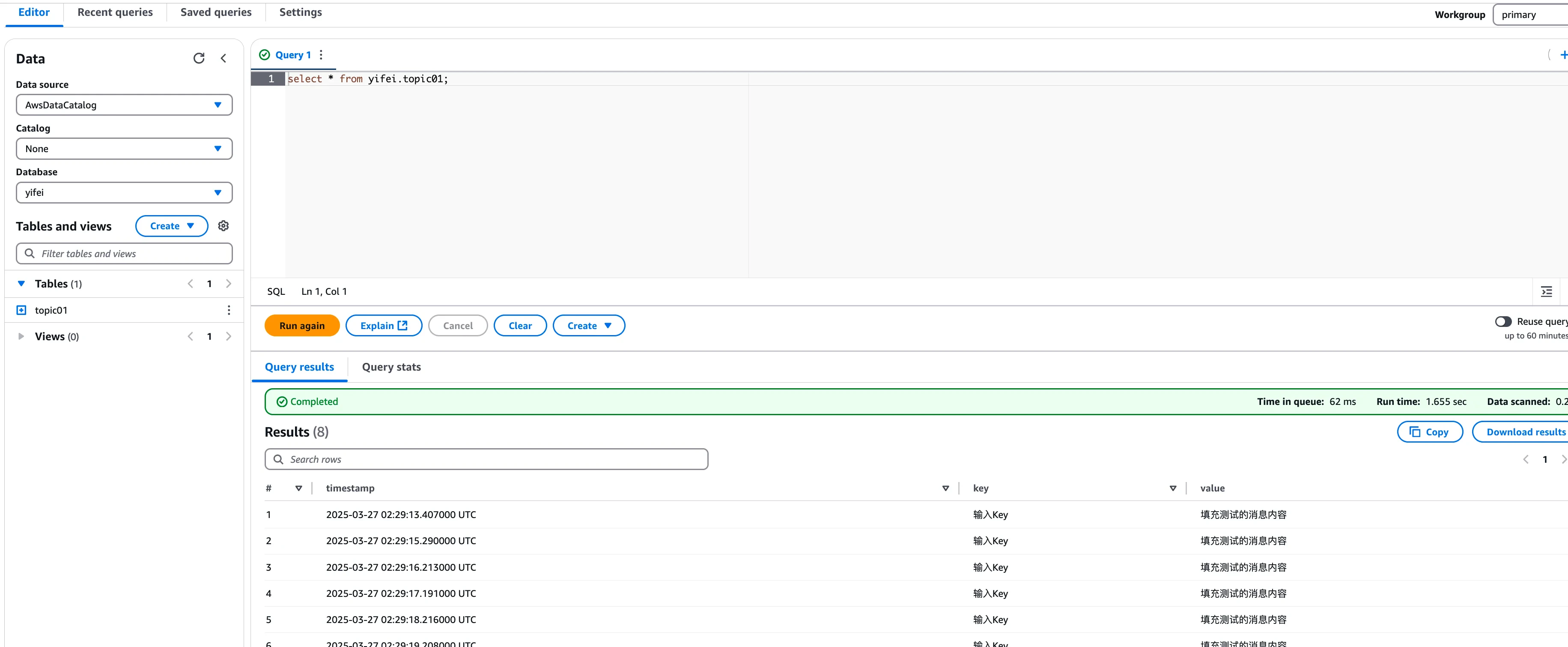
Click View Data to enable AWS Athena to query the table data in Glue, allowing you to see how AutoMQ transforms Kafka messages into corresponding data records in real-time. Users can also utilize other query engines for analysis and computation.
Was this page helpful?
{"docsConfig":{"theme":"mint","$schema":"https://mintlify.com/docs.json","name":"AutoMQ Documentation","colors":{"primary":"#2449D4","light":"#2449D4","dark":"#2449D4"},"logo":{"light":"https://mintcdn.com/automq/s9vNxeyMGZ1r1DRV/logo/automq-black.svg?fit=max\u0026auto=format\u0026n=s9vNxeyMGZ1r1DRV\u0026q=85\u0026s=bcc93ae74a4143ae2b7602497b7b354b","dark":"https://mintcdn.com/automq/s9vNxeyMGZ1r1DRV/logo/automq-white.svg?fit=max\u0026auto=format\u0026n=s9vNxeyMGZ1r1DRV\u0026q=85\u0026s=209c336f52b4021f2e991e10d07613ae"},"favicon":"https://mintcdn.com/automq/s9vNxeyMGZ1r1DRV/logo/favicon.svg?fit=max\u0026auto=format\u0026n=s9vNxeyMGZ1r1DRV\u0026q=85\u0026s=d736b0934a674250c9dbe95a5f642fb9","appearance":{"default":"light","strict":true},"navbar":{"links":[{"icon":"github","href":"https://github.com/automq/automq","label":"Github"}],"primary":{"type":"button","label":"automq.com","href":"https://www.automq.com"}},"footer":{"socials":{"slack":"https://go.automq.com/slack","telegram":"https://t.me/+VgqhN9wqBGIzYmU1","x":"https://x.com/AutoMQ_Lab","github":"https://github.com/automq/automq","linkedin":"https://linkedin.com/company/automq"}},"icons":{"library":"lucide"},"integrations":{"ga4":{"measurementId":"G-4F3BX9DFG9"}},"contextual":{"options":["copy","view","chatgpt","claude","perplexity","mcp","cursor","vscode"],"display":"header"},"styling":{"latex":true},"navigation":{"global":{"anchors":[{"anchor":"Github","icon":"github","href":"https://github.com/automq/automq"},{"anchor":"Slack","icon":"slack","href":"https://go.automq.com/slack"},{"anchor":"Telegram","icon":"Telegram","href":"https://t.me/+VgqhN9wqBGIzYmU1"},{"anchor":"Blog","icon":"newspaper","href":"https://www.automq.com/blog"}]},"languages":[{"language":"en","href":""},{"language":"cn","href":"zh/automq/what-is-automq/overview"}]}},"deployment":{"deploymentMetadataValue":{"subdomain":"automq","hasAudioNarration":false,"actualSubdomain":"automq","customDomains":["docs.automq.com"],"gitSource":{"type":"github","owner":"automq","repo":"sitebox","deployBranch":"main","contentDirectory":"docs","isPrivate":true,"mountPath":"","label":""},"chroma":{"liveDeploymentHistoryId":"6ad735a93eabd17c66250d4b","collectionId":"54500605-320d-46b3-b896-c0d1e0d9a573","schemaVersion":"v3","latestBuiltDeploymentHistoryId":"6ad735a93eabd17c66250d4b"},"feedback":{"thumbs":true,"edits":false,"issues":false},"entitlements":{"AI_CHAT":{"status":"DISABLED"},"WEB_MCP":{"status":"DISABLED"},"NARRATION":{"status":"DISABLED"}},"buildId":"6ad735a93eabd17c66250d4b","clientVersion":"0.0.3902","searchFilterCounts":[{"language":"cn","tag":"AutoMQ BYOC","count":124},{"language":"en","tag":"AutoMQ BYOC","count":113},{"language":"en","tag":"AutoMQ Open Source","count":61},{"language":"cn","tag":"AutoMQ Open Source","count":57},{"language":"en","tag":"Kafka Connect","count":48},{"language":"cn","tag":"Kafka Connect","count":48},{"language":"en","tag":"Sink Connectors","count":26},{"language":"cn","tag":"Sink Connectors","count":26},{"language":"en","tag":"Source Connectors","count":19},{"language":"cn","tag":"Source Connectors","count":19},{"language":"cn","tag":"快速开始","count":16},{"language":"en","tag":"Integrations","count":14},{"language":"en","tag":"Getting Started","count":12},{"language":"cn","tag":"生态集成","count":12},{"language":"en","tag":"Architecture","count":11},{"language":"cn","tag":"管理环境","count":11},{"language":"cn","tag":"技术架构","count":11},{"language":"cn","tag":"安装 BYOC 环境","count":9},{"language":"en","tag":"Eliminate Inter-Zone Traffics","count":8},{"language":"en","tag":"Manage Environments","count":8}]},"assistantConfig":{"deflection":{"enabled":true,"email":"support@automq.com"}},"hasChatPermissions":false,"hasWebMcpPermissions":false,"toggles":[{"name":"kill-isr","enabled":true,"variant":{"name":"disabled","enabled":false,"feature_enabled":true},"impressionData":false},{"name":"agent-mintlify-slack","enabled":true,"variant":{"name":"disabled","enabled":false,"feature_enabled":true},"impressionData":false},{"name":"editor-v7-file-tree","enabled":true,"variant":{"name":"disabled","enabled":false,"feature_enabled":true},"impressionData":false},{"name":"agent-integrations-settings","enabled":true,"variant":{"name":"disabled","enabled":false,"feature_enabled":true},"impressionData":false},{"name":"automations-pr-grouping","enabled":true,"variant":{"name":"disabled","enabled":false,"feature_enabled":true},"impressionData":false},{"name":"custom-prefix","enabled":true,"variant":{"name":"disabled","enabled":false,"feature_enabled":true},"impressionData":false},{"name":"analytics-v7","enabled":true,"variant":{"name":"disabled","enabled":false,"feature_enabled":true},"impressionData":false},{"name":"user-flows-analytics","enabled":true,"variant":{"name":"disabled","enabled":false,"feature_enabled":true},"impressionData":false},{"name":"no-publish-flow","enabled":true,"variant":{"name":"disabled","enabled":false,"feature_enabled":true},"impressionData":false},{"name":"workos-onboarding","enabled":true,"variant":{"name":"disabled","enabled":false,"feature_enabled":true},"impressionData":false},{"name":"llms-txt-v2","enabled":true,"variant":{"name":"disabled","enabled":false,"feature_enabled":true},"impressionData":false},{"name":"pause-universal-search-reconcile","enabled":true,"variant":{"name":"disabled","enabled":false,"feature_enabled":true},"impressionData":false},{"name":"snapshot-serving-live","enabled":true,"variant":{"name":"disabled","enabled":false,"feature_enabled":true},"impressionData":false},{"name":"stripTemperatureMiddleware","enabled":true,"variant":{"name":"disabled","enabled":false,"feature_enabled":true},"impressionData":false},{"name":"per-site-search-delta","enabled":true,"variant":{"name":"disabled","enabled":false,"feature_enabled":true},"impressionData":false},{"name":"support-platform-pylon-zendesk","enabled":true,"variant":{"name":"disabled","enabled":false,"feature_enabled":true},"impressionData":false},{"name":"editor-branches-v2-autocommit","enabled":true,"variant":{"name":"disabled","enabled":false,"feature_enabled":true},"impressionData":false},{"name":"editor-branches-v2","enabled":true,"variant":{"name":"disabled","enabled":false,"feature_enabled":true},"impressionData":false},{"name":"snapshot-serving","enabled":true,"variant":{"name":"disabled","enabled":false,"feature_enabled":true},"impressionData":false},{"name":"instant-rollback","enabled":true,"variant":{"name":"disabled","enabled":false,"feature_enabled":true},"impressionData":false},{"name":"granular-notifications-server","enabled":true,"variant":{"name":"disabled","enabled":false,"feature_enabled":true},"impressionData":false},{"name":"granular-notifications","enabled":true,"variant":{"name":"disabled","enabled":false,"feature_enabled":true},"impressionData":false},{"name":"editor-private-page-search","enabled":true,"variant":{"name":"disabled","enabled":false,"feature_enabled":true},"impressionData":false},{"name":"automations-fable","enabled":true,"variant":{"name":"disabled","enabled":false,"feature_enabled":true},"impressionData":false},{"name":"fixed-ai-action-pricing","enabled":true,"variant":{"name":"disabled","enabled":false,"feature_enabled":true},"impressionData":false},{"name":"automation-resolve-merge-conflict","enabled":true,"variant":{"name":"disabled","enabled":false,"feature_enabled":true},"impressionData":false},{"name":"scoped-publishing","enabled":true,"variant":{"name":"disabled","enabled":false,"feature_enabled":true},"impressionData":false},{"name":"mintql","enabled":true,"variant":{"name":"disabled","enabled":false,"feature_enabled":true},"impressionData":false},{"name":"page-level-analytics","enabled":true,"variant":{"name":"disabled","enabled":false,"feature_enabled":true},"impressionData":false},{"name":"teamspace","enabled":true,"variant":{"name":"disabled","enabled":false,"feature_enabled":true},"impressionData":false},{"name":"editor-version-history-v2","enabled":true,"variant":{"name":"disabled","enabled":false,"feature_enabled":true},"impressionData":false},{"name":"vite-origin","enabled":true,"variant":{"name":"disabled","enabled":false,"feature_enabled":true},"impressionData":false},{"name":"editor-nav-generations","enabled":true,"variant":{"name":"disabled","enabled":false,"feature_enabled":true},"impressionData":false},{"name":"workspace-projects","enabled":true,"variant":{"name":"disabled","enabled":false,"feature_enabled":true},"impressionData":false},{"name":"assistant-v5","enabled":true,"variant":{"name":"disabled","enabled":false,"feature_enabled":true},"impressionData":false},{"name":"byok-sep-25","enabled":true,"variant":{"name":"disabled","enabled":false,"feature_enabled":true},"impressionData":false},{"name":"revalidation-jwt","enabled":true,"variant":{"name":"disabled","enabled":false,"feature_enabled":true},"impressionData":false},{"name":"editor-agent-model-picker","enabled":true,"variant":{"name":"disabled","enabled":false,"feature_enabled":true},"impressionData":false},{"name":"client-snapshot-docs-config","enabled":true,"variant":{"name":"disabled","enabled":false,"feature_enabled":true},"impressionData":false},{"name":"hobby-abuse-scan","enabled":true,"variant":{"name":"disabled","enabled":false,"feature_enabled":true},"impressionData":false},{"name":"dashboard-inbox","enabled":true,"variant":{"name":"disabled","enabled":false,"feature_enabled":true},"impressionData":false}],"isAtlas":false,"googleFontsInlined":false},"customCss":[{"filePath":"static/style.css","content":"#content-area{word-break:keep-all;white-space:normal;overflow-wrap:normal}header div:nth-child(2) p{display:none}.emphasize-placeholder{background-color:#e0f2ff;border:1px solid #2d64eb;padding:2px 6px;border-radius:4px;font-family:monospace;cursor:pointer;display:inline-flex;align-items:center}.emoji-flip{display:inline-block;transform:scaleX(-1);font-size:.8em;margin-left:4px}"}],"page":{"pagePath":"automq-cloud/table-topic/table-topic-integration-with-aws-glue","slug":"/automq-cloud/table-topic/table-topic-integration-with-aws-glue","pageMetadata":{"title":"Table Topic Integration with AWS Glue","description":"Integrate AutoMQ's Kafka-compatible Table Topic with AWS Glue for data lake ingestion, analytics, and querying without ETL. Scale with cloud-native and cost-efficient solutions.","href":"/automq-cloud/table-topic/table-topic-integration-with-aws-glue"},"description":{"compiledSource":"\"use strict\";\nconst {jsx: _jsx} = arguments[0];\nconst {useMDXComponents: _provideComponents} = arguments[0];\nfunction _createMdxContent(props) {\n const _components = {\n p: \"p\",\n ..._provideComponents(),\n ...props.components\n };\n return _jsx(_components.p, {\n children: \"Integrate AutoMQ’s Kafka-compatible Table Topic with AWS Glue for data lake ingestion, analytics, and querying without ETL. Scale with cloud-native and cost-efficient solutions.\"\n });\n}\nfunction MDXContent(props = {}) {\n const {wrapper: MDXLayout} = {\n ..._provideComponents(),\n ...props.components\n };\n return MDXLayout ? _jsx(MDXLayout, {\n ...props,\n children: _jsx(_createMdxContent, {\n ...props\n })\n }) : _createMdxContent(props);\n}\nreturn {\n default: MDXContent\n};\n","frontmatter":{},"scope":{}},"pageType":"default","mdx":{"mdxSource":{"compiledSource":"\"use strict\";const{Fragment:_Fragment,jsx:_jsx,jsxs:_jsxs}=arguments[0];const{useMDXComponents:_provideComponents}=arguments[0];function _createMdxContent(props){const _components={a:`a`,li:`li`,ol:`ol`,p:`p`,strong:`strong`,ul:`ul`,..._provideComponents(),...props.components},{Heading,OptimizedImage,Tip}=_components;if(!Heading)_missingMdxReference(`Heading`,true);if(!OptimizedImage)_missingMdxReference(`OptimizedImage`,true);if(!Tip)_missingMdxReference(`Tip`,true);return _jsxs(_Fragment,{children:[_jsx(_components.p,{children:`AutoMQ Table Topic supports integration with Iceberg, allowing for streaming data into the lake for analysis and queries, while eliminating the need for ETL configuration and maintenance. This document explains how to configure the integration of Table Topic with Glue in an AWS environment.`}),`\n`,_jsx(Heading,{level:`2`,id:`prerequisites`,children:`Prerequisites`}),`\n`,_jsx(_components.p,{children:`To use the AutoMQ Table Topic feature in an AWS environment, the following conditions must be met:`}),`\n`,_jsxs(_components.ul,{children:[`\n`,_jsxs(_components.li,{children:[`\n`,_jsxs(_components.p,{children:[_jsx(_components.strong,{children:`Version Constraints:`}),` The AutoMQ instance must be version >= 1.4.1.`]}),`\n`]}),`\n`,_jsxs(_components.li,{children:[`\n`,_jsxs(_components.p,{children:[_jsx(_components.strong,{children:`Instance Constraints:`}),` The Table Topic feature must be enabled at the time of creating the AutoMQ instance. It can only be used if enabled during creation, as it cannot be activated later.`]}),`\n`]}),`\n`,_jsxs(_components.li,{children:[`\n`,_jsxs(_components.p,{children:[_jsx(_components.strong,{children:`Resource Requirements:`}),` On AWS, Table Topic allows you to use AWS Glue as a Data Catalog or AWS S3 Tablebucket as a Data Catalog.`]}),`\n`]}),`\n`]}),`\n`,_jsx(Heading,{level:`2`,id:`operational-steps`,children:`Operational Steps`}),`\n`,_jsx(Heading,{level:`3`,id:`step-1-prepare-a-data-lake-bucket`,children:`Step 1: Prepare a Data Lake Bucket`}),`\n`,_jsx(_components.p,{children:`When using Glue Catalog, data lake tables need to be stored in an S3 Bucket. We recommend creating an available Bucket in the target region in advance to store Iceberg table data for the long term.`}),`\n`,_jsx(Heading,{level:`3`,id:`step-2-create-an-automq-instance-and-enable-the-table-topic-feature`,children:`Step 2: Create an AutoMQ Instance and Enable the Table Topic Feature`}),`\n`,_jsx(_components.p,{children:`To use the AutoMQ Table Topic feature, it must be enabled during instance creation to facilitate streaming data into the lake. Refer to the following configuration when creating the instance:`}),`\n`,_jsxs(_components.ol,{children:[`\n`,_jsxs(_components.li,{children:[`\n`,_jsx(_components.p,{children:`Enable Table Topic.`}),`\n`]}),`\n`,_jsxs(_components.li,{children:[`\n`,_jsxs(_components.p,{children:[`Select `,_jsx(_components.strong,{children:`Glue`}),` as the Catalog type.`]}),`\n`]}),`\n`,_jsxs(_components.li,{children:[`\n`,_jsx(_components.p,{children:`Set the S3 Bucket used by Glue Catalog. We recommend selecting the data lake Bucket prepared in Step 1.`}),`\n`]}),`\n`]}),`\n`,_jsxs(Tip,{children:[_jsx(_components.p,{children:_jsx(_components.strong,{children:`Note:`})}),_jsx(_components.p,{children:`After enabling the Table Topic for an AutoMQ instance, not all Topics will automatically activate the table transformation feature. Configuration is required at the individual Topic level to stream data into the lake as needed.`}),_jsx(_components.p,{children:`To utilize Table Topics, you must enable them during the instance creation process. After an instance is created, this setting cannot be modified.`})]}),`\n`,_jsx(OptimizedImage,{alt:`AutoMQ instance creation page with Table Topic feature enabled`,src:`https://mintcdn.com/automq/4Uz-SDzI1srfDCLZ/automq-cloud/table-topic/table-topic-integration-with-aws-glue/3.webp?fit=max\u0026auto=format\u0026n=4Uz-SDzI1srfDCLZ\u0026q=85\u0026s=82b699afa289a1a26cf0991e711f2d6c`,\"data-og-width\":`2728`,width:`2728`,\"data-og-height\":`716`,height:`716`,\"data-path\":`automq-cloud/table-topic/table-topic-integration-with-aws-glue/3.webp`,\"data-optimize\":`true`,\"data-opv\":`3`,srcset:`https://mintcdn.com/automq/4Uz-SDzI1srfDCLZ/automq-cloud/table-topic/table-topic-integration-with-aws-glue/3.webp?w=280\u0026fit=max\u0026auto=format\u0026n=4Uz-SDzI1srfDCLZ\u0026q=85\u0026s=03b33e4f15195bdb9d46ea058bd7f88b 280w, https://mintcdn.com/automq/4Uz-SDzI1srfDCLZ/automq-cloud/table-topic/table-topic-integration-with-aws-glue/3.webp?w=560\u0026fit=max\u0026auto=format\u0026n=4Uz-SDzI1srfDCLZ\u0026q=85\u0026s=ebd52819d6e37239157efcacd37b2895 560w, https://mintcdn.com/automq/4Uz-SDzI1srfDCLZ/automq-cloud/table-topic/table-topic-integration-with-aws-glue/3.webp?w=840\u0026fit=max\u0026auto=format\u0026n=4Uz-SDzI1srfDCLZ\u0026q=85\u0026s=54034833d1d07d368799eb6879237938 840w, https://mintcdn.com/automq/4Uz-SDzI1srfDCLZ/automq-cloud/table-topic/table-topic-integration-with-aws-glue/3.webp?w=1100\u0026fit=max\u0026auto=format\u0026n=4Uz-SDzI1srfDCLZ\u0026q=85\u0026s=2d5147d3e537be4f49762b2eb39c1263 1100w, https://mintcdn.com/automq/4Uz-SDzI1srfDCLZ/automq-cloud/table-topic/table-topic-integration-with-aws-glue/3.webp?w=1650\u0026fit=max\u0026auto=format\u0026n=4Uz-SDzI1srfDCLZ\u0026q=85\u0026s=bc7b47c0f32fadde2d981fee23570cbf 1650w, https://mintcdn.com/automq/4Uz-SDzI1srfDCLZ/automq-cloud/table-topic/table-topic-integration-with-aws-glue/3.webp?w=2500\u0026fit=max\u0026auto=format\u0026n=4Uz-SDzI1srfDCLZ\u0026q=85\u0026s=bbfa6bc185148ef42454b689876e72de 2500w`}),`\n`,_jsx(Heading,{level:`3`,id:`step-3-create-a-topic-and-configure-a-materialized-view-table`,children:`Step 3: Create a Topic and Configure a Materialized View Table`}),`\n`,_jsx(_components.p,{children:`Once the Table Topic feature is enabled in the AutoMQ instance, you can set up a materialized view table as necessary when creating a Topic. Follow these steps:`}),`\n`,_jsxs(_components.ol,{children:[`\n`,_jsxs(_components.li,{children:[`\n`,_jsxs(_components.p,{children:[`Navigate to the instance from Step 2, find the Topic list, and click `,_jsx(_components.strong,{children:`Create Topic`}),`.`]}),`\n`]}),`\n`,_jsxs(_components.li,{children:[`\n`,_jsx(_components.p,{children:`In the configuration for creating the Topic, enable Table Topic conversion and configure the following parameters:`}),`\n`,_jsxs(_components.ol,{children:[`\n`,_jsxs(_components.li,{children:[`\n`,_jsxs(_components.p,{children:[_jsx(_components.strong,{children:`Namespace:`}),` A namespace serves to segregate different Iceberg tables, analogous to a Database in the Data Catalog. It’s advisable to assign parameter values based on business ownership.`]}),`\n`]}),`\n`,_jsxs(_components.li,{children:[`\n`,_jsxs(_components.p,{children:[_jsx(_components.strong,{children:`Schema Constraint Type:`}),` This setting determines whether a Topic message complies with Schema constraints. Selecting `,_jsx(_components.strong,{children:`Schema`}),` enables these constraints, requiring message Schemas to be registered in AutoMQ’s built-in SchemaRegistry. Messages must then be strictly formatted according to the Schema, and upcoming Table Topics will use this Schema’s fields to populate the Iceberg table. Choosing `,_jsx(_components.strong,{children:`Schemaless`}),` signifies that the message content lacks explicit Schema constraints; in this scenario, the message Key and Value are used as a single field to populate the Iceberg table.`]}),`\n`]}),`\n`]}),`\n`]}),`\n`]}),`\n`,_jsx(OptimizedImage,{alt:`Topic creation form with Table Topic conversion enabled, showing Namespace and Schema Constraint Type fields`,src:`https://mintcdn.com/automq/6t03b99H9kP_jCZq/automq-cloud/table-topic/table-topic-integration-with-aws-glue/4.webp?fit=max\u0026auto=format\u0026n=6t03b99H9kP_jCZq\u0026q=85\u0026s=1d492aa046b8bbf03695d72cb2c91028`,\"data-og-width\":`2732`,width:`2732`,\"data-og-height\":`1418`,height:`1418`,\"data-path\":`automq-cloud/table-topic/table-topic-integration-with-aws-glue/4.webp`,\"data-optimize\":`true`,\"data-opv\":`3`,srcset:`https://mintcdn.com/automq/6t03b99H9kP_jCZq/automq-cloud/table-topic/table-topic-integration-with-aws-glue/4.webp?w=280\u0026fit=max\u0026auto=format\u0026n=6t03b99H9kP_jCZq\u0026q=85\u0026s=57790a5067e72f95af32e96910298695 280w, https://mintcdn.com/automq/6t03b99H9kP_jCZq/automq-cloud/table-topic/table-topic-integration-with-aws-glue/4.webp?w=560\u0026fit=max\u0026auto=format\u0026n=6t03b99H9kP_jCZq\u0026q=85\u0026s=d6def3a189c1f95d3feff3a99621d116 560w, https://mintcdn.com/automq/6t03b99H9kP_jCZq/automq-cloud/table-topic/table-topic-integration-with-aws-glue/4.webp?w=840\u0026fit=max\u0026auto=format\u0026n=6t03b99H9kP_jCZq\u0026q=85\u0026s=646f49419fd3f8257efe893b23b7f813 840w, https://mintcdn.com/automq/6t03b99H9kP_jCZq/automq-cloud/table-topic/table-topic-integration-with-aws-glue/4.webp?w=1100\u0026fit=max\u0026auto=format\u0026n=6t03b99H9kP_jCZq\u0026q=85\u0026s=0248b8cb63fa4becabee57ae39244111 1100w, https://mintcdn.com/automq/6t03b99H9kP_jCZq/automq-cloud/table-topic/table-topic-integration-with-aws-glue/4.webp?w=1650\u0026fit=max\u0026auto=format\u0026n=6t03b99H9kP_jCZq\u0026q=85\u0026s=9459c50b966ce1c0f3684d2048dfc3cd 1650w, https://mintcdn.com/automq/6t03b99H9kP_jCZq/automq-cloud/table-topic/table-topic-integration-with-aws-glue/4.webp?w=2500\u0026fit=max\u0026auto=format\u0026n=6t03b99H9kP_jCZq\u0026q=85\u0026s=5c9dfd2bde1c9f62c598c5d733919685 2500w`}),`\n`,_jsxs(_components.ol,{start:`3`,children:[`\n`,_jsxs(_components.li,{children:[_jsx(_components.strong,{children:`Click Confirm`}),` to create a Topic that supports streaming tables.`]}),`\n`]}),`\n`,_jsx(Heading,{level:`3`,id:`step-4-produce-messages-and-query-iceberg-table-data-in-real-time`,children:`Step 4: Produce Messages and Query Iceberg Table Data in Real-time`}),`\n`,_jsx(_components.p,{children:`After configuring the AutoMQ instance and creating the Table Topic, you can proceed with testing data production and real-time querying of data in Iceberg tables.`}),`\n`,_jsxs(_components.ol,{children:[`\n`,_jsxs(_components.li,{children:[`\n`,_jsx(_components.p,{children:`Click to enter the Topic details, navigate to the Produce Message tab, input the test message Key and message Value, and send the message.`}),`\n`]}),`\n`,_jsxs(_components.li,{children:[`\n`,_jsxs(_components.p,{children:[`Go to the `,_jsx(_components.a,{href:`https://ap-southeast-1.console.aws.amazon.com/glue/home`,children:`AWS Glue Console`}),` to view the Iceberg database and table created by AutoMQ.`]}),`\n`]}),`\n`]}),`\n`,_jsx(OptimizedImage,{alt:`AWS Glue Console showing the Iceberg database and table created by AutoMQ`,src:`https://mintcdn.com/automq/6t03b99H9kP_jCZq/automq-cloud/table-topic/table-topic-integration-with-aws-glue/5.webp?fit=max\u0026auto=format\u0026n=6t03b99H9kP_jCZq\u0026q=85\u0026s=17a3eac67e35cce2622a99a8c4185af8`,\"data-og-width\":`3728`,width:`3728`,\"data-og-height\":`1250`,height:`1250`,\"data-path\":`automq-cloud/table-topic/table-topic-integration-with-aws-glue/5.webp`,\"data-optimize\":`true`,\"data-opv\":`3`,srcset:`https://mintcdn.com/automq/6t03b99H9kP_jCZq/automq-cloud/table-topic/table-topic-integration-with-aws-glue/5.webp?w=280\u0026fit=max\u0026auto=format\u0026n=6t03b99H9kP_jCZq\u0026q=85\u0026s=940e515e54e0b3dc4377eec6ab38418b 280w, https://mintcdn.com/automq/6t03b99H9kP_jCZq/automq-cloud/table-topic/table-topic-integration-with-aws-glue/5.webp?w=560\u0026fit=max\u0026auto=format\u0026n=6t03b99H9kP_jCZq\u0026q=85\u0026s=baef5d000be8fde3029b261c0f4bdeaa 560w, https://mintcdn.com/automq/6t03b99H9kP_jCZq/automq-cloud/table-topic/table-topic-integration-with-aws-glue/5.webp?w=840\u0026fit=max\u0026auto=format\u0026n=6t03b99H9kP_jCZq\u0026q=85\u0026s=30e8bd8515ec088fa5acc55abb549006 840w, https://mintcdn.com/automq/6t03b99H9kP_jCZq/automq-cloud/table-topic/table-topic-integration-with-aws-glue/5.webp?w=1100\u0026fit=max\u0026auto=format\u0026n=6t03b99H9kP_jCZq\u0026q=85\u0026s=a8da5e8e7e3d279138aff9a306f329c9 1100w, https://mintcdn.com/automq/6t03b99H9kP_jCZq/automq-cloud/table-topic/table-topic-integration-with-aws-glue/5.webp?w=1650\u0026fit=max\u0026auto=format\u0026n=6t03b99H9kP_jCZq\u0026q=85\u0026s=6d244a2319bce9da372047b62f44f071 1650w, https://mintcdn.com/automq/6t03b99H9kP_jCZq/automq-cloud/table-topic/table-topic-integration-with-aws-glue/5.webp?w=2500\u0026fit=max\u0026auto=format\u0026n=6t03b99H9kP_jCZq\u0026q=85\u0026s=74e8423b5eb2cc35a4ddcf3c63f202c8 2500w`}),`\n`,_jsxs(_components.ol,{children:[`\n`,_jsxs(_components.li,{children:[_jsx(_components.strong,{children:`Click View Data`}),` to enable AWS Athena to query the table data in Glue, allowing you to see how AutoMQ transforms Kafka messages into corresponding data records in real-time. Users can also utilize other query engines for analysis and computation.`]}),`\n`]}),`\n`,_jsx(OptimizedImage,{alt:`AWS Athena query results showing AutoMQ Kafka messages converted to Iceberg table records in real time`,src:`https://mintcdn.com/automq/6t03b99H9kP_jCZq/automq-cloud/table-topic/table-topic-integration-with-aws-glue/6.webp?fit=max\u0026auto=format\u0026n=6t03b99H9kP_jCZq\u0026q=85\u0026s=414822328ba0b09151ededc5cb98816e`,\"data-og-width\":`3662`,width:`3662`,\"data-og-height\":`1510`,height:`1510`,\"data-path\":`automq-cloud/table-topic/table-topic-integration-with-aws-glue/6.webp`,\"data-optimize\":`true`,\"data-opv\":`3`,srcset:`https://mintcdn.com/automq/6t03b99H9kP_jCZq/automq-cloud/table-topic/table-topic-integration-with-aws-glue/6.webp?w=280\u0026fit=max\u0026auto=format\u0026n=6t03b99H9kP_jCZq\u0026q=85\u0026s=c0898279be8a3f4488f4c2bb71b7ce74 280w, https://mintcdn.com/automq/6t03b99H9kP_jCZq/automq-cloud/table-topic/table-topic-integration-with-aws-glue/6.webp?w=560\u0026fit=max\u0026auto=format\u0026n=6t03b99H9kP_jCZq\u0026q=85\u0026s=7d5bc184c590bbe675bd6104ec7244cc 560w, https://mintcdn.com/automq/6t03b99H9kP_jCZq/automq-cloud/table-topic/table-topic-integration-with-aws-glue/6.webp?w=840\u0026fit=max\u0026auto=format\u0026n=6t03b99H9kP_jCZq\u0026q=85\u0026s=255c6015ab48f75d097038130f0d20b8 840w, https://mintcdn.com/automq/6t03b99H9kP_jCZq/automq-cloud/table-topic/table-topic-integration-with-aws-glue/6.webp?w=1100\u0026fit=max\u0026auto=format\u0026n=6t03b99H9kP_jCZq\u0026q=85\u0026s=3f81abe448e91431d9a28640f687cae7 1100w, https://mintcdn.com/automq/6t03b99H9kP_jCZq/automq-cloud/table-topic/table-topic-integration-with-aws-glue/6.webp?w=1650\u0026fit=max\u0026auto=format\u0026n=6t03b99H9kP_jCZq\u0026q=85\u0026s=64b09a41a2f2aa9728987ee0fa445d5a 1650w, https://mintcdn.com/automq/6t03b99H9kP_jCZq/automq-cloud/table-topic/table-topic-integration-with-aws-glue/6.webp?w=2500\u0026fit=max\u0026auto=format\u0026n=6t03b99H9kP_jCZq\u0026q=85\u0026s=ac5f5935e397619322c869a7b52971d8 2500w`})]})}function MDXContent(props={}){const{wrapper:MDXLayout}={..._provideComponents(),...props.components};return MDXLayout?_jsx(MDXLayout,{...props,children:_jsx(_createMdxContent,{...props})}):_createMdxContent(props)}return{default:MDXContent};function _missingMdxReference(id,component){throw new Error(`Expected `+(component?`component`:`object`)+\" `\"+id+\"` to be defined: you likely forgot to import, pass, or provide it.\")}","frontmatter":{},"scope":{"config":{},"pageMetadata":{"title":"Table Topic Integration with AWS Glue","description":"Integrate AutoMQ's Kafka-compatible Table Topic with AWS Glue for data lake ingestion, analytics, and querying without ETL. Scale with cloud-native and cost-efficient solutions.","href":"/automq-cloud/table-topic/table-topic-integration-with-aws-glue"}}},"mdxSourceWithNoJs":null},"mdxExtracts":{"tableOfContents":[{"title":"Prerequisites","slug":"prerequisites","depth":2,"children":[]},{"title":"Operational Steps","slug":"operational-steps","depth":2,"children":[{"title":"Step 1: Prepare a Data Lake Bucket","slug":"step-1-prepare-a-data-lake-bucket","depth":3,"children":[]},{"title":"Step 2: Create an AutoMQ Instance and Enable the Table Topic Feature","slug":"step-2-create-an-automq-instance-and-enable-the-table-topic-feature","depth":3,"children":[]},{"title":"Step 3: Create a Topic and Configure a Materialized View Table","slug":"step-3-create-a-topic-and-configure-a-materialized-view-table","depth":3,"children":[]},{"title":"Step 4: Produce Messages and Query Iceberg Table Data in Real-time","slug":"step-4-produce-messages-and-query-iceberg-table-data-in-real-time","depth":3,"children":[]}]}],"codeExamples":{}},"jsLinks":["/_mintlify/custom/automq/48fec8bab1afa455/content/monitor.js","/_mintlify/custom/automq/c09aa9839083e17a/content/hubspot.js","/_mintlify/custom/automq/786ace9ed17adbd7/content/luckyorange-tracking.js"],"subdomain":"automq","siteName":"AutoMQ Documentation","title":"Table Topic Integration with AWS Glue - AutoMQ Documentation","navMaps":{"firstHrefInVersion":{},"firstHrefInLanguage":{"en":{"href":"/automq-cloud/table-topic/table-topic-integration-with-aws-glue","matchLevel":0},"cn":{"href":"/zh/automq-cloud/table-topic/table-topic-integration-with-aws-glue","matchLevel":1}}},"lastModified":"2026-05-06T06:57:32.556Z","originalFileLocation":"automq-cloud/table-topic/table-topic-integration-with-aws-glue.mdx","locale":"en"},"headHtml":"\u003cscript data-mint-head>(function(){var d=document.documentElement,p=\"light\";if(!p){try{p=localStorage.getItem(\"isDarkMode\")}catch(e){}if(p==='true')p='dark';else if(p==='false')p='light';if(p!=='light'\u0026\u0026p!=='dark'\u0026\u0026p!=='system')p=\"light\"}var r=p==='system'?(matchMedia(\"(prefers-color-scheme: dark)\").matches?'dark':'light'):p;d.classList.remove(r==='dark'?'light':'dark');d.classList.add(r);d.setAttribute(\"data-theme-preference\",p)})();\u003c/script>\u003cmeta data-mint-head name=\"description\" content=\"Integrate AutoMQ\u0026#x27;s Kafka-compatible Table Topic with AWS Glue for data lake ingestion, analytics, and querying without ETL. Scale with cloud-native and cost-efficient solutions.\">\u003cmeta data-mint-head name=\"application-name\" content=\"AutoMQ Documentation\">\u003cmeta data-mint-head name=\"generator\" content=\"Mintlify\">\u003clink data-mint-head rel=\"icon\" type=\"image/png\" sizes=\"192x192\" href=\"/mintlify-assets/_mintlify/favicons/automq/ZRmM16tNeY4WJ6hO/_generated/favicon/android-chrome-192x192.png\" media=\"(prefers-color-scheme: light)\">\u003clink data-mint-head rel=\"apple-touch-icon\" type=\"image/png\" sizes=\"180x180\" href=\"/mintlify-assets/_mintlify/favicons/automq/ZRmM16tNeY4WJ6hO/_generated/favicon/apple-touch-icon.png\">\u003clink data-mint-head rel=\"icon\" type=\"image/png\" sizes=\"16x16\" href=\"/mintlify-assets/_mintlify/favicons/automq/ZRmM16tNeY4WJ6hO/_generated/favicon/favicon-16x16.png\" media=\"(prefers-color-scheme: light)\">\u003clink data-mint-head rel=\"icon\" type=\"image/png\" sizes=\"32x32\" href=\"/mintlify-assets/_mintlify/favicons/automq/ZRmM16tNeY4WJ6hO/_generated/favicon/favicon-32x32.png\" media=\"(prefers-color-scheme: light)\">\u003clink data-mint-head rel=\"shortcut icon\" type=\"image/x-icon\" href=\"/mintlify-assets/_mintlify/favicons/automq/ZRmM16tNeY4WJ6hO/_generated/favicon/favicon.ico\" media=\"(prefers-color-scheme: light)\">\u003clink data-mint-head rel=\"icon\" type=\"image/png\" sizes=\"192x192\" href=\"/mintlify-assets/_mintlify/favicons/automq/ZRmM16tNeY4WJ6hO/_generated/favicon-dark/android-chrome-192x192.png\" media=\"(prefers-color-scheme: dark)\">\u003clink data-mint-head rel=\"icon\" type=\"image/png\" sizes=\"16x16\" href=\"/mintlify-assets/_mintlify/favicons/automq/ZRmM16tNeY4WJ6hO/_generated/favicon-dark/favicon-16x16.png\" media=\"(prefers-color-scheme: dark)\">\u003clink data-mint-head rel=\"icon\" type=\"image/png\" sizes=\"32x32\" href=\"/mintlify-assets/_mintlify/favicons/automq/ZRmM16tNeY4WJ6hO/_generated/favicon-dark/favicon-32x32.png\" media=\"(prefers-color-scheme: dark)\">\u003clink data-mint-head rel=\"shortcut icon\" type=\"image/x-icon\" href=\"/mintlify-assets/_mintlify/favicons/automq/ZRmM16tNeY4WJ6hO/_generated/favicon-dark/favicon.ico\" media=\"(prefers-color-scheme: dark)\">\u003cmeta data-mint-head property=\"og:title\" content=\"Table Topic Integration with AWS Glue - AutoMQ Documentation\">\u003cmeta data-mint-head property=\"og:description\" content=\"Integrate AutoMQ\u0026#x27;s Kafka-compatible Table Topic with AWS Glue for data lake ingestion, analytics, and querying without ETL. Scale with cloud-native and cost-efficient solutions.\">\u003cmeta data-mint-head property=\"og:site_name\" content=\"AutoMQ Documentation\">\u003cmeta data-mint-head property=\"og:url\" content=\"https://docs.automq.com/automq-cloud/table-topic/table-topic-integration-with-aws-glue\">\u003cmeta data-mint-head property=\"og:type\" content=\"website\">\u003cmeta data-mint-head name=\"twitter:card\" content=\"summary_large_image\">\u003cmeta data-mint-head name=\"twitter:title\" content=\"Table Topic Integration with AWS Glue - AutoMQ Documentation\">\u003cmeta data-mint-head name=\"twitter:description\" content=\"Integrate AutoMQ\u0026#x27;s Kafka-compatible Table Topic with AWS Glue for data lake ingestion, analytics, and querying without ETL. Scale with cloud-native and cost-efficient solutions.\">\u003cmeta data-mint-head name=\"msapplication-config\" content=\"/mintlify-assets/_mintlify/favicons/automq/ZRmM16tNeY4WJ6hO/_generated/favicon/browserconfig.xml\">\u003cmeta data-mint-head name=\"apple-mobile-web-app-title\" content=\"AutoMQ Documentation\">\u003cmeta data-mint-head name=\"msapplication-TileColor\" content=\"#2449D4\">\u003clink data-mint-head rel=\"canonical\" href=\"https://docs.automq.com/automq-cloud/table-topic/table-topic-integration-with-aws-glue\">\u003clink data-mint-head rel=\"alternate\" type=\"application/xml\" href=\"/sitemap.xml\">\u003clink data-mint-head rel=\"alternate\" type=\"text/markdown\" href=\"/automq-cloud/table-topic/table-topic-integration-with-aws-glue.md\">\u003clink data-mint-head rel=\"alternate\" hreflang=\"en\" href=\"https://docs.automq.com/automq-cloud/table-topic/table-topic-integration-with-aws-glue\">\u003clink data-mint-head rel=\"alternate\" hreflang=\"zh\" href=\"https://docs.automq.com/zh/automq-cloud/table-topic/table-topic-integration-with-aws-glue\">\u003clink data-mint-head rel=\"alternate\" hreflang=\"x-default\" href=\"https://docs.automq.com/automq-cloud/table-topic/table-topic-integration-with-aws-glue\">\u003cscript data-mint-head type=\"application/ld+json\">{\"@context\":\"https://schema.org\",\"@graph\":[{\"@type\":\"Organization\",\"@id\":\"https://docs.automq.com/#organization\",\"name\":\"AutoMQ Documentation\",\"url\":\"https://docs.automq.com\",\"logo\":{\"@type\":\"ImageObject\",\"url\":\"https://mintcdn.com/automq/s9vNxeyMGZ1r1DRV/logo/automq-black.svg?fit=max\u0026auto=format\u0026n=s9vNxeyMGZ1r1DRV\u0026q=85\u0026s=bcc93ae74a4143ae2b7602497b7b354b\"}},{\"@type\":\"WebSite\",\"@id\":\"https://docs.automq.com#website\",\"name\":\"AutoMQ Documentation\",\"url\":\"https://docs.automq.com\",\"publisher\":{\"@id\":\"https://docs.automq.com/#organization\"}},{\"@type\":\"WebPage\",\"@id\":\"https://docs.automq.com/automq-cloud/table-topic/table-topic-integration-with-aws-glue#webpage\",\"url\":\"https://docs.automq.com/automq-cloud/table-topic/table-topic-integration-with-aws-glue\",\"name\":\"Table Topic Integration with AWS Glue\",\"description\":\"Integrate AutoMQ's Kafka-compatible Table Topic with AWS Glue for data lake ingestion, analytics, and querying without ETL. Scale with cloud-native and cost-efficient solutions.\",\"dateModified\":\"2026-05-06T06:57:32.556Z\",\"isPartOf\":{\"@id\":\"https://docs.automq.com#website\"},\"breadcrumb\":{\"@id\":\"https://docs.automq.com/automq-cloud/table-topic/table-topic-integration-with-aws-glue#breadcrumb\"}},{\"@type\":\"BreadcrumbList\",\"@id\":\"https://docs.automq.com/automq-cloud/table-topic/table-topic-integration-with-aws-glue#breadcrumb\",\"itemListElement\":[{\"@type\":\"ListItem\",\"position\":1,\"name\":\"Table Topic\",\"item\":\"https://docs.automq.com/automq-cloud/table-topic/overview\"},{\"@type\":\"ListItem\",\"position\":2,\"name\":\"Table Topic Integration with AWS Glue\",\"item\":\"https://docs.automq.com/automq-cloud/table-topic/table-topic-integration-with-aws-glue\"}]},{\"@type\":[\"Article\",\"TechArticle\"],\"@id\":\"https://docs.automq.com/automq-cloud/table-topic/table-topic-integration-with-aws-glue#article\",\"headline\":\"Table Topic Integration with AWS Glue\",\"name\":\"Table Topic Integration with AWS Glue\",\"description\":\"Integrate AutoMQ's Kafka-compatible Table Topic with AWS Glue for data lake ingestion, analytics, and querying without ETL. Scale with cloud-native and cost-efficient solutions.\",\"url\":\"https://docs.automq.com/automq-cloud/table-topic/table-topic-integration-with-aws-glue\",\"mainEntityOfPage\":{\"@id\":\"https://docs.automq.com/automq-cloud/table-topic/table-topic-integration-with-aws-glue#webpage\"},\"dateModified\":\"2026-05-06T06:57:32.556Z\",\"publisher\":{\"@id\":\"https://docs.automq.com/#organization\"},\"isPartOf\":{\"@id\":\"https://docs.automq.com#website\"}}]}\u003c/script>\u003cscript data-mint-head type=\"application/ld+json\">{\"@context\":\"https://schema.org\",\"@type\":\"WebSite\",\"name\":\"AutoMQ Documentation\",\"creator\":{\"@type\":\"Organization\",\"name\":\"Mintlify\",\"url\":\"https://mintlify.com\"}}\u003c/script>","siteName":"AutoMQ Documentation","nav":{"global":{"anchors":[{"anchor":"Github","icon":"github","href":"https://github.com/automq/automq"},{"anchor":"Slack","icon":"slack","href":"https://go.automq.com/slack"},{"anchor":"Telegram","icon":"Telegram","href":"https://t.me/+VgqhN9wqBGIzYmU1"},{"anchor":"Blog","icon":"newspaper","href":"https://www.automq.com/blog"}]},"languages":[{"language":"en","tabs":[{"tab":"Home","icon":"house","pages":[{"title":"Home","href":""}]},{"tab":"AutoMQ Open Source","icon":"github","pages":[{"title":"AutoMQ Open Source","href":"/automq/what-is-automq/overview"}]},{"tab":"AutoMQ BYOC","icon":"cloud","groups":[{"group":"Overview","icon":"readme","pages":[{"title":"What Is AutoMQ Cloud","href":"/automq-cloud/overview/what-is-automq-cloud"},{"title":"Glossary","href":"/automq-cloud/overview/glossary"},{"title":"Restrictions","href":"/automq-cloud/overview/restrictions"}]},{"group":"Getting Started","icon":"play","pages":[{"title":"Overview","href":"/automq-cloud/getting-started/overview"},{"group":"Install BYOC Environment","pages":[{"group":"AWS","pages":[{"title":"Prepare VPC","href":"/automq-cloud/getting-started/install-byoc-environment/aws/prepare-vpc"},{"title":"Install AutoMQ on AWS","href":"/automq-cloud/getting-started/install-byoc-environment/aws/install-automq-on-aws"}]},{"group":"Google Cloud","pages":[{"title":"Install AutoMQ on Google Cloud","href":"/automq-cloud/getting-started/install-byoc-environment/google-cloud/install-automq-on-gcp"}]},{"title":"OCI","href":"/automq-cloud/getting-started/install-byoc-environment/oci-install-automq"},{"group":"Azure","pages":[{"title":"Install AutoMQ on Azure","href":"/automq-cloud/getting-started/install-byoc-environment/install-env-on-azure"}]}]},{"title":"Experience AutoMQ","href":"/automq-cloud/getting-started/experience-automq"},{"title":"Client SDK Guide","href":"/automq-cloud/getting-started/client-sdk-guide"}]},{"group":"Deploy on Kubernetes","icon":"https://mintlify.s3.us-west-1.amazonaws.com/automq/images/kubernetes-svgrepo-com.svg","pages":[{"title":"Overview","href":"/automq-cloud/deploy-automq-on-kubernetes/overview"},{"title":"Deploy to AWS EKS","href":"/automq-cloud/deploy-automq-on-kubernetes/deploy-to-aws-eks"},{"title":"Deploy to Azure AKS","href":"/automq-cloud/deploy-automq-on-kubernetes/deploy-to-azure-aks"},{"title":"Deploy to Google Cloud GKE","href":"/automq-cloud/deploy-automq-on-kubernetes/deploy-to-google-cloud-gke"}]},{"group":"Subscriptions and Billings","icon":"receipt","pages":[{"title":"Overview","href":"/automq-cloud/subscriptions-and-billings/overview"},{"group":"BYOC Env Billings","pages":[{"title":"Usage-Based Billing for AWS","href":"/automq-cloud/subscriptions-and-billings/byoc-env-billings/usage-based-billing"},{"group":"Prepaid Billing for Others","pages":[{"title":"Prepaid Billing Overview","href":"/automq-cloud/subscriptions-and-billings/byoc-env-billings/billing-instructions-for-byoc"},{"title":"Manage Environment License","href":"/automq-cloud/manage-environments/manage-environment-license"}]}]}]},{"group":"Manage Environments","icon":"clipboard-list","pages":[{"title":"Overview","href":"/automq-cloud/manage-environments/overview"},{"title":"Upgrade Environment Version","href":"/automq-cloud/manage-environments/upgrade-environment-version"},{"group":"Manage Environment Ops Authing","pages":[{"title":"Overview","href":"/automq-cloud/manage-environments/manage-environment-ops-authing/overview"},{"title":"Set Ops Authing from AWS","href":"/automq-cloud/manage-environments/manage-environment-ops-authing/set-ops-authing-from-aws"},{"title":"Set Ops Authing from Google Cloud","href":"/automq-cloud/manage-environments/manage-environment-ops-authing/set-ops-authing-from-google-cloud"},{"title":"Set Ops Authing from OCI","href":"/automq-cloud/manage-environments/manage-environment-ops-authing/set-ops-authing-from-oci"},{"title":"Set Ops Authing from Azure","href":"/automq-cloud/manage-environments/manage-environment-ops-authing/set-ops-authing-from-azure"},{"title":"Set Ops Tunnel for Troubleshooting","href":"/automq-cloud/manage-environments/manage-environment-ops-authing/set-ops-tunnel-for-troubleshooting"}]}]},{"group":"Manage Identities and Access","icon":"fingerprint","pages":[{"title":"Overview","href":"/automq-cloud/manage-identities-and-access/overview"},{"title":"Member Accounts","href":"/automq-cloud/manage-identities-and-access/member-accounts"},{"title":"Role-Based Access Control","href":"/automq-cloud/manage-identities-and-access/role-based-access-control"},{"title":"Service Accounts","href":"/automq-cloud/manage-identities-and-access/service-accounts"},{"title":"Identity Providers and SSO Authentication","href":"/automq-cloud/manage-identities-and-access/identity-providers-and-sso-authentication"}]},{"group":"Managing AutoMQ","icon":"boxes","pages":[{"title":"Manage Instances","href":"/automq-cloud/managing-automq/manage-instances"},{"title":"Manage Topics","href":"/automq-cloud/managing-automq/manage-topics"},{"title":"Manage Consumer Groups","href":"/automq-cloud/managing-automq/manage-consumer-groups"}]},{"group":"Migrate to AutoMQ","icon":"arrow-right-left","pages":[{"title":"Overview","href":"/automq-cloud/migrate-to-automq/overview"},{"title":"Prerequisites","href":"/automq-cloud/migrate-to-automq/prerequisites"},{"title":"Executing Migration","href":"/automq-cloud/migrate-to-automq/executing-migration"},{"title":"Kafka Linking best practices","href":"/automq-cloud/migrate-to-automq/kafka-linking-best-practices"}]},{"group":"Manage Security","icon":"globe-lock","pages":[{"title":"Overview","href":"/automq-cloud/manage-security/overview"},{"group":"Authentication","pages":[{"title":"SASL Authentication","href":"/automq-cloud/manage-security/authentication/sasl-authentication"},{"title":"Mutual TLS (mTLS) Authentication","href":"/automq-cloud/manage-security/authentication/mutual-tls-mtls-authentication"}]},{"title":"Data Encryption at Rest","href":"/automq-cloud/manage-security/data-encryption-at-rest"},{"title":"Manage Kafka ACLs","href":"/automq-cloud/manage-security/manage-kafka-acls"}]},{"group":"Kafka Connect","icon":"blocks","pages":[{"title":"Overview","href":"/automq-cloud/kafka-connect/overview"},{"title":"Manage Plugins","href":"/automq-cloud/kafka-connect/manage-plugins"},{"title":"Manage Connectors","href":"/automq-cloud/kafka-connect/manage-connectors"},{"group":"Source Connectors","pages":[{"title":"Azure IoT Hub Source Connector","href":"/automq-cloud/kafka-connect/source-connectors/azure-iot-hub-source-connector"},{"title":"Camunda Zeebe Source Connector","href":"/automq-cloud/kafka-connect/source-connectors/camunda-zeebe-source-connector"},{"title":"Couchbase Source Connector","href":"/automq-cloud/kafka-connect/source-connectors/couchbase-kafka-connect-couchbase-source-connector"},{"title":"Debezium MongoDB CDC Source Connector","href":"/automq-cloud/kafka-connect/source-connectors/debezium-mongodb-source-connector"},{"title":"Debezium MySQL Source Connector","href":"/automq-cloud/kafka-connect/source-connectors/debezium-mysql-source-connector"},{"title":"Debezium PostgreSQL Source Connector","href":"/automq-cloud/kafka-connect/source-connectors/debezium-postgresql-source-connector"},{"title":"Debezium SQL Server Source Connector","href":"/automq-cloud/kafka-connect/source-connectors/debezium-sqlserver-source-connector"},{"title":"Diffusion Source Connector","href":"/automq-cloud/kafka-connect/source-connectors/diffusion-source-connector"},{"title":"Elasticsearch Source Connector","href":"/automq-cloud/kafka-connect/source-connectors/elasticsearch-source-connector"},{"title":"IRC Source Connector","href":"/automq-cloud/kafka-connect/source-connectors/irc-source-connector"},{"title":"MongoDB Source Connector","href":"/automq-cloud/kafka-connect/source-connectors/mongodb-source-connector"},{"title":"Neo4j Source Connector","href":"/automq-cloud/kafka-connect/source-connectors/neo4j-source-connector"},{"title":"Redis Stream Source Connector","href":"/automq-cloud/kafka-connect/source-connectors/redis-source-connector"},{"title":"RSS Source Connector","href":"/automq-cloud/kafka-connect/source-connectors/rss-source-connector"},{"title":"Scylla CDC Source Connector","href":"/automq-cloud/kafka-connect/source-connectors/scylla-cdc-source-connector"},{"title":"Server Sent Events Source Connector","href":"/automq-cloud/kafka-connect/source-connectors/server-sent-events-source-connector"},{"title":"Shell Source Connector","href":"/automq-cloud/kafka-connect/source-connectors/shell-source-connector"},{"title":"Twitter Source Connector","href":"/automq-cloud/kafka-connect/source-connectors/twitter-source-connector"},{"title":"YugabyteDB Source Connector","href":"/automq-cloud/kafka-connect/source-connectors/yugabytedb-source-connector"}]},{"group":"Sink Connectors","pages":[{"title":"Ably Sink Connector","href":"/automq-cloud/kafka-connect/sink-connectors/ably-kafka-sink-connector"},{"title":"Adobe Experience Platform Sink Connector","href":"/automq-cloud/kafka-connect/sink-connectors/adobe-experience-platform-sink-connector"},{"title":"Amazon EventBridge Sink Connector","href":"/automq-cloud/kafka-connect/sink-connectors/amazon-eventbridge-sink-connector"},{"title":"Apache Iceberg Sink Connector","href":"/automq-cloud/kafka-connect/sink-connectors/apache-iceberg-sink-connector"},{"title":"ArangoDB Sink Connector","href":"/automq-cloud/kafka-connect/sink-connectors/arangodb-sink-connector"},{"title":"Azure IoT Hub Sink Connector","href":"/automq-cloud/kafka-connect/sink-connectors/azure-iot-hub-sink-connector"},{"title":"Camunda Zeebe Sink Connector","href":"/automq-cloud/kafka-connect/sink-connectors/camunda-platform-8-zeebe-sink-connector"},{"title":"ClickHouse Sink Connector","href":"/automq-cloud/kafka-connect/sink-connectors/clickhouse-sink-connector"},{"title":"Couchbase Sink Connector","href":"/automq-cloud/kafka-connect/sink-connectors/couchbase-kafka-connect-couchbase-sink-connector"},{"title":"Datadog Logs Sink Connector","href":"/automq-cloud/kafka-connect/sink-connectors/datadog-logs-sink-connector"},{"title":"Diffusion Sink Connector","href":"/automq-cloud/kafka-connect/sink-connectors/diffusion-sink-connector"},{"title":"Google BigQuery Sink Connector","href":"/automq-cloud/kafka-connect/sink-connectors/wepay-kafka-connect-bigquery-sink-connector"},{"title":"Lightstreamer Sink Connector","href":"/automq-cloud/kafka-connect/sink-connectors/lightstreamer-sink-connector"},{"title":"Milvus Sink Connector","href":"/automq-cloud/kafka-connect/sink-connectors/milvus-sink-connector"},{"title":"MongoDB Sink Connector","href":"/automq-cloud/kafka-connect/sink-connectors/mongodb-sink-connector"},{"title":"Neo4j Sink Connector","href":"/automq-cloud/kafka-connect/sink-connectors/neo4j-sink-connector"},{"title":"New Relic Sink Connector","href":"/automq-cloud/kafka-connect/sink-connectors/new-relic-sink-connector"},{"title":"Redis Sink Connector","href":"/automq-cloud/kafka-connect/sink-connectors/redis-sink-connector"},{"title":"ScyllaDB Sink Connector","href":"/automq-cloud/kafka-connect/sink-connectors/scylladb-sink-connector"},{"title":"Shell Sink Connector","href":"/automq-cloud/kafka-connect/sink-connectors/shell-sink-connector"},{"title":"SingleStore Sink Connector","href":"/automq-cloud/kafka-connect/sink-connectors/singlestore-sink-connector"},{"title":"Snowflake Sink Connector","href":"/automq-cloud/kafka-connect/sink-connectors/snowflake-kafka-sink-connector"},{"title":"Splunk Sink Connector","href":"/automq-cloud/kafka-connect/sink-connectors/splunk-kafka-sink-connector"},{"title":"Timeplus Sink Connector","href":"/automq-cloud/kafka-connect/sink-connectors/timeplus-sink-connector"},{"title":"Vectara Sink Connector","href":"/automq-cloud/kafka-connect/sink-connectors/vectara-sink-connector"},{"title":"Weaviate Sink Connector","href":"/automq-cloud/kafka-connect/sink-connectors/weaviate-kafka-sink-connector"}]}]},{"group":"Monitoring \u0026 Alert","icon":"telescope","pages":[{"title":"Monitoring \u0026 Alert Via Prometheus","href":"/automq-cloud/monitoring-alert/monitoring-alert-via-prometheus"},{"title":"Integrating Metrics with Datadog","href":"/automq-cloud/monitoring-alert/integrating-metrics-with-datadog"}]},{"group":"Table Topic","icon":"text-search","pages":[{"title":"Overview","description":"AutoMQ Table Topic offers real-time data lake ingestion with Kafka compatibility, eliminating traditional ETL processes and providing elastic scaling and AWS integration. Enable with one click.","href":"/automq-cloud/table-topic/overview"},{"title":"Table Topic Integration with AWS Glue","href":"/automq-cloud/table-topic/table-topic-integration-with-aws-glue"},{"title":"Table Topic Integration with AWS S3 Table","description":"Integrate AutoMQ with AWS S3 Table for streaming data lake analysis without ETL. Achieve cloud-native scalability and Kafka compatibility with AutoMQ's Table Topic feature.","href":"/automq-cloud/table-topic/table-topic-integration-with-aws-s3-table"}]},{"group":"Best Practice","icon":"spotlight","pages":[{"title":"Kafka Client Config Tuning","href":"/automq-cloud/best-practice/kafka-client-config-tuning"}]},{"group":"Eliminate Inter-Zone Traffics","icon":"audio-lines","pages":[{"title":"Overview","href":"/automq-cloud/eliminate-inter-zone-traffics/overview"},{"title":"Broker Configuration","href":"/automq-cloud/eliminate-inter-zone-traffics/broker-configuration"},{"title":"Client Configuration","href":"/automq-cloud/eliminate-inter-zone-traffics/client-configuration"},{"title":"Monitor Cross-AZ Traffic","href":"/automq-cloud/eliminate-inter-zone-traffics/monitor-inter-zone-traffic"}]},{"group":"Release Notes","icon":"rocket","pages":[{"title":"Release Notes","href":"/automq-cloud/release-notes"}]},{"group":"Support","icon":"message-circle-question-mark","pages":[{"title":"Obtaining Services","href":"/automq-cloud/support/obtaining-services"},{"title":"Service Level Agreement","href":"/automq-cloud/support/service-level-agreement"},{"title":"Terms of Service","href":"/automq-cloud/support/terms-of-service"}]},{"group":"Appendix","icon":"book-text","pages":[{"title":"Cloud Resource List","href":"/automq-cloud/appendix/cloud-resource-list"},{"title":"Deploy AutoMQ Software Via Helm Chart","href":"/automq-cloud/appendix/deploy-automq-enterprise-via-helm-chart"},{"title":"Helm Chart Values Readme","href":"/automq-cloud/appendix/helm-chart-values-readme"},{"title":"Performance Benchmark","href":"/automq-cloud/appendix/performance-benchmark"},{"title":"AWS BYOC Console Upgrade Guide for Version 8.x","href":"/automq-cloud/appendix/byoc-console-upgrade-to-8.x-guide"},{"title":"GCP BYOC Console Upgrade Guide to v8.x","href":"/automq-cloud/appendix/gcp-byoc-console-upgrade-to-8.x-guide"},{"title":"Azure BYOC Console Upgrade Guide to v8.x","href":"/automq-cloud/appendix/azure-byoc-console-upgrade-to-8.x-guide"}]}]}]},{"language":"cn","pages":[{"title":"cn","href":"/zh/automq-cloud/table-topic/table-topic-integration-with-aws-glue"}]}]},"title":"Table Topic Integration with AWS Glue - AutoMQ Documentation","buildId":"dpl_C3fsfi1EcrBns9Vx91gUSN1X3Hi4","deploymentId":"dpl_C3fsfi1EcrBns9Vx91gUSN1X3Hi4","dynamics":["a74be98ba7"],"chunks":["zoom-image-lightbox-Evwtz42K.js","PlusIcon-DYlJbUaT.js","lightbox-handle-r17bVUz3.js"]}