AutoMQ integrates with enterprise identity providers using SAML for SSO authentication. Manage all users in one place and allow access with existing credentials.
AutoMQ supports configuring enterprise identity providers using the SAML protocol, allowing you to manage and authenticate AutoMQ environment members through your existing identity provider (hereinafter referred to as Identity Provider, IdP) without needing to use AutoMQ local usernames and passwords.After enabling SSO in AutoMQ, you can manage all users in one place and allow users to log in to AutoMQ using their existing SSO credentials.
The AutoMQ console by default provides an initial admin member and local member login method. To enable SSO login, the following conditions must be met:
The enterprise’s IdP must support the SAML 2.0 protocol. AutoMQ does not support the OIDC protocol.
Enterprise IdP needs to clearly identify each unique user.
The username provided by the enterprise IdP must not conflict with member names of the AutoMQ local type. Refer to Member Accounts▸.
When using Enterprise IdP for SSO login in the AutoMQ Console, the following limitations apply:
Each AutoMQ Console only supports the configuration of a single Enterprise IdP and does not support multiple identity sources.
After configuring the IdP, SSO is enabled by default, but the local user login method is still supported. Environment administrators can manage SSO through local login.
If the IdP is deleted, SSO is disabled by default, and existing SSO members will not be deleted and need to be manually removed.
AutoMQ does not support converting between SSO and local member types.
AutoMQ does not support the SAML Session logout protocol.
Before configuring IdP and enabling SSO login, the environment admin needs to set up the domain name for the AutoMQ console. This ensures that enterprise users can access the AutoMQ console via their browsers using the specified domain name. The configuration steps are as follows:
The enterprise admin clicks the Settings menu.
On the settings page, click Add Console Domain Name.
Enter the domain name, port, and protocol that the console will use to provide services to users.
Enterprise users who require the use of the HTTPS protocol are recommended to mount the console domain onto a front load balancing service such as ALB to complete the TLS protocol offloading.
Once setup is complete, conduct a connectivity test.
Step 2: Obtain SP Information from the AutoMQ Console
An AutoMQ environment administrator (a member authorized with the environment administrator role) should view the AutoMQ SP information and provide it to the enterprise IdP administrator. Follow these steps:
Click on the Access and Control section in the navigation bar. Then click Add IdP.
Select Console External Domain.
View the identity information of the AutoMQ console as a Service Provider (SP). Submit the SP information to the enterprise IdP administrator for entry. The administrator can manually copy the information or download the metadata file directly.
SP EntityID: A unique identifier for the AutoMQ console.
Assertion Consumer Service URL: The ACS URL is the unique address where AutoMQ, as an SP, receives SAML Responses, and it needs to be configured on the IdP.
AutoMQ SP Certificate: The certificate used to declare AutoMQ’s signed requests.
Step 3: Configure AutoMQ Service in Enterprise IdP
After obtaining the SP information in Step 2, the enterprise IdP administrator needs to configure the SP information of the AutoMQ console into the IdP service. The operations for this step vary depending on the IdP service. Below are common configuration methods for IdP.
Once the application is created, navigate to the Addons settings page to enable SAML2.0 configuration.
Click on the SAML 2 WEB APP option to open the settings page, and configure the following parameters:
In the Application Callback URL parameter box, set the ACS URL obtained from the AutoMQ console.
Click Enable and save.
On the Usage Tab page, record the Identity Provider Login URL, Issuer URN, and Identity Provider Certificate information for use in Step 4 for IdP information entry.
In the Okta admin console, navigate to Applications.
Click Add Application to start creating a custom application.
Select the SAML 2.0 application type.
Enter App Name, and click Next.
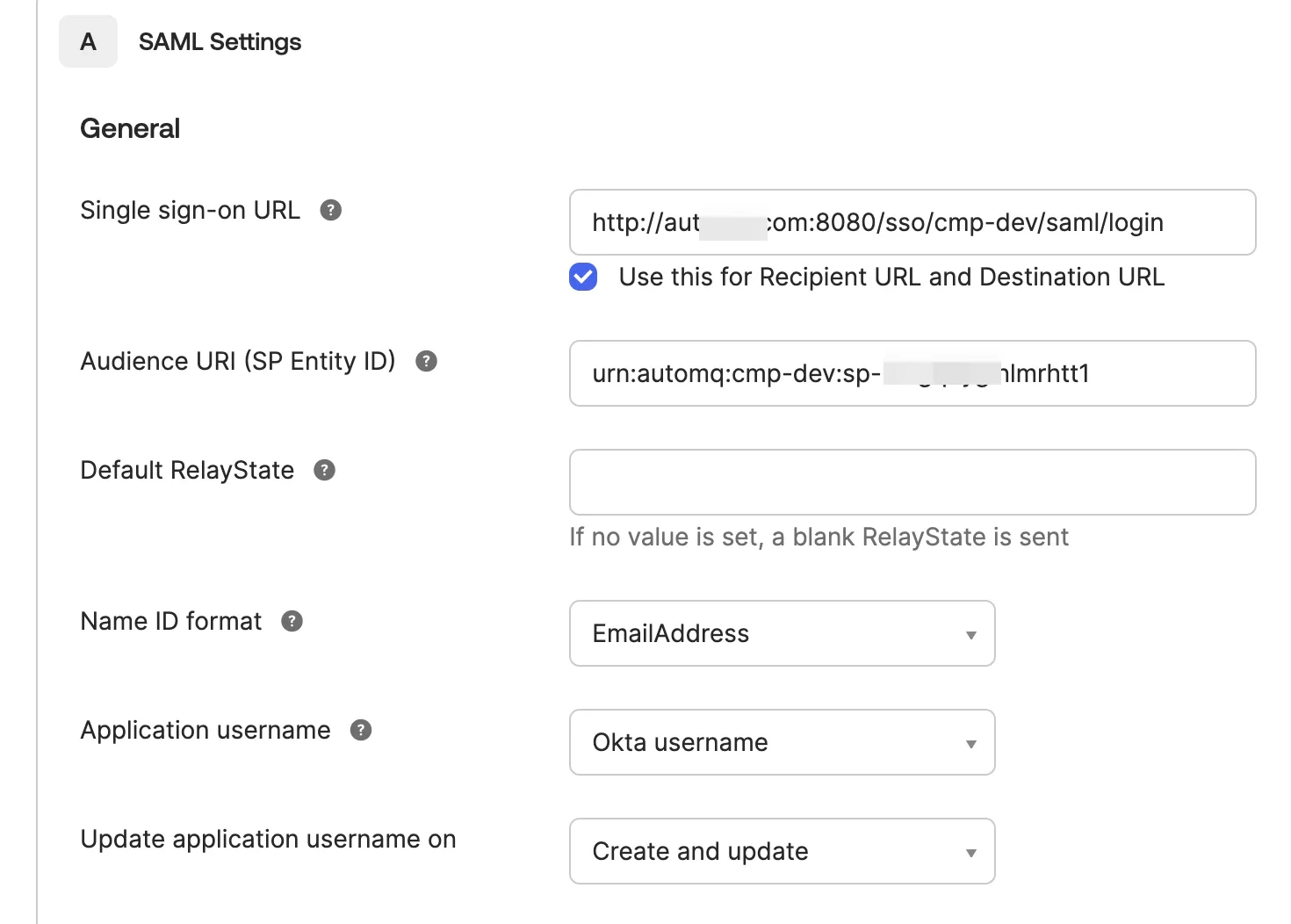
Configure the SP-related parameters according to the instructions below, and click Next.
Single sign-on URL: Enter the ACS URL provided by the SP from the second step.
Audience URI (SP Entity ID): Enter the SP Entity ID provided by the SP from the second step.
Name ID format: Fill in the unique identifier field according to your organization’s standards, with the email address being the recommended option.
Application username: According to the enterprise standard, fill in the unique identifier field. It is recommended to use the OKTA username.
Click “Finish” to complete the SP entry. Click to download the metadata configuration file, which will be used to complete the IdP information in Step 4.
Note:After creating a new application in OKTA, users who have not been assigned to this OKTA application by default cannot use the AutoMQ application. Therefore, it is recommended to allocate the application to relevant users based on requirements.
Go to Identity > Applications > Enterprise applications, and select New application.
Select Create your own application, enter an application name, select Integrate any other application you don’t find in the gallery (Non-gallery), and then select Create.
On the application overview page, select Single sign-on, and then select SAML.
In Basic SAML Configuration, select Edit and configure the following parameters with the SP information obtained in Step 2 (Obtain SP Information from the AutoMQ Console):
Identifier (Entity ID): Enter the AutoMQ SP EntityID.
Reply URL (Assertion Consumer Service URL): Enter the AutoMQ ACS URL.
Sign on URL (Optional): Enter the external URL of the AutoMQ console.
In Attributes & Claims, configure Unique User Identifier (Name ID). user.userprincipalname or user.mail is recommended. Find the emailaddress claim and note its complete Claim URI. Use this URI for both user mapping fields in Step 4.
In SAML Certificates, download Federation Metadata XML. You can upload this file directly when entering the IdP information in the AutoMQ console in Step 4.If you enter the IdP information manually, copy Microsoft Entra Identifier and Login URL from Set up <application name>, and download Certificate (Base64) from SAML Certificates.
Go to Users and groups, select Add user/group, and assign the users or groups that are allowed to access AutoMQ.
Microsoft Entra ID blocks sign-in for users who are not assigned to the enterprise application when Assignment required? is enabled. Assign at least one test user before verifying SSO, and keep a local AutoMQ environment administrator account available until the SSO configuration has been validated.
After configuring the enterprise IdP, the IdP information needs to be recorded in the AutoMQ console to complete the connection. The AutoMQ console supports manual entry and direct upload of metadata files. The required information is as follows:
IdP Alias: This is used to distinguish the information of the IdP. It supports English and Chinese letters, numbers, hyphens, and underscores, with a length limit of 3-64 characters.
IdP Entity ID: This is the unique identifier used to recognize the IdP.
IdP SSO URL: This is the unique login address assigned by the IdP to the AutoMQ console.
IdP Certificate: This is the certificate information used by the IdP to sign and encrypt SAML responses.
UserID Mapping (Optional): AutoMQ extracts the unique user ID attribute from the SAML response. If not set, the default value will be used.
UserName Mapping (Optional): AutoMQ extracts the displayed environment member name attribute from the SAML response. If not set, it will be the same as UserID.
Session Expiration Time Mapping (Optional): AutoMQ extracts the session expiration time attribute from the SAML response. If not set, it will default to 6 hours.
Microsoft Entra ID: When adding the identity provider, expand Advanced Configurations (Optional). You must configure both User ID Mapping and User Name Mapping, even though the section is labeled optional. Set both fields to the complete emailaddress Claim URI:
To find this URI in Azure / Microsoft Entra, open the enterprise application configured for AutoMQ, then go to Single sign-on > Attributes & Claims. Copy the complete Claim URI for emailaddress, including its namespace. Do not enter only emailaddress or the source attribute, such as user.mail.Session Expiration Mapping remains optional.
Once IdP input and SSO configuration are complete, the AutoMQ console can be accessed using SSO login.
Note:When a new user logs in directly using SSO, they will, by default, have no permissions to operate within the environment and will require authorization from an environment administrator to access specific resources.Environment administrators can also pre-create SSO members and assign predefined roles to them, allowing these SSO members to operate the console normally upon subsequent logins.
Was this page helpful?
{"docsConfig":{"theme":"mint","$schema":"https://mintlify.com/docs.json","name":"AutoMQ Documentation","colors":{"primary":"#2449D4","light":"#2449D4","dark":"#2449D4"},"logo":{"light":"https://mintcdn.com/automq/s9vNxeyMGZ1r1DRV/logo/automq-black.svg?fit=max\u0026auto=format\u0026n=s9vNxeyMGZ1r1DRV\u0026q=85\u0026s=bcc93ae74a4143ae2b7602497b7b354b","dark":"https://mintcdn.com/automq/s9vNxeyMGZ1r1DRV/logo/automq-white.svg?fit=max\u0026auto=format\u0026n=s9vNxeyMGZ1r1DRV\u0026q=85\u0026s=209c336f52b4021f2e991e10d07613ae"},"favicon":"https://mintcdn.com/automq/s9vNxeyMGZ1r1DRV/logo/favicon.svg?fit=max\u0026auto=format\u0026n=s9vNxeyMGZ1r1DRV\u0026q=85\u0026s=d736b0934a674250c9dbe95a5f642fb9","appearance":{"default":"light","strict":true},"navbar":{"links":[{"icon":"github","href":"https://github.com/automq/automq","label":"Github"}],"primary":{"type":"button","label":"automq.com","href":"https://www.automq.com"}},"footer":{"socials":{"slack":"https://go.automq.com/slack","telegram":"https://t.me/+VgqhN9wqBGIzYmU1","x":"https://x.com/AutoMQ_Lab","github":"https://github.com/automq/automq","linkedin":"https://linkedin.com/company/automq"}},"icons":{"library":"lucide"},"integrations":{"ga4":{"measurementId":"G-4F3BX9DFG9"}},"contextual":{"options":["copy","view","chatgpt","claude","perplexity","mcp","cursor","vscode"],"display":"header"},"styling":{"latex":true},"navigation":{"global":{"anchors":[{"anchor":"Github","icon":"github","href":"https://github.com/automq/automq"},{"anchor":"Slack","icon":"slack","href":"https://go.automq.com/slack"},{"anchor":"Telegram","icon":"Telegram","href":"https://t.me/+VgqhN9wqBGIzYmU1"},{"anchor":"Blog","icon":"newspaper","href":"https://www.automq.com/blog"}]},"languages":[{"language":"en","href":""},{"language":"cn","href":"zh/automq/what-is-automq/overview"}]}},"deployment":{"deploymentMetadataValue":{"subdomain":"automq","hasAudioNarration":false,"actualSubdomain":"automq","customDomains":["docs.automq.com"],"gitSource":{"type":"github","owner":"automq","repo":"sitebox","deployBranch":"main","contentDirectory":"docs","isPrivate":true,"mountPath":"","label":""},"chroma":{"liveDeploymentHistoryId":"6ad735a93eabd17c66250d4b","collectionId":"54500605-320d-46b3-b896-c0d1e0d9a573","schemaVersion":"v3","latestBuiltDeploymentHistoryId":"6ad735a93eabd17c66250d4b"},"feedback":{"thumbs":true,"edits":false,"issues":false},"entitlements":{"AI_CHAT":{"status":"DISABLED"},"WEB_MCP":{"status":"DISABLED"},"NARRATION":{"status":"DISABLED"}},"buildId":"6ad735a93eabd17c66250d4b","clientVersion":"0.0.3902","searchFilterCounts":[{"language":"cn","tag":"AutoMQ BYOC","count":124},{"language":"en","tag":"AutoMQ BYOC","count":113},{"language":"en","tag":"AutoMQ Open Source","count":61},{"language":"cn","tag":"AutoMQ Open Source","count":57},{"language":"en","tag":"Kafka Connect","count":48},{"language":"cn","tag":"Kafka Connect","count":48},{"language":"en","tag":"Sink Connectors","count":26},{"language":"cn","tag":"Sink Connectors","count":26},{"language":"en","tag":"Source Connectors","count":19},{"language":"cn","tag":"Source Connectors","count":19},{"language":"cn","tag":"快速开始","count":16},{"language":"en","tag":"Integrations","count":14},{"language":"en","tag":"Getting Started","count":12},{"language":"cn","tag":"生态集成","count":12},{"language":"en","tag":"Architecture","count":11},{"language":"cn","tag":"管理环境","count":11},{"language":"cn","tag":"技术架构","count":11},{"language":"cn","tag":"安装 BYOC 环境","count":9},{"language":"en","tag":"Eliminate Inter-Zone Traffics","count":8},{"language":"en","tag":"Manage Environments","count":8}]},"assistantConfig":{"deflection":{"enabled":true,"email":"support@automq.com"}},"hasChatPermissions":false,"hasWebMcpPermissions":false,"toggles":[{"name":"kill-isr","enabled":true,"variant":{"name":"disabled","enabled":false,"feature_enabled":true},"impressionData":false},{"name":"agent-mintlify-slack","enabled":true,"variant":{"name":"disabled","enabled":false,"feature_enabled":true},"impressionData":false},{"name":"editor-v7-file-tree","enabled":true,"variant":{"name":"disabled","enabled":false,"feature_enabled":true},"impressionData":false},{"name":"agent-integrations-settings","enabled":true,"variant":{"name":"disabled","enabled":false,"feature_enabled":true},"impressionData":false},{"name":"automations-pr-grouping","enabled":true,"variant":{"name":"disabled","enabled":false,"feature_enabled":true},"impressionData":false},{"name":"custom-prefix","enabled":true,"variant":{"name":"disabled","enabled":false,"feature_enabled":true},"impressionData":false},{"name":"analytics-v7","enabled":true,"variant":{"name":"disabled","enabled":false,"feature_enabled":true},"impressionData":false},{"name":"user-flows-analytics","enabled":true,"variant":{"name":"disabled","enabled":false,"feature_enabled":true},"impressionData":false},{"name":"no-publish-flow","enabled":true,"variant":{"name":"disabled","enabled":false,"feature_enabled":true},"impressionData":false},{"name":"workos-onboarding","enabled":true,"variant":{"name":"disabled","enabled":false,"feature_enabled":true},"impressionData":false},{"name":"llms-txt-v2","enabled":true,"variant":{"name":"disabled","enabled":false,"feature_enabled":true},"impressionData":false},{"name":"pause-universal-search-reconcile","enabled":true,"variant":{"name":"disabled","enabled":false,"feature_enabled":true},"impressionData":false},{"name":"snapshot-serving-live","enabled":true,"variant":{"name":"disabled","enabled":false,"feature_enabled":true},"impressionData":false},{"name":"stripTemperatureMiddleware","enabled":true,"variant":{"name":"disabled","enabled":false,"feature_enabled":true},"impressionData":false},{"name":"per-site-search-delta","enabled":true,"variant":{"name":"disabled","enabled":false,"feature_enabled":true},"impressionData":false},{"name":"support-platform-pylon-zendesk","enabled":true,"variant":{"name":"disabled","enabled":false,"feature_enabled":true},"impressionData":false},{"name":"editor-branches-v2-autocommit","enabled":true,"variant":{"name":"disabled","enabled":false,"feature_enabled":true},"impressionData":false},{"name":"editor-branches-v2","enabled":true,"variant":{"name":"disabled","enabled":false,"feature_enabled":true},"impressionData":false},{"name":"snapshot-serving","enabled":true,"variant":{"name":"disabled","enabled":false,"feature_enabled":true},"impressionData":false},{"name":"instant-rollback","enabled":true,"variant":{"name":"disabled","enabled":false,"feature_enabled":true},"impressionData":false},{"name":"granular-notifications-server","enabled":true,"variant":{"name":"disabled","enabled":false,"feature_enabled":true},"impressionData":false},{"name":"granular-notifications","enabled":true,"variant":{"name":"disabled","enabled":false,"feature_enabled":true},"impressionData":false},{"name":"editor-private-page-search","enabled":true,"variant":{"name":"disabled","enabled":false,"feature_enabled":true},"impressionData":false},{"name":"automations-fable","enabled":true,"variant":{"name":"disabled","enabled":false,"feature_enabled":true},"impressionData":false},{"name":"fixed-ai-action-pricing","enabled":true,"variant":{"name":"disabled","enabled":false,"feature_enabled":true},"impressionData":false},{"name":"automation-resolve-merge-conflict","enabled":true,"variant":{"name":"disabled","enabled":false,"feature_enabled":true},"impressionData":false},{"name":"scoped-publishing","enabled":true,"variant":{"name":"disabled","enabled":false,"feature_enabled":true},"impressionData":false},{"name":"mintql","enabled":true,"variant":{"name":"disabled","enabled":false,"feature_enabled":true},"impressionData":false},{"name":"page-level-analytics","enabled":true,"variant":{"name":"disabled","enabled":false,"feature_enabled":true},"impressionData":false},{"name":"teamspace","enabled":true,"variant":{"name":"disabled","enabled":false,"feature_enabled":true},"impressionData":false},{"name":"editor-version-history-v2","enabled":true,"variant":{"name":"disabled","enabled":false,"feature_enabled":true},"impressionData":false},{"name":"vite-origin","enabled":true,"variant":{"name":"disabled","enabled":false,"feature_enabled":true},"impressionData":false},{"name":"editor-nav-generations","enabled":true,"variant":{"name":"disabled","enabled":false,"feature_enabled":true},"impressionData":false},{"name":"workspace-projects","enabled":true,"variant":{"name":"disabled","enabled":false,"feature_enabled":true},"impressionData":false},{"name":"assistant-v5","enabled":true,"variant":{"name":"disabled","enabled":false,"feature_enabled":true},"impressionData":false},{"name":"byok-sep-25","enabled":true,"variant":{"name":"disabled","enabled":false,"feature_enabled":true},"impressionData":false},{"name":"revalidation-jwt","enabled":true,"variant":{"name":"disabled","enabled":false,"feature_enabled":true},"impressionData":false},{"name":"editor-agent-model-picker","enabled":true,"variant":{"name":"disabled","enabled":false,"feature_enabled":true},"impressionData":false},{"name":"client-snapshot-docs-config","enabled":true,"variant":{"name":"disabled","enabled":false,"feature_enabled":true},"impressionData":false},{"name":"hobby-abuse-scan","enabled":true,"variant":{"name":"disabled","enabled":false,"feature_enabled":true},"impressionData":false},{"name":"dashboard-inbox","enabled":true,"variant":{"name":"disabled","enabled":false,"feature_enabled":true},"impressionData":false}],"isAtlas":false,"googleFontsInlined":false},"customCss":[{"filePath":"static/style.css","content":"#content-area{word-break:keep-all;white-space:normal;overflow-wrap:normal}header div:nth-child(2) p{display:none}.emphasize-placeholder{background-color:#e0f2ff;border:1px solid #2d64eb;padding:2px 6px;border-radius:4px;font-family:monospace;cursor:pointer;display:inline-flex;align-items:center}.emoji-flip{display:inline-block;transform:scaleX(-1);font-size:.8em;margin-left:4px}"}],"page":{"pagePath":"automq-cloud/manage-identities-and-access/identity-providers-and-sso-authentication","slug":"/automq-cloud/manage-identities-and-access/identity-providers-and-sso-authentication","pageMetadata":{"title":"Identity Providers and SSO Authentication","description":"AutoMQ integrates with enterprise identity providers using SAML for SSO authentication. Manage all users in one place and allow access with existing credentials.","href":"/automq-cloud/manage-identities-and-access/identity-providers-and-sso-authentication"},"description":{"compiledSource":"\"use strict\";\nconst {jsx: _jsx} = arguments[0];\nconst {useMDXComponents: _provideComponents} = arguments[0];\nfunction _createMdxContent(props) {\n const _components = {\n p: \"p\",\n ..._provideComponents(),\n ...props.components\n };\n return _jsx(_components.p, {\n children: \"AutoMQ integrates with enterprise identity providers using SAML for SSO authentication. Manage all users in one place and allow access with existing credentials.\"\n });\n}\nfunction MDXContent(props = {}) {\n const {wrapper: MDXLayout} = {\n ..._provideComponents(),\n ...props.components\n };\n return MDXLayout ? _jsx(MDXLayout, {\n ...props,\n children: _jsx(_createMdxContent, {\n ...props\n })\n }) : _createMdxContent(props);\n}\nreturn {\n default: MDXContent\n};\n","frontmatter":{},"scope":{}},"pageType":"default","mdx":{"mdxSource":{"compiledSource":"\"use strict\";const{Fragment:_Fragment,jsx:_jsx,jsxs:_jsxs}=arguments[0];const{useMDXComponents:_provideComponents}=arguments[0];function _createMdxContent(props){const _components={a:`a`,code:`code`,li:`li`,ol:`ol`,p:`p`,pre:`pre`,span:`span`,strong:`strong`,ul:`ul`,..._provideComponents(),...props.components},{CodeBlock,Heading,OptimizedImage,Tab,Tabs,Tip,Warning}=_components;if(!CodeBlock)_missingMdxReference(`CodeBlock`,true);if(!Heading)_missingMdxReference(`Heading`,true);if(!OptimizedImage)_missingMdxReference(`OptimizedImage`,true);if(!Tab)_missingMdxReference(`Tab`,true);if(!Tabs)_missingMdxReference(`Tabs`,true);if(!Tip)_missingMdxReference(`Tip`,true);if(!Warning)_missingMdxReference(`Warning`,true);return _jsxs(_Fragment,{children:[_jsx(_components.p,{children:`AutoMQ supports configuring enterprise identity providers using the SAML protocol, allowing you to manage and authenticate AutoMQ environment members through your existing identity provider (hereinafter referred to as Identity Provider, IdP) without needing to use AutoMQ local usernames and passwords.`}),`\n`,_jsx(_components.p,{children:`After enabling SSO in AutoMQ, you can manage all users in one place and allow users to log in to AutoMQ using their existing SSO credentials.`}),`\n`,_jsx(Heading,{level:`2`,id:`prerequisites`,children:`Prerequisites`}),`\n`,_jsx(_components.p,{children:`The AutoMQ console by default provides an initial admin member and local member login method. To enable SSO login, the following conditions must be met:`}),`\n`,_jsxs(_components.ul,{children:[`\n`,_jsxs(_components.li,{children:[`\n`,_jsxs(_components.p,{children:[`The enterprise’s IdP must support the `,_jsx(_components.strong,{children:`SAML 2.0 protocol`}),`. AutoMQ does not support the OIDC protocol.`]}),`\n`]}),`\n`,_jsxs(_components.li,{children:[`\n`,_jsx(_components.p,{children:`Enterprise IdP needs to clearly identify each unique user.`}),`\n`]}),`\n`,_jsxs(_components.li,{children:[`\n`,_jsxs(_components.p,{children:[`The username provided by the enterprise IdP must not conflict with member names of the AutoMQ local type. Refer to `,_jsx(_components.a,{href:`/automq-cloud/manage-identities-and-access/member-accounts`,children:`Member Accounts▸`}),`.`]}),`\n`]}),`\n`]}),`\n`,_jsx(Heading,{level:`2`,id:`usage-limitations`,children:`Usage Limitations`}),`\n`,_jsx(_components.p,{children:`When using Enterprise IdP for SSO login in the AutoMQ Console, the following limitations apply:`}),`\n`,_jsxs(_components.ul,{children:[`\n`,_jsxs(_components.li,{children:[`\n`,_jsx(_components.p,{children:`Each AutoMQ Console only supports the configuration of a single Enterprise IdP and does not support multiple identity sources.`}),`\n`]}),`\n`,_jsxs(_components.li,{children:[`\n`,_jsx(_components.p,{children:`After configuring the IdP, SSO is enabled by default, but the local user login method is still supported. Environment administrators can manage SSO through local login.`}),`\n`]}),`\n`,_jsxs(_components.li,{children:[`\n`,_jsx(_components.p,{children:`If the IdP is deleted, SSO is disabled by default, and existing SSO members will not be deleted and need to be manually removed.`}),`\n`]}),`\n`,_jsxs(_components.li,{children:[`\n`,_jsx(_components.p,{children:`AutoMQ does not support converting between SSO and local member types.`}),`\n`]}),`\n`,_jsxs(_components.li,{children:[`\n`,_jsx(_components.p,{children:`AutoMQ does not support the SAML Session logout protocol.`}),`\n`]}),`\n`]}),`\n`,_jsx(Heading,{level:`2`,id:`configuring-enterprise-identity-providers-and-sso`,children:`Configuring Enterprise Identity Providers and SSO.`}),`\n`,_jsx(Heading,{level:`3`,id:`step-1-configure-automq-console-domain-name`,children:`Step 1: Configure AutoMQ Console Domain Name`}),`\n`,_jsx(_components.p,{children:`Before configuring IdP and enabling SSO login, the environment admin needs to set up the domain name for the AutoMQ console. This ensures that enterprise users can access the AutoMQ console via their browsers using the specified domain name. The configuration steps are as follows:`}),`\n`,_jsxs(_components.ol,{children:[`\n`,_jsxs(_components.li,{children:[`\n`,_jsxs(_components.p,{children:[`The enterprise admin clicks the `,_jsx(_components.strong,{children:`Settings`}),` menu.`]}),`\n`]}),`\n`,_jsxs(_components.li,{children:[`\n`,_jsxs(_components.p,{children:[`On the settings page, click `,_jsx(_components.strong,{children:`Add Console Domain Name`}),`.`]}),`\n`]}),`\n`,_jsxs(_components.li,{children:[`\n`,_jsx(_components.p,{children:`Enter the domain name, port, and protocol that the console will use to provide services to users.`}),`\n`]}),`\n`]}),`\n`,_jsx(OptimizedImage,{src:`https://mintcdn.com/automq/HveFFwfWarPtnDnE/automq-cloud/manage-identities-and-access/identity-providers-and-sso-authentication/1.webp?fit=max\u0026auto=format\u0026n=HveFFwfWarPtnDnE\u0026q=85\u0026s=bf91d455317c25c3f34826bfd1f86260`,alt:`Settings page showing the Add Console Domain Name configuration form`,\"data-og-width\":`2714`,width:`2714`,\"data-og-height\":`702`,height:`702`,\"data-path\":`automq-cloud/manage-identities-and-access/identity-providers-and-sso-authentication/1.webp`,\"data-optimize\":`true`,\"data-opv\":`3`,srcset:`https://mintcdn.com/automq/HveFFwfWarPtnDnE/automq-cloud/manage-identities-and-access/identity-providers-and-sso-authentication/1.webp?w=280\u0026fit=max\u0026auto=format\u0026n=HveFFwfWarPtnDnE\u0026q=85\u0026s=1ca52fa16df2b0465d2f90f2360e06ae 280w, https://mintcdn.com/automq/HveFFwfWarPtnDnE/automq-cloud/manage-identities-and-access/identity-providers-and-sso-authentication/1.webp?w=560\u0026fit=max\u0026auto=format\u0026n=HveFFwfWarPtnDnE\u0026q=85\u0026s=1e4a61d05a6130248980f7596b60fbc3 560w, https://mintcdn.com/automq/HveFFwfWarPtnDnE/automq-cloud/manage-identities-and-access/identity-providers-and-sso-authentication/1.webp?w=840\u0026fit=max\u0026auto=format\u0026n=HveFFwfWarPtnDnE\u0026q=85\u0026s=75e808ed556550da165dc0652315e86c 840w, https://mintcdn.com/automq/HveFFwfWarPtnDnE/automq-cloud/manage-identities-and-access/identity-providers-and-sso-authentication/1.webp?w=1100\u0026fit=max\u0026auto=format\u0026n=HveFFwfWarPtnDnE\u0026q=85\u0026s=1d5a4ce1ce800a7f818c2ef9779df338 1100w, https://mintcdn.com/automq/HveFFwfWarPtnDnE/automq-cloud/manage-identities-and-access/identity-providers-and-sso-authentication/1.webp?w=1650\u0026fit=max\u0026auto=format\u0026n=HveFFwfWarPtnDnE\u0026q=85\u0026s=aefad04974de1480651aabd2e4481c2d 1650w, https://mintcdn.com/automq/HveFFwfWarPtnDnE/automq-cloud/manage-identities-and-access/identity-providers-and-sso-authentication/1.webp?w=2500\u0026fit=max\u0026auto=format\u0026n=HveFFwfWarPtnDnE\u0026q=85\u0026s=8e23caab101aa2a92f4299d0bb54c546 2500w`}),`\n`,_jsx(Tip,{children:_jsx(_components.p,{children:`Enterprise users who require the use of the HTTPS protocol are recommended to mount the console domain onto a front load balancing service such as ALB to complete the TLS protocol offloading.`})}),`\n`,_jsxs(_components.ol,{start:`4`,children:[`\n`,_jsx(_components.li,{children:`Once setup is complete, conduct a connectivity test.`}),`\n`]}),`\n`,_jsx(OptimizedImage,{src:`https://mintcdn.com/automq/HveFFwfWarPtnDnE/automq-cloud/manage-identities-and-access/identity-providers-and-sso-authentication/2.webp?fit=max\u0026auto=format\u0026n=HveFFwfWarPtnDnE\u0026q=85\u0026s=f9a0d947106f3acfe9b98c143572a301`,alt:`Connectivity test result for the configured AutoMQ Console domain`,\"data-og-width\":`2616`,width:`2616`,\"data-og-height\":`480`,height:`480`,\"data-path\":`automq-cloud/manage-identities-and-access/identity-providers-and-sso-authentication/2.webp`,\"data-optimize\":`true`,\"data-opv\":`3`,srcset:`https://mintcdn.com/automq/HveFFwfWarPtnDnE/automq-cloud/manage-identities-and-access/identity-providers-and-sso-authentication/2.webp?w=280\u0026fit=max\u0026auto=format\u0026n=HveFFwfWarPtnDnE\u0026q=85\u0026s=cec1a67817eb147b503ef2bd122eab27 280w, https://mintcdn.com/automq/HveFFwfWarPtnDnE/automq-cloud/manage-identities-and-access/identity-providers-and-sso-authentication/2.webp?w=560\u0026fit=max\u0026auto=format\u0026n=HveFFwfWarPtnDnE\u0026q=85\u0026s=f4eaab021bb1bd796c9f3af91d778915 560w, https://mintcdn.com/automq/HveFFwfWarPtnDnE/automq-cloud/manage-identities-and-access/identity-providers-and-sso-authentication/2.webp?w=840\u0026fit=max\u0026auto=format\u0026n=HveFFwfWarPtnDnE\u0026q=85\u0026s=ea4fae64c79724b82f853cc4a33b40ab 840w, https://mintcdn.com/automq/HveFFwfWarPtnDnE/automq-cloud/manage-identities-and-access/identity-providers-and-sso-authentication/2.webp?w=1100\u0026fit=max\u0026auto=format\u0026n=HveFFwfWarPtnDnE\u0026q=85\u0026s=358805c79bc8aac8e466aac1d9359f47 1100w, https://mintcdn.com/automq/HveFFwfWarPtnDnE/automq-cloud/manage-identities-and-access/identity-providers-and-sso-authentication/2.webp?w=1650\u0026fit=max\u0026auto=format\u0026n=HveFFwfWarPtnDnE\u0026q=85\u0026s=6291cea1c8df4a12c55a92f56c5baa92 1650w, https://mintcdn.com/automq/HveFFwfWarPtnDnE/automq-cloud/manage-identities-and-access/identity-providers-and-sso-authentication/2.webp?w=2500\u0026fit=max\u0026auto=format\u0026n=HveFFwfWarPtnDnE\u0026q=85\u0026s=76a2523c5ba76176816348238c459c64 2500w`}),`\n`,_jsx(Heading,{level:`3`,id:`step-2-obtain-sp-information-from-the-automq-console`,children:`Step 2: Obtain SP Information from the AutoMQ Console`}),`\n`,_jsx(_components.p,{children:`An AutoMQ environment administrator (a member authorized with the environment administrator role) should view the AutoMQ SP information and provide it to the enterprise IdP administrator. Follow these steps:`}),`\n`,_jsxs(_components.ol,{children:[`\n`,_jsxs(_components.li,{children:[`\n`,_jsxs(_components.p,{children:[`Click on the `,_jsx(_components.strong,{children:`Access and Control`}),` section in the navigation bar. Then click `,_jsx(_components.strong,{children:`Add IdP`}),`.`]}),`\n`]}),`\n`,_jsxs(_components.li,{children:[`\n`,_jsxs(_components.p,{children:[_jsx(_components.strong,{children:`Select Console External Domain`}),`.`]}),`\n`]}),`\n`,_jsxs(_components.li,{children:[`\n`,_jsx(_components.p,{children:`View the identity information of the AutoMQ console as a Service Provider (SP). Submit the SP information to the enterprise IdP administrator for entry. The administrator can manually copy the information or download the metadata file directly.`}),`\n`,_jsxs(_components.ol,{children:[`\n`,_jsxs(_components.li,{children:[`\n`,_jsxs(_components.p,{children:[_jsx(_components.strong,{children:`SP EntityID:`}),` A unique identifier for the AutoMQ console.`]}),`\n`]}),`\n`,_jsxs(_components.li,{children:[`\n`,_jsxs(_components.p,{children:[_jsx(_components.strong,{children:`Assertion Consumer Service URL:`}),` The ACS URL is the unique address where AutoMQ, as an SP, receives SAML Responses, and it needs to be configured on the IdP.`]}),`\n`]}),`\n`,_jsxs(_components.li,{children:[`\n`,_jsxs(_components.p,{children:[_jsx(_components.strong,{children:`AutoMQ SP Certificate:`}),` The certificate used to declare AutoMQ’s signed requests.`]}),`\n`]}),`\n`]}),`\n`]}),`\n`]}),`\n`,_jsx(OptimizedImage,{src:`https://mintcdn.com/automq/HveFFwfWarPtnDnE/automq-cloud/manage-identities-and-access/identity-providers-and-sso-authentication/3.webp?fit=max\u0026auto=format\u0026n=HveFFwfWarPtnDnE\u0026q=85\u0026s=cecbf359ad50aeaf0a4b077e1f22ff07`,alt:`AutoMQ Console SP information panel showing SP EntityID, ACS URL, and SP certificate`,\"data-og-width\":`2290`,width:`2290`,\"data-og-height\":`1448`,height:`1448`,\"data-path\":`automq-cloud/manage-identities-and-access/identity-providers-and-sso-authentication/3.webp`,\"data-optimize\":`true`,\"data-opv\":`3`,srcset:`https://mintcdn.com/automq/HveFFwfWarPtnDnE/automq-cloud/manage-identities-and-access/identity-providers-and-sso-authentication/3.webp?w=280\u0026fit=max\u0026auto=format\u0026n=HveFFwfWarPtnDnE\u0026q=85\u0026s=22c414b179c1336ea42822495fbc3bdd 280w, https://mintcdn.com/automq/HveFFwfWarPtnDnE/automq-cloud/manage-identities-and-access/identity-providers-and-sso-authentication/3.webp?w=560\u0026fit=max\u0026auto=format\u0026n=HveFFwfWarPtnDnE\u0026q=85\u0026s=b4d5541004e0a6a8c9145ccf80be459f 560w, https://mintcdn.com/automq/HveFFwfWarPtnDnE/automq-cloud/manage-identities-and-access/identity-providers-and-sso-authentication/3.webp?w=840\u0026fit=max\u0026auto=format\u0026n=HveFFwfWarPtnDnE\u0026q=85\u0026s=4d7b4830126f6f487d2a05631253408b 840w, https://mintcdn.com/automq/HveFFwfWarPtnDnE/automq-cloud/manage-identities-and-access/identity-providers-and-sso-authentication/3.webp?w=1100\u0026fit=max\u0026auto=format\u0026n=HveFFwfWarPtnDnE\u0026q=85\u0026s=ca92d9eacdbb3a42802458b4db426a56 1100w, https://mintcdn.com/automq/HveFFwfWarPtnDnE/automq-cloud/manage-identities-and-access/identity-providers-and-sso-authentication/3.webp?w=1650\u0026fit=max\u0026auto=format\u0026n=HveFFwfWarPtnDnE\u0026q=85\u0026s=fcd80881419550cdf619c37d53ece4e3 1650w, https://mintcdn.com/automq/HveFFwfWarPtnDnE/automq-cloud/manage-identities-and-access/identity-providers-and-sso-authentication/3.webp?w=2500\u0026fit=max\u0026auto=format\u0026n=HveFFwfWarPtnDnE\u0026q=85\u0026s=f39c8d2ab486e4e4b9a5f2db44fa990d 2500w`}),`\n`,_jsx(Heading,{level:`3`,id:`step-3-configure-automq-service-in-enterprise-idp`,children:`Step 3: Configure AutoMQ Service in Enterprise IdP`}),`\n`,_jsx(_components.p,{children:`After obtaining the SP information in Step 2, the enterprise IdP administrator needs to configure the SP information of the AutoMQ console into the IdP service. The operations for this step vary depending on the IdP service. Below are common configuration methods for IdP.`}),`\n`,_jsxs(Tabs,{children:[_jsx(Tab,{title:`Auth0`,id:`auth0`,children:_jsxs(_components.ol,{children:[`\n`,_jsxs(_components.li,{children:[`\n`,_jsxs(_components.p,{children:[`Log in to the `,_jsx(_components.a,{href:`https://manage.auth0.com/`,children:`Auth0 account`}),`.`]}),`\n`]}),`\n`,_jsxs(_components.li,{children:[`\n`,_jsxs(_components.p,{children:[`Select `,_jsx(_components.strong,{children:`Applications`}),`.`]}),`\n`]}),`\n`,_jsxs(_components.li,{children:[`\n`,_jsxs(_components.p,{children:[`Click `,_jsx(_components.strong,{children:`Create Application`}),`.`]}),`\n`]}),`\n`,_jsxs(_components.li,{children:[`\n`,_jsx(_components.p,{children:`Enter the application name.`}),`\n`]}),`\n`,_jsxs(_components.li,{children:[`\n`,_jsxs(_components.p,{children:[`Select `,_jsx(_components.strong,{children:`Regular Web Applications`}),` and click `,_jsx(_components.strong,{children:`Create.`})]}),`\n`]}),`\n`,_jsxs(_components.li,{children:[`\n`,_jsx(_components.p,{children:`Once the application is created, navigate to the Addons settings page to enable SAML2.0 configuration.`}),`\n`]}),`\n`,_jsxs(_components.li,{children:[`\n`,_jsxs(_components.p,{children:[`Click on the `,_jsx(_components.strong,{children:`SAML 2 WEB APP`}),` option to open the settings page, and configure the following parameters:`]}),`\n`,_jsxs(_components.ol,{children:[`\n`,_jsxs(_components.li,{children:[`In the `,_jsx(_components.strong,{children:`Application Callback URL`}),` parameter box, set the `,_jsx(_components.strong,{children:`ACS URL`}),` obtained from the AutoMQ console.`]}),`\n`]}),`\n`]}),`\n`,_jsxs(_components.li,{children:[`\n`,_jsxs(_components.p,{children:[`Click `,_jsx(_components.strong,{children:`Enable`}),` and save.`]}),`\n`]}),`\n`,_jsxs(_components.li,{children:[`\n`,_jsxs(_components.p,{children:[`On the `,_jsx(_components.strong,{children:`Usage Tab`}),` page, record the `,_jsx(_components.strong,{children:`Identity Provider Login URL`}),`, `,_jsx(_components.strong,{children:`Issuer URN`}),`, and `,_jsx(_components.strong,{children:`Identity Provider Certificate`}),` information for use in Step 4 for IdP information entry.`]}),`\n`]}),`\n`]})}),_jsxs(Tab,{title:`OKTA`,id:`okta`,children:[_jsxs(_components.ol,{children:[`\n`,_jsxs(_components.li,{children:[`\n`,_jsxs(_components.p,{children:[`In the Okta admin console, navigate to `,_jsx(_components.strong,{children:`Applications`}),`.`]}),`\n`]}),`\n`,_jsxs(_components.li,{children:[`\n`,_jsxs(_components.p,{children:[`Click `,_jsx(_components.strong,{children:`Add Application`}),` to start creating a custom application.`]}),`\n`]}),`\n`,_jsxs(_components.li,{children:[`\n`,_jsxs(_components.p,{children:[`Select the `,_jsx(_components.strong,{children:`SAML 2.0`}),` application type.`]}),`\n`]}),`\n`,_jsxs(_components.li,{children:[`\n`,_jsxs(_components.p,{children:[`Enter `,_jsx(_components.strong,{children:`App Name`}),`, and click Next.`]}),`\n`]}),`\n`,_jsxs(_components.li,{children:[`\n`,_jsx(_components.p,{children:`Configure the SP-related parameters according to the instructions below, and click Next.`}),`\n`,_jsxs(_components.ol,{children:[`\n`,_jsxs(_components.li,{children:[`\n`,_jsx(_components.p,{children:`Single sign-on URL: Enter the ACS URL provided by the SP from the second step.`}),`\n`]}),`\n`,_jsxs(_components.li,{children:[`\n`,_jsx(_components.p,{children:`Audience URI (SP Entity ID): Enter the SP Entity ID provided by the SP from the second step.`}),`\n`]}),`\n`,_jsxs(_components.li,{children:[`\n`,_jsx(_components.p,{children:`Name ID format: Fill in the unique identifier field according to your organization’s standards, with the email address being the recommended option.`}),`\n`]}),`\n`,_jsxs(_components.li,{children:[`\n`,_jsx(_components.p,{children:`Application username: According to the enterprise standard, fill in the unique identifier field. It is recommended to use the OKTA username.`}),`\n`]}),`\n`]}),`\n`]}),`\n`]}),_jsx(OptimizedImage,{src:`https://mintcdn.com/automq/HveFFwfWarPtnDnE/automq-cloud/manage-identities-and-access/identity-providers-and-sso-authentication/4.webp?fit=max\u0026auto=format\u0026n=HveFFwfWarPtnDnE\u0026q=85\u0026s=5baec243c7f4e561bbcce306bfbb4812`,alt:`Okta SAML application configuration showing single sign-on URL and Audience URI fields`,\"data-og-width\":`1470`,width:`1470`,\"data-og-height\":`1052`,height:`1052`,\"data-path\":`automq-cloud/manage-identities-and-access/identity-providers-and-sso-authentication/4.webp`,\"data-optimize\":`true`,\"data-opv\":`3`,srcset:`https://mintcdn.com/automq/HveFFwfWarPtnDnE/automq-cloud/manage-identities-and-access/identity-providers-and-sso-authentication/4.webp?w=280\u0026fit=max\u0026auto=format\u0026n=HveFFwfWarPtnDnE\u0026q=85\u0026s=3d8614cee9c73fdecaa8c78285e0b36a 280w, https://mintcdn.com/automq/HveFFwfWarPtnDnE/automq-cloud/manage-identities-and-access/identity-providers-and-sso-authentication/4.webp?w=560\u0026fit=max\u0026auto=format\u0026n=HveFFwfWarPtnDnE\u0026q=85\u0026s=965c11a816ba0c84fd1d4e537c0317f8 560w, https://mintcdn.com/automq/HveFFwfWarPtnDnE/automq-cloud/manage-identities-and-access/identity-providers-and-sso-authentication/4.webp?w=840\u0026fit=max\u0026auto=format\u0026n=HveFFwfWarPtnDnE\u0026q=85\u0026s=26ea3439d78a689bad8778095f016da8 840w, https://mintcdn.com/automq/HveFFwfWarPtnDnE/automq-cloud/manage-identities-and-access/identity-providers-and-sso-authentication/4.webp?w=1100\u0026fit=max\u0026auto=format\u0026n=HveFFwfWarPtnDnE\u0026q=85\u0026s=7462bdcfa9ce5ea46b44a9ff113b3712 1100w, https://mintcdn.com/automq/HveFFwfWarPtnDnE/automq-cloud/manage-identities-and-access/identity-providers-and-sso-authentication/4.webp?w=1650\u0026fit=max\u0026auto=format\u0026n=HveFFwfWarPtnDnE\u0026q=85\u0026s=d73414339904730a307001273301c1db 1650w, https://mintcdn.com/automq/HveFFwfWarPtnDnE/automq-cloud/manage-identities-and-access/identity-providers-and-sso-authentication/4.webp?w=2500\u0026fit=max\u0026auto=format\u0026n=HveFFwfWarPtnDnE\u0026q=85\u0026s=be4cb1d893613880fc88cc9cc5eb6541 2500w`}),_jsxs(_components.ol,{start:`6`,children:[`\n`,_jsx(_components.li,{children:`Click “Finish” to complete the SP entry. Click to download the metadata configuration file, which will be used to complete the IdP information in Step 4.`}),`\n`]}),_jsxs(Tip,{children:[_jsx(_components.p,{children:_jsx(_components.strong,{children:`Note:`})}),_jsx(_components.p,{children:`After creating a new application in OKTA, users who have not been assigned to this OKTA application by default cannot use the AutoMQ application. Therefore, it is recommended to allocate the application to relevant users based on requirements.`})]})]}),_jsxs(Tab,{title:`Microsoft Entra ID`,id:`microsoft-entra-id`,children:[_jsxs(_components.ol,{children:[`\n`,_jsxs(_components.li,{children:[`\n`,_jsxs(_components.p,{children:[`Sign in to the `,_jsx(_components.a,{href:`https://entra.microsoft.com/`,children:`Microsoft Entra admin center`}),` as at least a Cloud Application Administrator.`]}),`\n`]}),`\n`,_jsxs(_components.li,{children:[`\n`,_jsxs(_components.p,{children:[`Go to `,_jsx(_components.strong,{children:`Identity`}),` > `,_jsx(_components.strong,{children:`Applications`}),` > `,_jsx(_components.strong,{children:`Enterprise applications`}),`, and select `,_jsx(_components.strong,{children:`New application`}),`.`]}),`\n`]}),`\n`,_jsxs(_components.li,{children:[`\n`,_jsxs(_components.p,{children:[`Select `,_jsx(_components.strong,{children:`Create your own application`}),`, enter an application name, select `,_jsx(_components.strong,{children:`Integrate any other application you don’t find in the gallery (Non-gallery)`}),`, and then select `,_jsx(_components.strong,{children:`Create`}),`.`]}),`\n`]}),`\n`,_jsxs(_components.li,{children:[`\n`,_jsxs(_components.p,{children:[`On the application overview page, select `,_jsx(_components.strong,{children:`Single sign-on`}),`, and then select `,_jsx(_components.strong,{children:`SAML`}),`.`]}),`\n`]}),`\n`,_jsxs(_components.li,{children:[`\n`,_jsxs(_components.p,{children:[`In `,_jsx(_components.strong,{children:`Basic SAML Configuration`}),`, select `,_jsx(_components.strong,{children:`Edit`}),` and configure the following parameters with the SP information obtained in Step 2 (Obtain SP Information from the AutoMQ Console):`]}),`\n`,_jsxs(_components.ol,{children:[`\n`,_jsxs(_components.li,{children:[`\n`,_jsxs(_components.p,{children:[_jsx(_components.strong,{children:`Identifier (Entity ID):`}),` Enter the AutoMQ `,_jsx(_components.strong,{children:`SP EntityID`}),`.`]}),`\n`]}),`\n`,_jsxs(_components.li,{children:[`\n`,_jsxs(_components.p,{children:[_jsx(_components.strong,{children:`Reply URL (Assertion Consumer Service URL):`}),` Enter the AutoMQ `,_jsx(_components.strong,{children:`ACS URL`}),`.`]}),`\n`]}),`\n`,_jsxs(_components.li,{children:[`\n`,_jsxs(_components.p,{children:[_jsx(_components.strong,{children:`Sign on URL (Optional):`}),` Enter the external URL of the AutoMQ console.`]}),`\n`]}),`\n`]}),`\n`]}),`\n`,_jsxs(_components.li,{children:[`\n`,_jsxs(_components.p,{children:[`In `,_jsx(_components.strong,{children:`Attributes \u0026 Claims`}),`, configure `,_jsx(_components.strong,{children:`Unique User Identifier (Name ID)`}),`. `,_jsx(_components.code,{children:`user.userprincipalname`}),` or `,_jsx(_components.code,{children:`user.mail`}),` is recommended. Find the `,_jsx(_components.code,{children:`emailaddress`}),` claim and note its complete Claim URI. Use this URI for both user mapping fields in Step 4.`]}),`\n`]}),`\n`,_jsxs(_components.li,{children:[`\n`,_jsxs(_components.p,{children:[`In `,_jsx(_components.strong,{children:`SAML Certificates`}),`, download `,_jsx(_components.strong,{children:`Federation Metadata XML`}),`. You can upload this file directly when entering the IdP information in the AutoMQ console in Step 4.`]}),`\n`,_jsxs(_components.p,{children:[`If you enter the IdP information manually, copy `,_jsx(_components.strong,{children:`Microsoft Entra Identifier`}),` and `,_jsx(_components.strong,{children:`Login URL`}),` from `,_jsx(_components.strong,{children:`Set up \u003capplication name>`}),`, and download `,_jsx(_components.strong,{children:`Certificate (Base64)`}),` from `,_jsx(_components.strong,{children:`SAML Certificates`}),`.`]}),`\n`]}),`\n`,_jsxs(_components.li,{children:[`\n`,_jsxs(_components.p,{children:[`Go to `,_jsx(_components.strong,{children:`Users and groups`}),`, select `,_jsx(_components.strong,{children:`Add user/group`}),`, and assign the users or groups that are allowed to access AutoMQ.`]}),`\n`]}),`\n`]}),_jsx(Tip,{children:_jsxs(_components.p,{children:[`Microsoft Entra ID blocks sign-in for users who are not assigned to the enterprise application when `,_jsx(_components.strong,{children:`Assignment required?`}),` is enabled. Assign at least one test user before verifying SSO, and keep a local AutoMQ environment administrator account available until the SSO configuration has been validated.`]})})]})]}),`\n`,_jsx(Heading,{level:`3`,id:`step-4-complete-idp-entry-in-the-automq-console`,children:`Step 4: Complete IdP Entry in the AutoMQ Console`}),`\n`,_jsx(_components.p,{children:`After configuring the enterprise IdP, the IdP information needs to be recorded in the AutoMQ console to complete the connection. The AutoMQ console supports manual entry and direct upload of metadata files. The required information is as follows:`}),`\n`,_jsxs(_components.ul,{children:[`\n`,_jsxs(_components.li,{children:[`\n`,_jsxs(_components.p,{children:[_jsx(_components.strong,{children:`IdP Alias:`}),` This is used to distinguish the information of the IdP. It supports English and Chinese letters, numbers, hyphens, and underscores, with a length limit of 3-64 characters.`]}),`\n`]}),`\n`,_jsxs(_components.li,{children:[`\n`,_jsxs(_components.p,{children:[_jsx(_components.strong,{children:`IdP Entity ID:`}),` This is the unique identifier used to recognize the IdP.`]}),`\n`]}),`\n`,_jsxs(_components.li,{children:[`\n`,_jsxs(_components.p,{children:[_jsx(_components.strong,{children:`IdP SSO URL:`}),` This is the unique login address assigned by the IdP to the AutoMQ console.`]}),`\n`]}),`\n`,_jsxs(_components.li,{children:[`\n`,_jsxs(_components.p,{children:[_jsx(_components.strong,{children:`IdP Certificate:`}),` This is the certificate information used by the IdP to sign and encrypt SAML responses.`]}),`\n`]}),`\n`,_jsxs(_components.li,{children:[`\n`,_jsxs(_components.p,{children:[_jsx(_components.strong,{children:`UserID Mapping (Optional):`}),` AutoMQ extracts the unique user ID attribute from the SAML response. If not set, the default value will be used.`]}),`\n`]}),`\n`,_jsxs(_components.li,{children:[`\n`,_jsxs(_components.p,{children:[_jsx(_components.strong,{children:`UserName Mapping (Optional):`}),` AutoMQ extracts the displayed environment member name attribute from the SAML response. If not set, it will be the same as UserID.`]}),`\n`]}),`\n`,_jsxs(_components.li,{children:[`\n`,_jsxs(_components.p,{children:[_jsx(_components.strong,{children:`Session Expiration Time Mapping (Optional):`}),` AutoMQ extracts the session expiration time attribute from the SAML response. If not set, it will default to 6 hours.`]}),`\n`]}),`\n`]}),`\n`,_jsx(OptimizedImage,{src:`https://mintcdn.com/automq/HveFFwfWarPtnDnE/automq-cloud/manage-identities-and-access/identity-providers-and-sso-authentication/5.webp?fit=max\u0026auto=format\u0026n=HveFFwfWarPtnDnE\u0026q=85\u0026s=9fe636a817f881e84583a4dd2b11b1f4`,alt:`IdP entry form in AutoMQ Console for configuring IdP alias, entity ID, SSO URL, and certificate`,\"data-og-width\":`2442`,width:`2442`,\"data-og-height\":`1448`,height:`1448`,\"data-path\":`automq-cloud/manage-identities-and-access/identity-providers-and-sso-authentication/5.webp`,\"data-optimize\":`true`,\"data-opv\":`3`,srcset:`https://mintcdn.com/automq/HveFFwfWarPtnDnE/automq-cloud/manage-identities-and-access/identity-providers-and-sso-authentication/5.webp?w=280\u0026fit=max\u0026auto=format\u0026n=HveFFwfWarPtnDnE\u0026q=85\u0026s=966234adff640564006bdc58fc8f91e3 280w, https://mintcdn.com/automq/HveFFwfWarPtnDnE/automq-cloud/manage-identities-and-access/identity-providers-and-sso-authentication/5.webp?w=560\u0026fit=max\u0026auto=format\u0026n=HveFFwfWarPtnDnE\u0026q=85\u0026s=903abf37c731cd243873791144556052 560w, https://mintcdn.com/automq/HveFFwfWarPtnDnE/automq-cloud/manage-identities-and-access/identity-providers-and-sso-authentication/5.webp?w=840\u0026fit=max\u0026auto=format\u0026n=HveFFwfWarPtnDnE\u0026q=85\u0026s=47d7b0991513f9d59d72bd952dfaf94c 840w, https://mintcdn.com/automq/HveFFwfWarPtnDnE/automq-cloud/manage-identities-and-access/identity-providers-and-sso-authentication/5.webp?w=1100\u0026fit=max\u0026auto=format\u0026n=HveFFwfWarPtnDnE\u0026q=85\u0026s=3e9d8bfac7e9386aa4d272515ad84f70 1100w, https://mintcdn.com/automq/HveFFwfWarPtnDnE/automq-cloud/manage-identities-and-access/identity-providers-and-sso-authentication/5.webp?w=1650\u0026fit=max\u0026auto=format\u0026n=HveFFwfWarPtnDnE\u0026q=85\u0026s=d0f3b3e9c7870af39aebcc29af872658 1650w, https://mintcdn.com/automq/HveFFwfWarPtnDnE/automq-cloud/manage-identities-and-access/identity-providers-and-sso-authentication/5.webp?w=2500\u0026fit=max\u0026auto=format\u0026n=HveFFwfWarPtnDnE\u0026q=85\u0026s=ea1c062b36951ff45479d747fc864086 2500w`}),`\n`,_jsxs(Warning,{children:[_jsxs(_components.p,{children:[_jsx(_components.strong,{children:`Microsoft Entra ID:`}),` When adding the identity provider, expand `,_jsx(_components.strong,{children:`Advanced Configurations (Optional)`}),`. You must configure both `,_jsx(_components.strong,{children:`User ID Mapping`}),` and `,_jsx(_components.strong,{children:`User Name Mapping`}),`, even though the section is labeled optional. Set both fields to the complete `,_jsx(_components.code,{children:`emailaddress`}),` Claim URI:`]}),_jsx(CodeBlock,{filename:``,numberOfLines:`2`,language:`text`,children:_jsx(_components.pre,{className:`shiki shiki-themes github-light-default dark-plus`,style:{backgroundColor:`#ffffff`,\"--shiki-dark-bg\":`#0B0C0E`,color:`#1f2328`,\"--shiki-dark\":`#D4D4D4`},language:`text`,children:_jsxs(_components.code,{language:`text`,numberOfLines:`2`,children:[_jsx(_components.span,{className:`line`,children:_jsx(_components.span,{children:`http://schemas.xmlsoap.org/ws/2005/05/identity/claims/emailaddress`})}),`\n`,_jsx(_components.span,{className:`line`,children:_jsx(_components.span,{})})]})})}),_jsxs(_components.p,{children:[`To find this URI in Azure / Microsoft Entra, open the enterprise application configured for AutoMQ, then go to `,_jsx(_components.strong,{children:`Single sign-on`}),` > `,_jsx(_components.strong,{children:`Attributes \u0026 Claims`}),`. Copy the complete Claim URI for `,_jsx(_components.code,{children:`emailaddress`}),`, including its namespace. Do not enter only `,_jsx(_components.code,{children:`emailaddress`}),` or the source attribute, such as `,_jsx(_components.code,{children:`user.mail`}),`.`]}),_jsxs(_components.p,{children:[_jsx(_components.strong,{children:`Session Expiration Mapping`}),` remains optional.`]})]}),`\n`,_jsx(_components.p,{children:`Advanced attribute field settings are as follows:`}),`\n`,_jsx(OptimizedImage,{src:`https://mintcdn.com/automq/HveFFwfWarPtnDnE/automq-cloud/manage-identities-and-access/identity-providers-and-sso-authentication/6.webp?fit=max\u0026auto=format\u0026n=HveFFwfWarPtnDnE\u0026q=85\u0026s=4d268f490ad9adbf2ce2989f868fefb9`,alt:`Advanced attribute mapping settings for UserID, UserName, and session expiration time`,\"data-og-width\":`1910`,width:`1910`,\"data-og-height\":`694`,height:`694`,\"data-path\":`automq-cloud/manage-identities-and-access/identity-providers-and-sso-authentication/6.webp`,\"data-optimize\":`true`,\"data-opv\":`3`,srcset:`https://mintcdn.com/automq/HveFFwfWarPtnDnE/automq-cloud/manage-identities-and-access/identity-providers-and-sso-authentication/6.webp?w=280\u0026fit=max\u0026auto=format\u0026n=HveFFwfWarPtnDnE\u0026q=85\u0026s=2fbda25fd10030ffd627c1ace26f606e 280w, https://mintcdn.com/automq/HveFFwfWarPtnDnE/automq-cloud/manage-identities-and-access/identity-providers-and-sso-authentication/6.webp?w=560\u0026fit=max\u0026auto=format\u0026n=HveFFwfWarPtnDnE\u0026q=85\u0026s=c279de7cb3f95c60c9d1bd1e2507fd0a 560w, https://mintcdn.com/automq/HveFFwfWarPtnDnE/automq-cloud/manage-identities-and-access/identity-providers-and-sso-authentication/6.webp?w=840\u0026fit=max\u0026auto=format\u0026n=HveFFwfWarPtnDnE\u0026q=85\u0026s=3f2b2c958216d0703f17a52361e70285 840w, https://mintcdn.com/automq/HveFFwfWarPtnDnE/automq-cloud/manage-identities-and-access/identity-providers-and-sso-authentication/6.webp?w=1100\u0026fit=max\u0026auto=format\u0026n=HveFFwfWarPtnDnE\u0026q=85\u0026s=40f36b7d32fb9de6e6b23b337ed7ac43 1100w, https://mintcdn.com/automq/HveFFwfWarPtnDnE/automq-cloud/manage-identities-and-access/identity-providers-and-sso-authentication/6.webp?w=1650\u0026fit=max\u0026auto=format\u0026n=HveFFwfWarPtnDnE\u0026q=85\u0026s=807b41a73591c6975c5320fa6fb049bb 1650w, https://mintcdn.com/automq/HveFFwfWarPtnDnE/automq-cloud/manage-identities-and-access/identity-providers-and-sso-authentication/6.webp?w=2500\u0026fit=max\u0026auto=format\u0026n=HveFFwfWarPtnDnE\u0026q=85\u0026s=341e8ac234f85e367c626d9373d9908b 2500w`}),`\n`,_jsx(Heading,{level:`3`,id:`step-five-sso-user-login`,children:`Step Five: SSO User Login`}),`\n`,_jsx(_components.p,{children:`Once IdP input and SSO configuration are complete, the AutoMQ console can be accessed using SSO login.`}),`\n`,_jsx(OptimizedImage,{src:`https://mintcdn.com/automq/HveFFwfWarPtnDnE/automq-cloud/manage-identities-and-access/identity-providers-and-sso-authentication/7.webp?fit=max\u0026auto=format\u0026n=HveFFwfWarPtnDnE\u0026q=85\u0026s=b4e8d68a4823f9cc7ab3dbe03c719641`,alt:`AutoMQ Console login screen with SSO login option`,\"data-og-width\":`1574`,width:`1574`,\"data-og-height\":`1176`,height:`1176`,\"data-path\":`automq-cloud/manage-identities-and-access/identity-providers-and-sso-authentication/7.webp`,\"data-optimize\":`true`,\"data-opv\":`3`,srcset:`https://mintcdn.com/automq/HveFFwfWarPtnDnE/automq-cloud/manage-identities-and-access/identity-providers-and-sso-authentication/7.webp?w=280\u0026fit=max\u0026auto=format\u0026n=HveFFwfWarPtnDnE\u0026q=85\u0026s=f619d32ae02e36ec41bdd83263cdf84e 280w, https://mintcdn.com/automq/HveFFwfWarPtnDnE/automq-cloud/manage-identities-and-access/identity-providers-and-sso-authentication/7.webp?w=560\u0026fit=max\u0026auto=format\u0026n=HveFFwfWarPtnDnE\u0026q=85\u0026s=fe2a5207ea29ef67679bd1dc2731bc53 560w, https://mintcdn.com/automq/HveFFwfWarPtnDnE/automq-cloud/manage-identities-and-access/identity-providers-and-sso-authentication/7.webp?w=840\u0026fit=max\u0026auto=format\u0026n=HveFFwfWarPtnDnE\u0026q=85\u0026s=bd0232419f075631fd33a878233256ea 840w, https://mintcdn.com/automq/HveFFwfWarPtnDnE/automq-cloud/manage-identities-and-access/identity-providers-and-sso-authentication/7.webp?w=1100\u0026fit=max\u0026auto=format\u0026n=HveFFwfWarPtnDnE\u0026q=85\u0026s=b635ed93d6d1571317a0c7ddac9d221e 1100w, https://mintcdn.com/automq/HveFFwfWarPtnDnE/automq-cloud/manage-identities-and-access/identity-providers-and-sso-authentication/7.webp?w=1650\u0026fit=max\u0026auto=format\u0026n=HveFFwfWarPtnDnE\u0026q=85\u0026s=7fdbbde3eb4d8d086796b90076dd95e9 1650w, https://mintcdn.com/automq/HveFFwfWarPtnDnE/automq-cloud/manage-identities-and-access/identity-providers-and-sso-authentication/7.webp?w=2500\u0026fit=max\u0026auto=format\u0026n=HveFFwfWarPtnDnE\u0026q=85\u0026s=373f9e79f27698691abe66bd1be1da44 2500w`}),`\n`,_jsxs(Tip,{children:[_jsx(_components.p,{children:_jsx(_components.strong,{children:`Note:`})}),_jsx(_components.p,{children:`When a new user logs in directly using SSO, they will, by default, have no permissions to operate within the environment and will require authorization from an environment administrator to access specific resources.`}),_jsx(_components.p,{children:`Environment administrators can also pre-create SSO members and assign predefined roles to them, allowing these SSO members to operate the console normally upon subsequent logins.`})]})]})}function MDXContent(props={}){const{wrapper:MDXLayout}={..._provideComponents(),...props.components};return MDXLayout?_jsx(MDXLayout,{...props,children:_jsx(_createMdxContent,{...props})}):_createMdxContent(props)}return{default:MDXContent};function _missingMdxReference(id,component){throw new Error(`Expected `+(component?`component`:`object`)+\" `\"+id+\"` to be defined: you likely forgot to import, pass, or provide it.\")}","frontmatter":{},"scope":{"config":{},"pageMetadata":{"title":"Identity Providers and SSO Authentication","description":"AutoMQ integrates with enterprise identity providers using SAML for SSO authentication. Manage all users in one place and allow access with existing credentials.","href":"/automq-cloud/manage-identities-and-access/identity-providers-and-sso-authentication"}}},"mdxSourceWithNoJs":null},"mdxExtracts":{"tableOfContents":[{"title":"Prerequisites","slug":"prerequisites","depth":2,"children":[]},{"title":"Usage Limitations","slug":"usage-limitations","depth":2,"children":[]},{"title":"Configuring Enterprise Identity Providers and SSO.","slug":"configuring-enterprise-identity-providers-and-sso","depth":2,"children":[{"title":"Step 1: Configure AutoMQ Console Domain Name","slug":"step-1-configure-automq-console-domain-name","depth":3,"children":[]},{"title":"Step 2: Obtain SP Information from the AutoMQ Console","slug":"step-2-obtain-sp-information-from-the-automq-console","depth":3,"children":[]},{"title":"Step 3: Configure AutoMQ Service in Enterprise IdP","slug":"step-3-configure-automq-service-in-enterprise-idp","depth":3,"children":[]},{"title":"Step 4: Complete IdP Entry in the AutoMQ Console","slug":"step-4-complete-idp-entry-in-the-automq-console","depth":3,"children":[]},{"title":"Step Five: SSO User Login","slug":"step-five-sso-user-login","depth":3,"children":[]}]}],"codeExamples":{}},"jsLinks":["/_mintlify/custom/automq/48fec8bab1afa455/content/monitor.js","/_mintlify/custom/automq/c09aa9839083e17a/content/hubspot.js","/_mintlify/custom/automq/786ace9ed17adbd7/content/luckyorange-tracking.js"],"subdomain":"automq","siteName":"AutoMQ Documentation","title":"Identity Providers and SSO Authentication - AutoMQ Documentation","navMaps":{"firstHrefInVersion":{},"firstHrefInLanguage":{"en":{"href":"/automq-cloud/manage-identities-and-access/identity-providers-and-sso-authentication","matchLevel":0},"cn":{"href":"/zh/automq-cloud/manage-identities-and-access/identity-providers-and-sso-authentication","matchLevel":1}}},"lastModified":"2026-09-14T12:18:20.836Z","originalFileLocation":"automq-cloud/manage-identities-and-access/identity-providers-and-sso-authentication.mdx","locale":"en"},"headHtml":"\u003cscript data-mint-head>(function(){var d=document.documentElement,p=\"light\";if(!p){try{p=localStorage.getItem(\"isDarkMode\")}catch(e){}if(p==='true')p='dark';else if(p==='false')p='light';if(p!=='light'\u0026\u0026p!=='dark'\u0026\u0026p!=='system')p=\"light\"}var r=p==='system'?(matchMedia(\"(prefers-color-scheme: dark)\").matches?'dark':'light'):p;d.classList.remove(r==='dark'?'light':'dark');d.classList.add(r);d.setAttribute(\"data-theme-preference\",p)})();\u003c/script>\u003cmeta data-mint-head name=\"description\" content=\"AutoMQ integrates with enterprise identity providers using SAML for SSO authentication. Manage all users in one place and allow access with existing credentials.\">\u003cmeta data-mint-head name=\"application-name\" content=\"AutoMQ Documentation\">\u003cmeta data-mint-head name=\"generator\" content=\"Mintlify\">\u003clink data-mint-head rel=\"icon\" type=\"image/png\" sizes=\"192x192\" href=\"/mintlify-assets/_mintlify/favicons/automq/ZRmM16tNeY4WJ6hO/_generated/favicon/android-chrome-192x192.png\" media=\"(prefers-color-scheme: light)\">\u003clink data-mint-head rel=\"apple-touch-icon\" type=\"image/png\" sizes=\"180x180\" href=\"/mintlify-assets/_mintlify/favicons/automq/ZRmM16tNeY4WJ6hO/_generated/favicon/apple-touch-icon.png\">\u003clink data-mint-head rel=\"icon\" type=\"image/png\" sizes=\"16x16\" href=\"/mintlify-assets/_mintlify/favicons/automq/ZRmM16tNeY4WJ6hO/_generated/favicon/favicon-16x16.png\" media=\"(prefers-color-scheme: light)\">\u003clink data-mint-head rel=\"icon\" type=\"image/png\" sizes=\"32x32\" href=\"/mintlify-assets/_mintlify/favicons/automq/ZRmM16tNeY4WJ6hO/_generated/favicon/favicon-32x32.png\" media=\"(prefers-color-scheme: light)\">\u003clink data-mint-head rel=\"shortcut icon\" type=\"image/x-icon\" href=\"/mintlify-assets/_mintlify/favicons/automq/ZRmM16tNeY4WJ6hO/_generated/favicon/favicon.ico\" media=\"(prefers-color-scheme: light)\">\u003clink data-mint-head rel=\"icon\" type=\"image/png\" sizes=\"192x192\" href=\"/mintlify-assets/_mintlify/favicons/automq/ZRmM16tNeY4WJ6hO/_generated/favicon-dark/android-chrome-192x192.png\" media=\"(prefers-color-scheme: dark)\">\u003clink data-mint-head rel=\"icon\" type=\"image/png\" sizes=\"16x16\" href=\"/mintlify-assets/_mintlify/favicons/automq/ZRmM16tNeY4WJ6hO/_generated/favicon-dark/favicon-16x16.png\" media=\"(prefers-color-scheme: dark)\">\u003clink data-mint-head rel=\"icon\" type=\"image/png\" sizes=\"32x32\" href=\"/mintlify-assets/_mintlify/favicons/automq/ZRmM16tNeY4WJ6hO/_generated/favicon-dark/favicon-32x32.png\" media=\"(prefers-color-scheme: dark)\">\u003clink data-mint-head rel=\"shortcut icon\" type=\"image/x-icon\" href=\"/mintlify-assets/_mintlify/favicons/automq/ZRmM16tNeY4WJ6hO/_generated/favicon-dark/favicon.ico\" media=\"(prefers-color-scheme: dark)\">\u003cmeta data-mint-head property=\"og:title\" content=\"Identity Providers and SSO Authentication - AutoMQ Documentation\">\u003cmeta data-mint-head property=\"og:description\" content=\"AutoMQ integrates with enterprise identity providers using SAML for SSO authentication. Manage all users in one place and allow access with existing credentials.\">\u003cmeta data-mint-head property=\"og:site_name\" content=\"AutoMQ Documentation\">\u003cmeta data-mint-head property=\"og:url\" content=\"https://docs.automq.com/automq-cloud/manage-identities-and-access/identity-providers-and-sso-authentication\">\u003cmeta data-mint-head property=\"og:type\" content=\"website\">\u003cmeta data-mint-head name=\"twitter:card\" content=\"summary_large_image\">\u003cmeta data-mint-head name=\"twitter:title\" content=\"Identity Providers and SSO Authentication - AutoMQ Documentation\">\u003cmeta data-mint-head name=\"twitter:description\" content=\"AutoMQ integrates with enterprise identity providers using SAML for SSO authentication. Manage all users in one place and allow access with existing credentials.\">\u003cmeta data-mint-head name=\"msapplication-config\" content=\"/mintlify-assets/_mintlify/favicons/automq/ZRmM16tNeY4WJ6hO/_generated/favicon/browserconfig.xml\">\u003cmeta data-mint-head name=\"apple-mobile-web-app-title\" content=\"AutoMQ Documentation\">\u003cmeta data-mint-head name=\"msapplication-TileColor\" content=\"#2449D4\">\u003clink data-mint-head rel=\"canonical\" href=\"https://docs.automq.com/automq-cloud/manage-identities-and-access/identity-providers-and-sso-authentication\">\u003clink data-mint-head rel=\"alternate\" type=\"application/xml\" href=\"/sitemap.xml\">\u003clink data-mint-head rel=\"alternate\" type=\"text/markdown\" href=\"/automq-cloud/manage-identities-and-access/identity-providers-and-sso-authentication.md\">\u003clink data-mint-head rel=\"alternate\" hreflang=\"en\" href=\"https://docs.automq.com/automq-cloud/manage-identities-and-access/identity-providers-and-sso-authentication\">\u003clink data-mint-head rel=\"alternate\" hreflang=\"zh\" href=\"https://docs.automq.com/zh/automq-cloud/manage-identities-and-access/identity-providers-and-sso-authentication\">\u003clink data-mint-head rel=\"alternate\" hreflang=\"x-default\" href=\"https://docs.automq.com/automq-cloud/manage-identities-and-access/identity-providers-and-sso-authentication\">\u003cscript data-mint-head type=\"application/ld+json\">{\"@context\":\"https://schema.org\",\"@graph\":[{\"@type\":\"Organization\",\"@id\":\"https://docs.automq.com/#organization\",\"name\":\"AutoMQ Documentation\",\"url\":\"https://docs.automq.com\",\"logo\":{\"@type\":\"ImageObject\",\"url\":\"https://mintcdn.com/automq/s9vNxeyMGZ1r1DRV/logo/automq-black.svg?fit=max\u0026auto=format\u0026n=s9vNxeyMGZ1r1DRV\u0026q=85\u0026s=bcc93ae74a4143ae2b7602497b7b354b\"}},{\"@type\":\"WebSite\",\"@id\":\"https://docs.automq.com#website\",\"name\":\"AutoMQ Documentation\",\"url\":\"https://docs.automq.com\",\"publisher\":{\"@id\":\"https://docs.automq.com/#organization\"}},{\"@type\":\"WebPage\",\"@id\":\"https://docs.automq.com/automq-cloud/manage-identities-and-access/identity-providers-and-sso-authentication#webpage\",\"url\":\"https://docs.automq.com/automq-cloud/manage-identities-and-access/identity-providers-and-sso-authentication\",\"name\":\"Identity Providers and SSO Authentication\",\"description\":\"AutoMQ integrates with enterprise identity providers using SAML for SSO authentication. Manage all users in one place and allow access with existing credentials.\",\"dateModified\":\"2026-09-14T12:18:20.836Z\",\"isPartOf\":{\"@id\":\"https://docs.automq.com#website\"},\"breadcrumb\":{\"@id\":\"https://docs.automq.com/automq-cloud/manage-identities-and-access/identity-providers-and-sso-authentication#breadcrumb\"}},{\"@type\":\"BreadcrumbList\",\"@id\":\"https://docs.automq.com/automq-cloud/manage-identities-and-access/identity-providers-and-sso-authentication#breadcrumb\",\"itemListElement\":[{\"@type\":\"ListItem\",\"position\":1,\"name\":\"Manage Identities and Access\",\"item\":\"https://docs.automq.com/automq-cloud/manage-identities-and-access/overview\"},{\"@type\":\"ListItem\",\"position\":2,\"name\":\"Identity Providers and SSO Authentication\",\"item\":\"https://docs.automq.com/automq-cloud/manage-identities-and-access/identity-providers-and-sso-authentication\"}]},{\"@type\":[\"Article\",\"TechArticle\"],\"@id\":\"https://docs.automq.com/automq-cloud/manage-identities-and-access/identity-providers-and-sso-authentication#article\",\"headline\":\"Identity Providers and SSO Authentication\",\"name\":\"Identity Providers and SSO Authentication\",\"description\":\"AutoMQ integrates with enterprise identity providers using SAML for SSO authentication. Manage all users in one place and allow access with existing credentials.\",\"url\":\"https://docs.automq.com/automq-cloud/manage-identities-and-access/identity-providers-and-sso-authentication\",\"mainEntityOfPage\":{\"@id\":\"https://docs.automq.com/automq-cloud/manage-identities-and-access/identity-providers-and-sso-authentication#webpage\"},\"dateModified\":\"2026-09-14T12:18:20.836Z\",\"publisher\":{\"@id\":\"https://docs.automq.com/#organization\"},\"isPartOf\":{\"@id\":\"https://docs.automq.com#website\"}}]}\u003c/script>\u003cscript data-mint-head type=\"application/ld+json\">{\"@context\":\"https://schema.org\",\"@type\":\"WebSite\",\"name\":\"AutoMQ Documentation\",\"creator\":{\"@type\":\"Organization\",\"name\":\"Mintlify\",\"url\":\"https://mintlify.com\"}}\u003c/script>","siteName":"AutoMQ Documentation","nav":{"global":{"anchors":[{"anchor":"Github","icon":"github","href":"https://github.com/automq/automq"},{"anchor":"Slack","icon":"slack","href":"https://go.automq.com/slack"},{"anchor":"Telegram","icon":"Telegram","href":"https://t.me/+VgqhN9wqBGIzYmU1"},{"anchor":"Blog","icon":"newspaper","href":"https://www.automq.com/blog"}]},"languages":[{"language":"en","tabs":[{"tab":"Home","icon":"house","pages":[{"title":"Home","href":""}]},{"tab":"AutoMQ Open Source","icon":"github","pages":[{"title":"AutoMQ Open Source","href":"/automq/what-is-automq/overview"}]},{"tab":"AutoMQ BYOC","icon":"cloud","groups":[{"group":"Overview","icon":"readme","pages":[{"title":"What Is AutoMQ Cloud","href":"/automq-cloud/overview/what-is-automq-cloud"},{"title":"Glossary","href":"/automq-cloud/overview/glossary"},{"title":"Restrictions","href":"/automq-cloud/overview/restrictions"}]},{"group":"Getting Started","icon":"play","pages":[{"title":"Overview","href":"/automq-cloud/getting-started/overview"},{"group":"Install BYOC Environment","pages":[{"group":"AWS","pages":[{"title":"Prepare VPC","href":"/automq-cloud/getting-started/install-byoc-environment/aws/prepare-vpc"},{"title":"Install AutoMQ on AWS","href":"/automq-cloud/getting-started/install-byoc-environment/aws/install-automq-on-aws"}]},{"group":"Google Cloud","pages":[{"title":"Install AutoMQ on Google Cloud","href":"/automq-cloud/getting-started/install-byoc-environment/google-cloud/install-automq-on-gcp"}]},{"title":"OCI","href":"/automq-cloud/getting-started/install-byoc-environment/oci-install-automq"},{"group":"Azure","pages":[{"title":"Install AutoMQ on Azure","href":"/automq-cloud/getting-started/install-byoc-environment/install-env-on-azure"}]}]},{"title":"Experience AutoMQ","href":"/automq-cloud/getting-started/experience-automq"},{"title":"Client SDK Guide","href":"/automq-cloud/getting-started/client-sdk-guide"}]},{"group":"Deploy on Kubernetes","icon":"https://mintlify.s3.us-west-1.amazonaws.com/automq/images/kubernetes-svgrepo-com.svg","pages":[{"title":"Overview","href":"/automq-cloud/deploy-automq-on-kubernetes/overview"},{"title":"Deploy to AWS EKS","href":"/automq-cloud/deploy-automq-on-kubernetes/deploy-to-aws-eks"},{"title":"Deploy to Azure AKS","href":"/automq-cloud/deploy-automq-on-kubernetes/deploy-to-azure-aks"},{"title":"Deploy to Google Cloud GKE","href":"/automq-cloud/deploy-automq-on-kubernetes/deploy-to-google-cloud-gke"}]},{"group":"Subscriptions and Billings","icon":"receipt","pages":[{"title":"Overview","href":"/automq-cloud/subscriptions-and-billings/overview"},{"group":"BYOC Env Billings","pages":[{"title":"Usage-Based Billing for AWS","href":"/automq-cloud/subscriptions-and-billings/byoc-env-billings/usage-based-billing"},{"group":"Prepaid Billing for Others","pages":[{"title":"Prepaid Billing Overview","href":"/automq-cloud/subscriptions-and-billings/byoc-env-billings/billing-instructions-for-byoc"},{"title":"Manage Environment License","href":"/automq-cloud/manage-environments/manage-environment-license"}]}]}]},{"group":"Manage Environments","icon":"clipboard-list","pages":[{"title":"Overview","href":"/automq-cloud/manage-environments/overview"},{"title":"Upgrade Environment Version","href":"/automq-cloud/manage-environments/upgrade-environment-version"},{"group":"Manage Environment Ops Authing","pages":[{"title":"Overview","href":"/automq-cloud/manage-environments/manage-environment-ops-authing/overview"},{"title":"Set Ops Authing from AWS","href":"/automq-cloud/manage-environments/manage-environment-ops-authing/set-ops-authing-from-aws"},{"title":"Set Ops Authing from Google Cloud","href":"/automq-cloud/manage-environments/manage-environment-ops-authing/set-ops-authing-from-google-cloud"},{"title":"Set Ops Authing from OCI","href":"/automq-cloud/manage-environments/manage-environment-ops-authing/set-ops-authing-from-oci"},{"title":"Set Ops Authing from Azure","href":"/automq-cloud/manage-environments/manage-environment-ops-authing/set-ops-authing-from-azure"},{"title":"Set Ops Tunnel for Troubleshooting","href":"/automq-cloud/manage-environments/manage-environment-ops-authing/set-ops-tunnel-for-troubleshooting"}]}]},{"group":"Manage Identities and Access","icon":"fingerprint","pages":[{"title":"Overview","href":"/automq-cloud/manage-identities-and-access/overview"},{"title":"Member Accounts","href":"/automq-cloud/manage-identities-and-access/member-accounts"},{"title":"Role-Based Access Control","href":"/automq-cloud/manage-identities-and-access/role-based-access-control"},{"title":"Service Accounts","description":"Create and manage service accounts in AutoMQ Cloud for API and Terraform access. Service accounts are fully isolated between environments and independent of cloud provider accounts.","href":"/automq-cloud/manage-identities-and-access/service-accounts"},{"title":"Identity Providers and SSO Authentication","href":"/automq-cloud/manage-identities-and-access/identity-providers-and-sso-authentication"}]},{"group":"Managing AutoMQ","icon":"boxes","pages":[{"title":"Manage Instances","description":"Create, view, scale, upgrade, and delete AutoMQ BYOC (Bring Your Own Cloud) instances.","href":"/automq-cloud/managing-automq/manage-instances"},{"title":"Manage Topics","href":"/automq-cloud/managing-automq/manage-topics"},{"title":"Manage Consumer Groups","href":"/automq-cloud/managing-automq/manage-consumer-groups"}]},{"group":"Migrate to AutoMQ","icon":"arrow-right-left","pages":[{"title":"Overview","href":"/automq-cloud/migrate-to-automq/overview"},{"title":"Prerequisites","href":"/automq-cloud/migrate-to-automq/prerequisites"},{"title":"Executing Migration","href":"/automq-cloud/migrate-to-automq/executing-migration"},{"title":"Kafka Linking best practices","href":"/automq-cloud/migrate-to-automq/kafka-linking-best-practices"}]},{"group":"Manage Security","icon":"globe-lock","pages":[{"title":"Overview","href":"/automq-cloud/manage-security/overview"},{"group":"Authentication","pages":[{"title":"SASL Authentication","href":"/automq-cloud/manage-security/authentication/sasl-authentication"},{"title":"Mutual TLS (mTLS) Authentication","href":"/automq-cloud/manage-security/authentication/mutual-tls-mtls-authentication"}]},{"title":"Data Encryption at Rest","href":"/automq-cloud/manage-security/data-encryption-at-rest"},{"title":"Manage Kafka ACLs","href":"/automq-cloud/manage-security/manage-kafka-acls"}]},{"group":"Kafka Connect","icon":"blocks","pages":[{"title":"Overview","href":"/automq-cloud/kafka-connect/overview"},{"title":"Manage Plugins","href":"/automq-cloud/kafka-connect/manage-plugins"},{"title":"Manage Connectors","href":"/automq-cloud/kafka-connect/manage-connectors"},{"group":"Source Connectors","pages":[{"title":"Azure IoT Hub Source Connector","href":"/automq-cloud/kafka-connect/source-connectors/azure-iot-hub-source-connector"},{"title":"Camunda Zeebe Source Connector","href":"/automq-cloud/kafka-connect/source-connectors/camunda-zeebe-source-connector"},{"title":"Couchbase Source Connector","href":"/automq-cloud/kafka-connect/source-connectors/couchbase-kafka-connect-couchbase-source-connector"},{"title":"Debezium MongoDB CDC Source Connector","href":"/automq-cloud/kafka-connect/source-connectors/debezium-mongodb-source-connector"},{"title":"Debezium MySQL Source Connector","href":"/automq-cloud/kafka-connect/source-connectors/debezium-mysql-source-connector"},{"title":"Debezium PostgreSQL Source Connector","href":"/automq-cloud/kafka-connect/source-connectors/debezium-postgresql-source-connector"},{"title":"Debezium SQL Server Source Connector","href":"/automq-cloud/kafka-connect/source-connectors/debezium-sqlserver-source-connector"},{"title":"Diffusion Source Connector","href":"/automq-cloud/kafka-connect/source-connectors/diffusion-source-connector"},{"title":"Elasticsearch Source Connector","href":"/automq-cloud/kafka-connect/source-connectors/elasticsearch-source-connector"},{"title":"IRC Source Connector","href":"/automq-cloud/kafka-connect/source-connectors/irc-source-connector"},{"title":"MongoDB Source Connector","href":"/automq-cloud/kafka-connect/source-connectors/mongodb-source-connector"},{"title":"Neo4j Source Connector","href":"/automq-cloud/kafka-connect/source-connectors/neo4j-source-connector"},{"title":"Redis Stream Source Connector","href":"/automq-cloud/kafka-connect/source-connectors/redis-source-connector"},{"title":"RSS Source Connector","href":"/automq-cloud/kafka-connect/source-connectors/rss-source-connector"},{"title":"Scylla CDC Source Connector","href":"/automq-cloud/kafka-connect/source-connectors/scylla-cdc-source-connector"},{"title":"Server Sent Events Source Connector","href":"/automq-cloud/kafka-connect/source-connectors/server-sent-events-source-connector"},{"title":"Shell Source Connector","href":"/automq-cloud/kafka-connect/source-connectors/shell-source-connector"},{"title":"Twitter Source Connector","href":"/automq-cloud/kafka-connect/source-connectors/twitter-source-connector"},{"title":"YugabyteDB Source Connector","href":"/automq-cloud/kafka-connect/source-connectors/yugabytedb-source-connector"}]},{"group":"Sink Connectors","pages":[{"title":"Ably Sink Connector","href":"/automq-cloud/kafka-connect/sink-connectors/ably-kafka-sink-connector"},{"title":"Adobe Experience Platform Sink Connector","href":"/automq-cloud/kafka-connect/sink-connectors/adobe-experience-platform-sink-connector"},{"title":"Amazon EventBridge Sink Connector","href":"/automq-cloud/kafka-connect/sink-connectors/amazon-eventbridge-sink-connector"},{"title":"Apache Iceberg Sink Connector","href":"/automq-cloud/kafka-connect/sink-connectors/apache-iceberg-sink-connector"},{"title":"ArangoDB Sink Connector","href":"/automq-cloud/kafka-connect/sink-connectors/arangodb-sink-connector"},{"title":"Azure IoT Hub Sink Connector","href":"/automq-cloud/kafka-connect/sink-connectors/azure-iot-hub-sink-connector"},{"title":"Camunda Zeebe Sink Connector","href":"/automq-cloud/kafka-connect/sink-connectors/camunda-platform-8-zeebe-sink-connector"},{"title":"ClickHouse Sink Connector","href":"/automq-cloud/kafka-connect/sink-connectors/clickhouse-sink-connector"},{"title":"Couchbase Sink Connector","href":"/automq-cloud/kafka-connect/sink-connectors/couchbase-kafka-connect-couchbase-sink-connector"},{"title":"Datadog Logs Sink Connector","href":"/automq-cloud/kafka-connect/sink-connectors/datadog-logs-sink-connector"},{"title":"Diffusion Sink Connector","href":"/automq-cloud/kafka-connect/sink-connectors/diffusion-sink-connector"},{"title":"Google BigQuery Sink Connector","href":"/automq-cloud/kafka-connect/sink-connectors/wepay-kafka-connect-bigquery-sink-connector"},{"title":"Lightstreamer Sink Connector","href":"/automq-cloud/kafka-connect/sink-connectors/lightstreamer-sink-connector"},{"title":"Milvus Sink Connector","href":"/automq-cloud/kafka-connect/sink-connectors/milvus-sink-connector"},{"title":"MongoDB Sink Connector","href":"/automq-cloud/kafka-connect/sink-connectors/mongodb-sink-connector"},{"title":"Neo4j Sink Connector","href":"/automq-cloud/kafka-connect/sink-connectors/neo4j-sink-connector"},{"title":"New Relic Sink Connector","href":"/automq-cloud/kafka-connect/sink-connectors/new-relic-sink-connector"},{"title":"Redis Sink Connector","href":"/automq-cloud/kafka-connect/sink-connectors/redis-sink-connector"},{"title":"ScyllaDB Sink Connector","href":"/automq-cloud/kafka-connect/sink-connectors/scylladb-sink-connector"},{"title":"Shell Sink Connector","href":"/automq-cloud/kafka-connect/sink-connectors/shell-sink-connector"},{"title":"SingleStore Sink Connector","href":"/automq-cloud/kafka-connect/sink-connectors/singlestore-sink-connector"},{"title":"Snowflake Sink Connector","href":"/automq-cloud/kafka-connect/sink-connectors/snowflake-kafka-sink-connector"},{"title":"Splunk Sink Connector","href":"/automq-cloud/kafka-connect/sink-connectors/splunk-kafka-sink-connector"},{"title":"Timeplus Sink Connector","href":"/automq-cloud/kafka-connect/sink-connectors/timeplus-sink-connector"},{"title":"Vectara Sink Connector","href":"/automq-cloud/kafka-connect/sink-connectors/vectara-sink-connector"},{"title":"Weaviate Sink Connector","href":"/automq-cloud/kafka-connect/sink-connectors/weaviate-kafka-sink-connector"}]}]},{"group":"Monitoring \u0026 Alert","icon":"telescope","pages":[{"title":"Monitoring \u0026 Alert Via Prometheus","href":"/automq-cloud/monitoring-alert/monitoring-alert-via-prometheus"},{"title":"Integrating Metrics with Datadog","href":"/automq-cloud/monitoring-alert/integrating-metrics-with-datadog"}]},{"group":"Table Topic","icon":"text-search","pages":[{"title":"Overview","href":"/automq-cloud/table-topic/overview"},{"title":"Table Topic Integration with AWS Glue","href":"/automq-cloud/table-topic/table-topic-integration-with-aws-glue"},{"title":"Table Topic Integration with AWS S3 Table","href":"/automq-cloud/table-topic/table-topic-integration-with-aws-s3-table"}]},{"group":"Best Practice","icon":"spotlight","pages":[{"title":"Kafka Client Config Tuning","href":"/automq-cloud/best-practice/kafka-client-config-tuning"}]},{"group":"Eliminate Inter-Zone Traffics","icon":"audio-lines","pages":[{"title":"Overview","href":"/automq-cloud/eliminate-inter-zone-traffics/overview"},{"title":"Broker Configuration","href":"/automq-cloud/eliminate-inter-zone-traffics/broker-configuration"},{"title":"Client Configuration","href":"/automq-cloud/eliminate-inter-zone-traffics/client-configuration"},{"title":"Monitor Cross-AZ Traffic","href":"/automq-cloud/eliminate-inter-zone-traffics/monitor-inter-zone-traffic"}]},{"group":"Release Notes","icon":"rocket","pages":[{"title":"Release Notes","href":"/automq-cloud/release-notes"}]},{"group":"Support","icon":"message-circle-question-mark","pages":[{"title":"Obtaining Services","href":"/automq-cloud/support/obtaining-services"},{"title":"Service Level Agreement","href":"/automq-cloud/support/service-level-agreement"},{"title":"Terms of Service","href":"/automq-cloud/support/terms-of-service"}]},{"group":"Appendix","icon":"book-text","pages":[{"title":"Cloud Resource List","href":"/automq-cloud/appendix/cloud-resource-list"},{"title":"Deploy AutoMQ Software Via Helm Chart","href":"/automq-cloud/appendix/deploy-automq-enterprise-via-helm-chart"},{"title":"Helm Chart Values Readme","href":"/automq-cloud/appendix/helm-chart-values-readme"},{"title":"Performance Benchmark","href":"/automq-cloud/appendix/performance-benchmark"},{"title":"AWS BYOC Console Upgrade Guide for Version 8.x","href":"/automq-cloud/appendix/byoc-console-upgrade-to-8.x-guide"},{"title":"GCP BYOC Console Upgrade Guide to v8.x","href":"/automq-cloud/appendix/gcp-byoc-console-upgrade-to-8.x-guide"},{"title":"Azure BYOC Console Upgrade Guide to v8.x","href":"/automq-cloud/appendix/azure-byoc-console-upgrade-to-8.x-guide"}]}]}]},{"language":"cn","pages":[{"title":"cn","href":"/zh/automq-cloud/manage-identities-and-access/identity-providers-and-sso-authentication"}]}]},"title":"Identity Providers and SSO Authentication - AutoMQ Documentation","buildId":"dpl_C3fsfi1EcrBns9Vx91gUSN1X3Hi4","deploymentId":"dpl_C3fsfi1EcrBns9Vx91gUSN1X3Hi4","dynamics":["a74be98ba7"],"chunks":["zoom-image-lightbox-Evwtz42K.js","PlusIcon-DYlJbUaT.js","lightbox-handle-r17bVUz3.js"]}