AutoMQ integrates with Databend, enabling cloud-native scalability and Kafka compatibility for efficient big data analytics. Learn how to ingest data from AutoMQ to Databend.
Databend is a next-generation cloud-native data warehouse developed in Rust. It is specifically designed for cloud architecture. Built on object storage, it offers businesses integration with data lakes and warehouses while providing a big data analytics platform that separates compute from storage.This document will guide you on how to import data from AutoMQ into Databend using bend-ingest-kafka.
Refer to Deploy Multi-Nodes Cluster on Linux▸ to set up AutoMQ, making sure there’s network connectivity between AutoMQ and Databend.Quickly create a topic named example_topic in AutoMQ and write test JSON data into it by following these steps.
Use Apache Kafka command-line tools to create a topic. Ensure you have access to the Kafka environment and that the Kafka service is running. Below is an example command for creating a topic:
Use Kafka’s command-line tools or programming methods to write test data into a topic named example_topic. Here is an example using command-line tools:
bend-ingest-kafka is designed to monitor Kafka and batch write data into a Databend Table. After deploying bend-ingest-kafka, the data import job can be initiated.
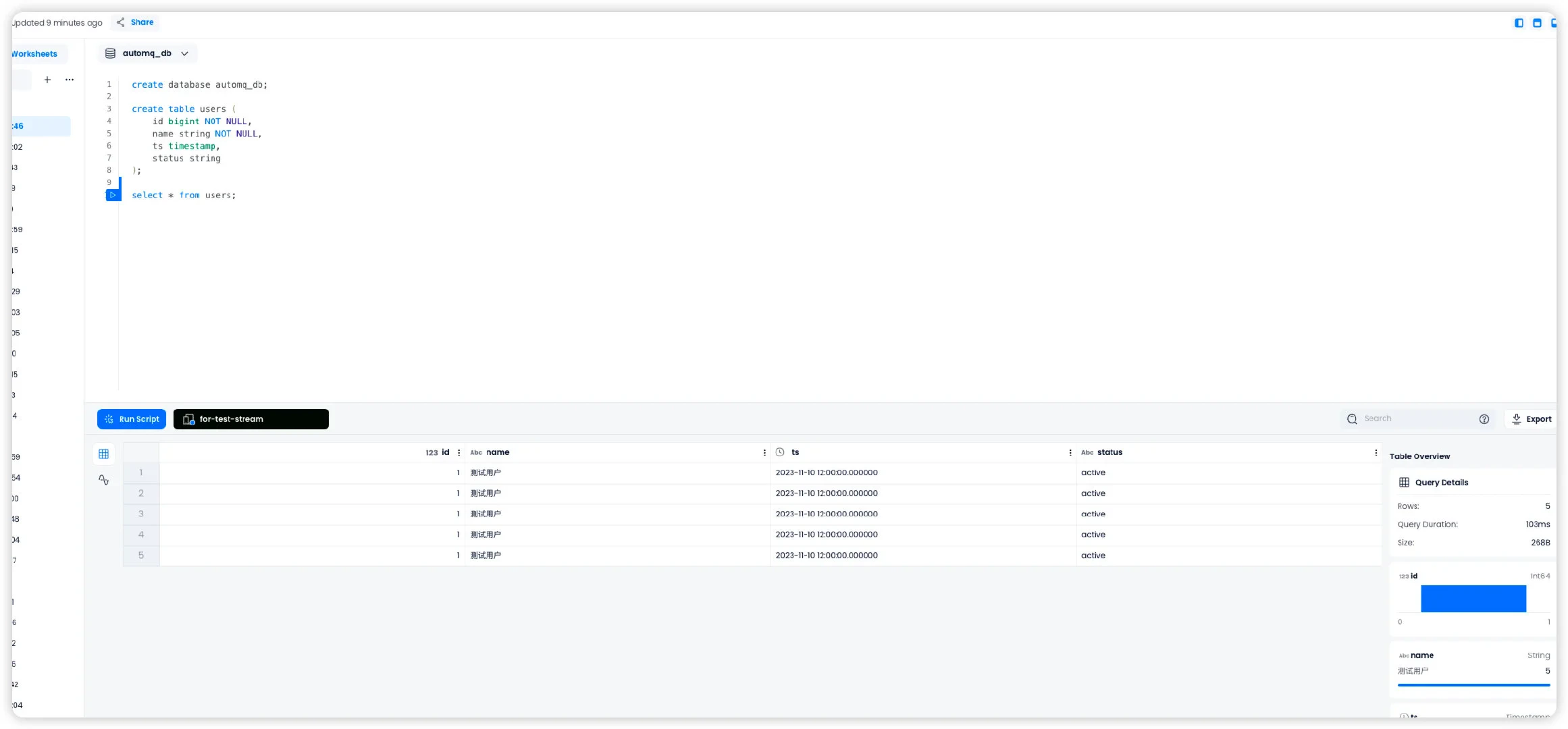
Navigate to the Databend Cloud worksheet and query the automq_db.users table. You should confirm that the data has been successfully synchronized from AutoMQ to the Databend Table.
Was this page helpful?
{"docsConfig":{"theme":"mint","$schema":"https://mintlify.com/docs.json","name":"AutoMQ Documentation","colors":{"primary":"#2449D4","light":"#2449D4","dark":"#2449D4"},"logo":{"light":"https://mintcdn.com/automq/s9vNxeyMGZ1r1DRV/logo/automq-black.svg?fit=max\u0026auto=format\u0026n=s9vNxeyMGZ1r1DRV\u0026q=85\u0026s=bcc93ae74a4143ae2b7602497b7b354b","dark":"https://mintcdn.com/automq/s9vNxeyMGZ1r1DRV/logo/automq-white.svg?fit=max\u0026auto=format\u0026n=s9vNxeyMGZ1r1DRV\u0026q=85\u0026s=209c336f52b4021f2e991e10d07613ae"},"favicon":"https://mintcdn.com/automq/s9vNxeyMGZ1r1DRV/logo/favicon.svg?fit=max\u0026auto=format\u0026n=s9vNxeyMGZ1r1DRV\u0026q=85\u0026s=d736b0934a674250c9dbe95a5f642fb9","appearance":{"default":"light","strict":true},"navbar":{"links":[{"icon":"github","href":"https://github.com/automq/automq","label":"Github"}],"primary":{"type":"button","label":"automq.com","href":"https://www.automq.com"}},"footer":{"socials":{"slack":"https://go.automq.com/slack","telegram":"https://t.me/+VgqhN9wqBGIzYmU1","x":"https://x.com/AutoMQ_Lab","github":"https://github.com/automq/automq","linkedin":"https://linkedin.com/company/automq"}},"icons":{"library":"lucide"},"integrations":{"ga4":{"measurementId":"G-4F3BX9DFG9"}},"contextual":{"options":["copy","view","chatgpt","claude","perplexity","mcp","cursor","vscode"],"display":"header"},"styling":{"latex":true},"navigation":{"global":{"anchors":[{"anchor":"Github","icon":"github","href":"https://github.com/automq/automq"},{"anchor":"Slack","icon":"slack","href":"https://go.automq.com/slack"},{"anchor":"Telegram","icon":"Telegram","href":"https://t.me/+VgqhN9wqBGIzYmU1"},{"anchor":"Blog","icon":"newspaper","href":"https://www.automq.com/blog"}]},"languages":[{"language":"en","href":""},{"language":"cn","href":"zh/automq/what-is-automq/overview"}]}},"deployment":{"deploymentMetadataValue":{"subdomain":"automq","hasAudioNarration":false,"actualSubdomain":"automq","customDomains":["docs.automq.com"],"gitSource":{"type":"github","owner":"automq","repo":"sitebox","deployBranch":"main","contentDirectory":"docs","isPrivate":true,"mountPath":"","label":""},"chroma":{"liveDeploymentHistoryId":"6ad735a93eabd17c66250d4b","collectionId":"54500605-320d-46b3-b896-c0d1e0d9a573","schemaVersion":"v3","latestBuiltDeploymentHistoryId":"6ad735a93eabd17c66250d4b"},"feedback":{"thumbs":true,"edits":false,"issues":false},"entitlements":{"AI_CHAT":{"status":"DISABLED"},"WEB_MCP":{"status":"DISABLED"},"NARRATION":{"status":"DISABLED"}},"buildId":"6ad735a93eabd17c66250d4b","clientVersion":"0.0.3902","searchFilterCounts":[{"language":"cn","tag":"AutoMQ BYOC","count":124},{"language":"en","tag":"AutoMQ BYOC","count":113},{"language":"en","tag":"AutoMQ Open Source","count":61},{"language":"cn","tag":"AutoMQ Open Source","count":57},{"language":"en","tag":"Kafka Connect","count":48},{"language":"cn","tag":"Kafka Connect","count":48},{"language":"en","tag":"Sink Connectors","count":26},{"language":"cn","tag":"Sink Connectors","count":26},{"language":"en","tag":"Source Connectors","count":19},{"language":"cn","tag":"Source Connectors","count":19},{"language":"cn","tag":"快速开始","count":16},{"language":"en","tag":"Integrations","count":14},{"language":"en","tag":"Getting Started","count":12},{"language":"cn","tag":"生态集成","count":12},{"language":"en","tag":"Architecture","count":11},{"language":"cn","tag":"管理环境","count":11},{"language":"cn","tag":"技术架构","count":11},{"language":"cn","tag":"安装 BYOC 环境","count":9},{"language":"en","tag":"Eliminate Inter-Zone Traffics","count":8},{"language":"en","tag":"Manage Environments","count":8}]},"assistantConfig":{"deflection":{"enabled":true,"email":"support@automq.com"}},"hasChatPermissions":false,"hasWebMcpPermissions":false,"toggles":[{"name":"kill-isr","enabled":true,"variant":{"name":"disabled","enabled":false,"feature_enabled":true},"impressionData":false},{"name":"agent-mintlify-slack","enabled":true,"variant":{"name":"disabled","enabled":false,"feature_enabled":true},"impressionData":false},{"name":"editor-v7-file-tree","enabled":true,"variant":{"name":"disabled","enabled":false,"feature_enabled":true},"impressionData":false},{"name":"agent-integrations-settings","enabled":true,"variant":{"name":"disabled","enabled":false,"feature_enabled":true},"impressionData":false},{"name":"automations-pr-grouping","enabled":true,"variant":{"name":"disabled","enabled":false,"feature_enabled":true},"impressionData":false},{"name":"custom-prefix","enabled":true,"variant":{"name":"disabled","enabled":false,"feature_enabled":true},"impressionData":false},{"name":"analytics-v7","enabled":true,"variant":{"name":"disabled","enabled":false,"feature_enabled":true},"impressionData":false},{"name":"user-flows-analytics","enabled":true,"variant":{"name":"disabled","enabled":false,"feature_enabled":true},"impressionData":false},{"name":"no-publish-flow","enabled":true,"variant":{"name":"disabled","enabled":false,"feature_enabled":true},"impressionData":false},{"name":"workos-onboarding","enabled":true,"variant":{"name":"disabled","enabled":false,"feature_enabled":true},"impressionData":false},{"name":"llms-txt-v2","enabled":true,"variant":{"name":"disabled","enabled":false,"feature_enabled":true},"impressionData":false},{"name":"pause-universal-search-reconcile","enabled":true,"variant":{"name":"disabled","enabled":false,"feature_enabled":true},"impressionData":false},{"name":"snapshot-serving-live","enabled":true,"variant":{"name":"disabled","enabled":false,"feature_enabled":true},"impressionData":false},{"name":"stripTemperatureMiddleware","enabled":true,"variant":{"name":"disabled","enabled":false,"feature_enabled":true},"impressionData":false},{"name":"per-site-search-delta","enabled":true,"variant":{"name":"disabled","enabled":false,"feature_enabled":true},"impressionData":false},{"name":"support-platform-pylon-zendesk","enabled":true,"variant":{"name":"disabled","enabled":false,"feature_enabled":true},"impressionData":false},{"name":"editor-branches-v2-autocommit","enabled":true,"variant":{"name":"disabled","enabled":false,"feature_enabled":true},"impressionData":false},{"name":"editor-branches-v2","enabled":true,"variant":{"name":"disabled","enabled":false,"feature_enabled":true},"impressionData":false},{"name":"snapshot-serving","enabled":true,"variant":{"name":"disabled","enabled":false,"feature_enabled":true},"impressionData":false},{"name":"instant-rollback","enabled":true,"variant":{"name":"disabled","enabled":false,"feature_enabled":true},"impressionData":false},{"name":"granular-notifications-server","enabled":true,"variant":{"name":"disabled","enabled":false,"feature_enabled":true},"impressionData":false},{"name":"granular-notifications","enabled":true,"variant":{"name":"disabled","enabled":false,"feature_enabled":true},"impressionData":false},{"name":"editor-private-page-search","enabled":true,"variant":{"name":"disabled","enabled":false,"feature_enabled":true},"impressionData":false},{"name":"automations-fable","enabled":true,"variant":{"name":"disabled","enabled":false,"feature_enabled":true},"impressionData":false},{"name":"fixed-ai-action-pricing","enabled":true,"variant":{"name":"disabled","enabled":false,"feature_enabled":true},"impressionData":false},{"name":"automation-resolve-merge-conflict","enabled":true,"variant":{"name":"disabled","enabled":false,"feature_enabled":true},"impressionData":false},{"name":"scoped-publishing","enabled":true,"variant":{"name":"disabled","enabled":false,"feature_enabled":true},"impressionData":false},{"name":"mintql","enabled":true,"variant":{"name":"disabled","enabled":false,"feature_enabled":true},"impressionData":false},{"name":"page-level-analytics","enabled":true,"variant":{"name":"disabled","enabled":false,"feature_enabled":true},"impressionData":false},{"name":"teamspace","enabled":true,"variant":{"name":"disabled","enabled":false,"feature_enabled":true},"impressionData":false},{"name":"editor-version-history-v2","enabled":true,"variant":{"name":"disabled","enabled":false,"feature_enabled":true},"impressionData":false},{"name":"vite-origin","enabled":true,"variant":{"name":"disabled","enabled":false,"feature_enabled":true},"impressionData":false},{"name":"editor-nav-generations","enabled":true,"variant":{"name":"disabled","enabled":false,"feature_enabled":true},"impressionData":false},{"name":"workspace-projects","enabled":true,"variant":{"name":"disabled","enabled":false,"feature_enabled":true},"impressionData":false},{"name":"assistant-v5","enabled":true,"variant":{"name":"disabled","enabled":false,"feature_enabled":true},"impressionData":false},{"name":"byok-sep-25","enabled":true,"variant":{"name":"disabled","enabled":false,"feature_enabled":true},"impressionData":false},{"name":"revalidation-jwt","enabled":true,"variant":{"name":"disabled","enabled":false,"feature_enabled":true},"impressionData":false},{"name":"editor-agent-model-picker","enabled":true,"variant":{"name":"disabled","enabled":false,"feature_enabled":true},"impressionData":false},{"name":"client-snapshot-docs-config","enabled":true,"variant":{"name":"disabled","enabled":false,"feature_enabled":true},"impressionData":false},{"name":"hobby-abuse-scan","enabled":true,"variant":{"name":"disabled","enabled":false,"feature_enabled":true},"impressionData":false},{"name":"dashboard-inbox","enabled":true,"variant":{"name":"disabled","enabled":false,"feature_enabled":true},"impressionData":false}],"isAtlas":false,"googleFontsInlined":false},"customCss":[{"filePath":"static/style.css","content":"#content-area{word-break:keep-all;white-space:normal;overflow-wrap:normal}header div:nth-child(2) p{display:none}.emphasize-placeholder{background-color:#e0f2ff;border:1px solid #2d64eb;padding:2px 6px;border-radius:4px;font-family:monospace;cursor:pointer;display:inline-flex;align-items:center}.emoji-flip{display:inline-block;transform:scaleX(-1);font-size:.8em;margin-left:4px}"}],"page":{"pagePath":"automq/integrations/data-analysis/databend","slug":"/automq/integrations/data-analysis/databend","pageMetadata":{"title":"Databend","description":"AutoMQ integrates with Databend, enabling cloud-native scalability and Kafka compatibility for efficient big data analytics. Learn how to ingest data from AutoMQ to Databend.","href":"/automq/integrations/data-analysis/databend"},"description":{"compiledSource":"\"use strict\";\nconst {jsx: _jsx} = arguments[0];\nconst {useMDXComponents: _provideComponents} = arguments[0];\nfunction _createMdxContent(props) {\n const _components = {\n p: \"p\",\n ..._provideComponents(),\n ...props.components\n };\n return _jsx(_components.p, {\n children: \"AutoMQ integrates with Databend, enabling cloud-native scalability and Kafka compatibility for efficient big data analytics. Learn how to ingest data from AutoMQ to Databend.\"\n });\n}\nfunction MDXContent(props = {}) {\n const {wrapper: MDXLayout} = {\n ..._provideComponents(),\n ...props.components\n };\n return MDXLayout ? _jsx(MDXLayout, {\n ...props,\n children: _jsx(_createMdxContent, {\n ...props\n })\n }) : _createMdxContent(props);\n}\nreturn {\n default: MDXContent\n};\n","frontmatter":{},"scope":{}},"pageType":"default","mdx":{"mdxSource":{"compiledSource":"\"use strict\";const{Fragment:_Fragment,jsx:_jsx,jsxs:_jsxs}=arguments[0];const{useMDXComponents:_provideComponents}=arguments[0];function _createMdxContent(props){const _components={a:`a`,code:`code`,p:`p`,pre:`pre`,span:`span`,strong:`strong`,..._provideComponents(),...props.components},{CodeBlock,Heading,OptimizedImage,Tip}=_components;if(!CodeBlock)_missingMdxReference(`CodeBlock`,true);if(!Heading)_missingMdxReference(`Heading`,true);if(!OptimizedImage)_missingMdxReference(`OptimizedImage`,true);if(!Tip)_missingMdxReference(`Tip`,true);return _jsxs(_Fragment,{children:[_jsxs(_components.p,{children:[_jsx(_components.a,{href:`https://github.com/datafuselabs/databend`,children:`Databend`}),` is a next-generation cloud-native data warehouse developed in Rust. It is specifically designed for cloud architecture. Built on object storage, it offers businesses integration with data lakes and warehouses while providing a big data analytics platform that separates compute from storage.`]}),`\n`,_jsxs(_components.p,{children:[`This document will guide you on how to import data from AutoMQ into Databend using `,_jsx(_components.a,{href:`https://github.com/databendcloud/bend-ingest-kafka`,children:`bend-ingest-kafka`}),`.`]}),`\n`,_jsx(Heading,{level:`2`,id:`environment-preparation`,children:`Environment Preparation`}),`\n`,_jsx(Heading,{level:`3`,id:`prepare-databend-cloud-and-test-data`,children:`Prepare Databend Cloud and Test Data`}),`\n`,_jsxs(_components.p,{children:[`Firstly, visit `,_jsx(_components.a,{href:`https://docs.databend.cn/guides/cloud/new-account`,children:`Databend Cloud`}),` to initiate a Warehouse. Then, create databases and test tables within the worksheet.`]}),`\n`,_jsx(CodeBlock,{filename:``,numberOfLines:`8`,language:`sql`,children:_jsx(_components.pre,{className:`shiki shiki-themes github-light-default dark-plus`,style:{backgroundColor:`#ffffff`,\"--shiki-dark-bg\":`#0B0C0E`,color:`#1f2328`,\"--shiki-dark\":`#D4D4D4`},language:`sql`,children:_jsxs(_components.code,{language:`sql`,numberOfLines:`8`,children:[_jsxs(_components.span,{className:`line`,children:[_jsx(_components.span,{style:{color:`#CF222E`,\"--shiki-dark\":`#569CD6`},children:`create`}),_jsx(_components.span,{style:{color:`#CF222E`,\"--shiki-dark\":`#569CD6`},children:` database`}),_jsx(_components.span,{style:{color:`#8250DF`,\"--shiki-dark\":`#DCDCAA`},children:` automq_db`}),_jsx(_components.span,{style:{color:`#1F2328`,\"--shiki-dark\":`#D4D4D4`},children:`;`})]}),`\n`,_jsxs(_components.span,{className:`line`,children:[_jsx(_components.span,{style:{color:`#CF222E`,\"--shiki-dark\":`#569CD6`},children:`create`}),_jsx(_components.span,{style:{color:`#CF222E`,\"--shiki-dark\":`#569CD6`},children:` table`}),_jsx(_components.span,{style:{color:`#8250DF`,\"--shiki-dark\":`#DCDCAA`},children:` users`}),_jsx(_components.span,{style:{color:`#1F2328`,\"--shiki-dark\":`#D4D4D4`},children:` (`})]}),`\n`,_jsxs(_components.span,{className:`line`,children:[_jsx(_components.span,{style:{color:`#1F2328`,\"--shiki-dark\":`#D4D4D4`},children:` id `}),_jsx(_components.span,{style:{color:`#CF222E`,\"--shiki-dark\":`#569CD6`},children:`bigint`}),_jsx(_components.span,{style:{color:`#CF222E`,\"--shiki-dark\":`#569CD6`},children:` NOT NULL`}),_jsx(_components.span,{style:{color:`#1F2328`,\"--shiki-dark\":`#D4D4D4`},children:`,`})]}),`\n`,_jsxs(_components.span,{className:`line`,children:[_jsx(_components.span,{style:{color:`#CF222E`,\"--shiki-dark\":`#569CD6`},children:` name`}),_jsx(_components.span,{style:{color:`#1F2328`,\"--shiki-dark\":`#D4D4D4`},children:` string `}),_jsx(_components.span,{style:{color:`#CF222E`,\"--shiki-dark\":`#569CD6`},children:`NOT NULL`}),_jsx(_components.span,{style:{color:`#1F2328`,\"--shiki-dark\":`#D4D4D4`},children:`,`})]}),`\n`,_jsxs(_components.span,{className:`line`,children:[_jsx(_components.span,{style:{color:`#1F2328`,\"--shiki-dark\":`#D4D4D4`},children:` ts `}),_jsx(_components.span,{style:{color:`#CF222E`,\"--shiki-dark\":`#569CD6`},children:`timestamp`}),_jsx(_components.span,{style:{color:`#1F2328`,\"--shiki-dark\":`#D4D4D4`},children:`,`})]}),`\n`,_jsxs(_components.span,{className:`line`,children:[_jsx(_components.span,{style:{color:`#CF222E`,\"--shiki-dark\":`#569CD6`},children:` status`}),_jsx(_components.span,{style:{color:`#1F2328`,\"--shiki-dark\":`#D4D4D4`},children:` string`})]}),`\n`,_jsx(_components.span,{className:`line`,children:_jsx(_components.span,{style:{color:`#1F2328`,\"--shiki-dark\":`#D4D4D4`},children:`)`})}),`\n`,_jsx(_components.span,{className:`line`}),`\n`]})})}),`\n`,_jsx(Heading,{level:`3`,id:`prepare-automq-and-test-data`,children:`Prepare AutoMQ and Test Data`}),`\n`,_jsxs(_components.p,{children:[`Refer to `,_jsx(_components.a,{href:`/automq/deployment/deploy-multi-nodes-cluster-on-linux`,children:`Deploy Multi-Nodes Cluster on Linux▸`}),` to set up AutoMQ, making sure there’s network connectivity between AutoMQ and Databend.`]}),`\n`,_jsxs(_components.p,{children:[`Quickly create a topic named `,_jsx(_components.code,{children:`example_topic`}),` in AutoMQ and write test JSON data into it by following these steps.`]}),`\n`,_jsx(Heading,{level:`4`,id:`create-topic`,children:_jsx(_components.strong,{children:`Create Topic`})}),`\n`,_jsx(_components.p,{children:`Use Apache Kafka command-line tools to create a topic. Ensure you have access to the Kafka environment and that the Kafka service is running. Below is an example command for creating a topic:`}),`\n`,_jsx(CodeBlock,{filename:``,numberOfLines:`2`,language:`shellscript`,children:_jsx(_components.pre,{className:`shiki shiki-themes github-light-default dark-plus`,style:{backgroundColor:`#ffffff`,\"--shiki-dark-bg\":`#0B0C0E`,color:`#1f2328`,\"--shiki-dark\":`#D4D4D4`},language:`shellscript`,children:_jsxs(_components.code,{language:`shellscript`,numberOfLines:`2`,children:[_jsxs(_components.span,{className:`line`,children:[_jsx(_components.span,{style:{color:`#953800`,\"--shiki-dark\":`#DCDCAA`},children:`./kafka-topics.sh`}),_jsx(_components.span,{style:{color:`#0550AE`,\"--shiki-dark\":`#569CD6`},children:` --create`}),_jsx(_components.span,{style:{color:`#0550AE`,\"--shiki-dark\":`#569CD6`},children:` --topic`}),_jsx(_components.span,{style:{color:`#0A3069`,\"--shiki-dark\":`#CE9178`},children:` exampleto_topic`}),_jsx(_components.span,{style:{color:`#0550AE`,\"--shiki-dark\":`#569CD6`},children:` --bootstrap-server`}),_jsx(_components.span,{style:{color:`#0A3069`,\"--shiki-dark\":`#CE9178`},children:` 10.0.96.4:9092`}),_jsx(_components.span,{style:{color:`#0550AE`,\"--shiki-dark\":`#569CD6`},children:` --partitions`}),_jsx(_components.span,{style:{color:`#0550AE`,\"--shiki-dark\":`#B5CEA8`},children:` 1`}),_jsx(_components.span,{style:{color:`#0550AE`,\"--shiki-dark\":`#569CD6`},children:` --replication-factor`}),_jsx(_components.span,{style:{color:`#0550AE`,\"--shiki-dark\":`#B5CEA8`},children:` 1`})]}),`\n`,_jsx(_components.span,{className:`line`}),`\n`]})})}),`\n`,_jsx(Tip,{children:_jsxs(_components.p,{children:[`When executing commands, replace `,_jsx(_components.code,{children:`topic`}),` and `,_jsx(_components.code,{children:`bootstrap-server`}),` with the actual Kafka server addresses.`]})}),`\n`,_jsx(_components.p,{children:`After creating the topic, you can use the following command to verify whether the topic has been successfully created.`}),`\n`,_jsx(CodeBlock,{filename:``,numberOfLines:`1`,language:`shellscript`,children:_jsx(_components.pre,{className:`shiki shiki-themes github-light-default dark-plus`,style:{backgroundColor:`#ffffff`,\"--shiki-dark-bg\":`#0B0C0E`,color:`#1f2328`,\"--shiki-dark\":`#D4D4D4`},language:`shellscript`,children:_jsxs(_components.code,{language:`shellscript`,numberOfLines:`1`,children:[_jsxs(_components.span,{className:`line`,children:[_jsx(_components.span,{style:{color:`#953800`,\"--shiki-dark\":`#DCDCAA`},children:`./kafka-topics.sh`}),_jsx(_components.span,{style:{color:`#0550AE`,\"--shiki-dark\":`#569CD6`},children:` --describe`}),_jsx(_components.span,{style:{color:`#0A3069`,\"--shiki-dark\":`#CE9178`},children:` example_topic`}),_jsx(_components.span,{style:{color:`#0550AE`,\"--shiki-dark\":`#569CD6`},children:` --bootstrap-server`}),_jsx(_components.span,{style:{color:`#0A3069`,\"--shiki-dark\":`#CE9178`},children:` 10.0.96.4:9092`})]}),`\n`]})})}),`\n`,_jsx(Heading,{level:`4`,id:`generate-test-data`,children:_jsx(_components.strong,{children:`Generate Test Data`})}),`\n`,_jsx(_components.p,{children:`Generate test data in JSON format that corresponds to the previously mentioned table.`}),`\n`,_jsx(CodeBlock,{filename:``,numberOfLines:`7`,language:`json`,children:_jsx(_components.pre,{className:`shiki shiki-themes github-light-default dark-plus`,style:{backgroundColor:`#ffffff`,\"--shiki-dark-bg\":`#0B0C0E`,color:`#1f2328`,\"--shiki-dark\":`#D4D4D4`},language:`json`,children:_jsxs(_components.code,{language:`json`,numberOfLines:`7`,children:[_jsx(_components.span,{className:`line`,children:_jsx(_components.span,{style:{color:`#1F2328`,\"--shiki-dark\":`#D4D4D4`},children:`{`})}),`\n`,_jsxs(_components.span,{className:`line`,children:[_jsx(_components.span,{style:{color:`#116329`,\"--shiki-dark\":`#9CDCFE`},children:` \"id\"`}),_jsx(_components.span,{style:{color:`#1F2328`,\"--shiki-dark\":`#D4D4D4`},children:`: `}),_jsx(_components.span,{style:{color:`#0550AE`,\"--shiki-dark\":`#B5CEA8`},children:`1`}),_jsx(_components.span,{style:{color:`#1F2328`,\"--shiki-dark\":`#D4D4D4`},children:`,`})]}),`\n`,_jsxs(_components.span,{className:`line`,children:[_jsx(_components.span,{style:{color:`#116329`,\"--shiki-dark\":`#9CDCFE`},children:` \"name\"`}),_jsx(_components.span,{style:{color:`#1F2328`,\"--shiki-dark\":`#D4D4D4`},children:`: `}),_jsx(_components.span,{style:{color:`#0A3069`,\"--shiki-dark\":`#CE9178`},children:`\"Test User\"`}),_jsx(_components.span,{style:{color:`#1F2328`,\"--shiki-dark\":`#D4D4D4`},children:`,`})]}),`\n`,_jsxs(_components.span,{className:`line`,children:[_jsx(_components.span,{style:{color:`#116329`,\"--shiki-dark\":`#9CDCFE`},children:` \"timestamp\"`}),_jsx(_components.span,{style:{color:`#1F2328`,\"--shiki-dark\":`#D4D4D4`},children:`: `}),_jsx(_components.span,{style:{color:`#0A3069`,\"--shiki-dark\":`#CE9178`},children:`\"2023-11-10T12:00:00\"`}),_jsx(_components.span,{style:{color:`#1F2328`,\"--shiki-dark\":`#D4D4D4`},children:`,`})]}),`\n`,_jsxs(_components.span,{className:`line`,children:[_jsx(_components.span,{style:{color:`#116329`,\"--shiki-dark\":`#9CDCFE`},children:` \"status\"`}),_jsx(_components.span,{style:{color:`#1F2328`,\"--shiki-dark\":`#D4D4D4`},children:`: `}),_jsx(_components.span,{style:{color:`#0A3069`,\"--shiki-dark\":`#CE9178`},children:`\"active\"`})]}),`\n`,_jsx(_components.span,{className:`line`,children:_jsx(_components.span,{style:{color:`#1F2328`,\"--shiki-dark\":`#D4D4D4`},children:`}`})}),`\n`,_jsx(_components.span,{className:`line`}),`\n`]})})}),`\n`,_jsx(Heading,{level:`4`,id:`write-test-data`,children:_jsx(_components.strong,{children:`Write Test Data`})}),`\n`,_jsx(_components.p,{children:`Use Kafka’s command-line tools or programming methods to write test data into a topic named example_topic. Here is an example using command-line tools:`}),`\n`,_jsx(CodeBlock,{filename:``,numberOfLines:`2`,language:`shellscript`,children:_jsx(_components.pre,{className:`shiki shiki-themes github-light-default dark-plus`,style:{backgroundColor:`#ffffff`,\"--shiki-dark-bg\":`#0B0C0E`,color:`#1f2328`,\"--shiki-dark\":`#D4D4D4`},language:`shellscript`,children:_jsxs(_components.code,{language:`shellscript`,numberOfLines:`2`,children:[_jsxs(_components.span,{className:`line`,children:[_jsx(_components.span,{style:{color:`#0550AE`,\"--shiki-dark\":`#DCDCAA`},children:`echo`}),_jsx(_components.span,{style:{color:`#0A3069`,\"--shiki-dark\":`#CE9178`},children:` '{\"id\": 1, \"name\": \"Test User\", \"timestamp\": \"2023-11-10T12:00:00\", \"status\": \"active\"}'`}),_jsx(_components.span,{style:{color:`#CF222E`,\"--shiki-dark\":`#D4D4D4`},children:` |`}),_jsx(_components.span,{style:{color:`#953800`,\"--shiki-dark\":`#DCDCAA`},children:` sh`}),_jsx(_components.span,{style:{color:`#0A3069`,\"--shiki-dark\":`#CE9178`},children:` kafka-console-producer.sh`}),_jsx(_components.span,{style:{color:`#0550AE`,\"--shiki-dark\":`#569CD6`},children:` --broker-list`}),_jsx(_components.span,{style:{color:`#0A3069`,\"--shiki-dark\":`#CE9178`},children:` 10.0.96.4:9092`}),_jsx(_components.span,{style:{color:`#0550AE`,\"--shiki-dark\":`#569CD6`},children:` --topic`}),_jsx(_components.span,{style:{color:`#0A3069`,\"--shiki-dark\":`#CE9178`},children:` example_topic`})]}),`\n`,_jsx(_components.span,{className:`line`}),`\n`]})})}),`\n`,_jsx(Tip,{children:_jsx(_components.p,{children:`When executing the command, replace the topic and bootstrap-server with the actual Kafka server address being used.`})}),`\n`,_jsx(_components.p,{children:`You can view the topic data just written using the following command:`}),`\n`,_jsx(CodeBlock,{filename:``,numberOfLines:`1`,language:`shellscript`,children:_jsx(_components.pre,{className:`shiki shiki-themes github-light-default dark-plus`,style:{backgroundColor:`#ffffff`,\"--shiki-dark-bg\":`#0B0C0E`,color:`#1f2328`,\"--shiki-dark\":`#D4D4D4`},language:`shellscript`,children:_jsxs(_components.code,{language:`shellscript`,numberOfLines:`1`,children:[_jsxs(_components.span,{className:`line`,children:[_jsx(_components.span,{style:{color:`#953800`,\"--shiki-dark\":`#DCDCAA`},children:`sh`}),_jsx(_components.span,{style:{color:`#0A3069`,\"--shiki-dark\":`#CE9178`},children:` kafka-console-consumer.sh`}),_jsx(_components.span,{style:{color:`#0550AE`,\"--shiki-dark\":`#569CD6`},children:` --bootstrap-server`}),_jsx(_components.span,{style:{color:`#0A3069`,\"--shiki-dark\":`#CE9178`},children:` 10.0.96.4:9092`}),_jsx(_components.span,{style:{color:`#0550AE`,\"--shiki-dark\":`#569CD6`},children:` --topic`}),_jsx(_components.span,{style:{color:`#0A3069`,\"--shiki-dark\":`#CE9178`},children:` example_topic`}),_jsx(_components.span,{style:{color:`#0550AE`,\"--shiki-dark\":`#569CD6`},children:` --from-beginning`})]}),`\n`]})})}),`\n`,_jsx(Heading,{level:`2`,id:`create-a-bend-ingest-databend-job`,children:`Create a Bend-ingest-databend Job`}),`\n`,_jsxs(_components.p,{children:[_jsx(_components.a,{href:`https://github.com/databendcloud/bend-ingest-kafka`,children:`bend-ingest-kafka`}),` is designed to monitor Kafka and batch write data into a Databend Table. After deploying `,_jsx(_components.code,{children:`bend-ingest-kafka`}),`, the data import job can be initiated.`]}),`\n`,_jsx(CodeBlock,{filename:``,numberOfLines:`2`,language:`shellscript`,children:_jsx(_components.pre,{className:`shiki shiki-themes github-light-default dark-plus`,style:{backgroundColor:`#ffffff`,\"--shiki-dark-bg\":`#0B0C0E`,color:`#1f2328`,\"--shiki-dark\":`#D4D4D4`},language:`shellscript`,children:_jsxs(_components.code,{language:`shellscript`,numberOfLines:`2`,children:[_jsxs(_components.span,{className:`line`,children:[_jsx(_components.span,{style:{color:`#953800`,\"--shiki-dark\":`#DCDCAA`},children:`bend-ingest-kafka`}),_jsx(_components.span,{style:{color:`#0550AE`,\"--shiki-dark\":`#569CD6`},children:` --kafka-bootstrap-servers=`}),_jsx(_components.span,{style:{color:`#0A3069`,\"--shiki-dark\":`#CE9178`},children:`\"localhost:9094\"`}),_jsx(_components.span,{style:{color:`#0550AE`,\"--shiki-dark\":`#569CD6`},children:` --kafka-topic=`}),_jsx(_components.span,{style:{color:`#0A3069`,\"--shiki-dark\":`#CE9178`},children:`\"example_topic\"`}),_jsx(_components.span,{style:{color:`#0550AE`,\"--shiki-dark\":`#569CD6`},children:` --kafka-consumer-group=`}),_jsx(_components.span,{style:{color:`#0A3069`,\"--shiki-dark\":`#CE9178`},children:`\"Consumer Group\"`}),_jsx(_components.span,{style:{color:`#0550AE`,\"--shiki-dark\":`#569CD6`},children:` --databend-dsn=`}),_jsx(_components.span,{style:{color:`#0A3069`,\"--shiki-dark\":`#CE9178`},children:`\"https://cloudapp:password@host:443\"`}),_jsx(_components.span,{style:{color:`#0550AE`,\"--shiki-dark\":`#569CD6`},children:` --databend-table=`}),_jsx(_components.span,{style:{color:`#0A3069`,\"--shiki-dark\":`#CE9178`},children:`\"automq_db.users\"`}),_jsx(_components.span,{style:{color:`#0550AE`,\"--shiki-dark\":`#569CD6`},children:` --data-format=`}),_jsx(_components.span,{style:{color:`#0A3069`,\"--shiki-dark\":`#CE9178`},children:`\"json\"`}),_jsx(_components.span,{style:{color:`#0550AE`,\"--shiki-dark\":`#569CD6`},children:` --batch-size=5`}),_jsx(_components.span,{style:{color:`#0550AE`,\"--shiki-dark\":`#569CD6`},children:` --batch-max-interval=30s`})]}),`\n`,_jsx(_components.span,{className:`line`}),`\n`]})})}),`\n`,_jsx(Tip,{children:_jsx(_components.p,{children:`When executing the command, replace kafka-bootstrap-servers with the actual Kafka server address you are using.`})}),`\n`,_jsx(Heading,{level:`3`,id:`parameter-description`,children:`Parameter Description`}),`\n`,_jsx(Heading,{level:`4`,id:`databend-dsn`,children:_jsx(_components.strong,{children:`databend-dsn`})}),`\n`,_jsx(_components.p,{children:`The DSN provided by Databend Cloud for connecting to the warehouse can be found in this documentation.`}),`\n`,_jsx(Heading,{level:`4`,id:`batch-size`,children:_jsx(_components.strong,{children:`batch-size`})}),`\n`,_jsxs(_components.p,{children:[_jsx(_components.code,{children:`bend-ingest-kafka`}),` will gather data until it reaches the specified batch size, then initiate a data synchronization process.`]}),`\n`,_jsx(Heading,{level:`2`,id:`verify-data-import`,children:`Verify Data Import`}),`\n`,_jsxs(_components.p,{children:[`Navigate to the Databend Cloud worksheet and query the `,_jsx(_components.code,{children:`automq_db.users`}),` table. You should confirm that the data has been successfully synchronized from AutoMQ to the Databend Table.`]}),`\n`,_jsx(OptimizedImage,{src:`https://mintcdn.com/automq/1QgM5miUDiCjXCsL/automq/integrations/data-analysis/databend/1.webp?fit=max\u0026auto=format\u0026n=1QgM5miUDiCjXCsL\u0026q=85\u0026s=51aa45e5d553f2f3e6c118d021ff7b37`,\"data-og-width\":`2322`,width:`2322`,\"data-og-height\":`1080`,height:`1080`,\"data-path\":`automq/integrations/data-analysis/databend/1.webp`,\"data-optimize\":`true`,\"data-opv\":`3`,srcset:`https://mintcdn.com/automq/1QgM5miUDiCjXCsL/automq/integrations/data-analysis/databend/1.webp?w=280\u0026fit=max\u0026auto=format\u0026n=1QgM5miUDiCjXCsL\u0026q=85\u0026s=035847d04f9a20898835c8464dc7e8ea 280w, https://mintcdn.com/automq/1QgM5miUDiCjXCsL/automq/integrations/data-analysis/databend/1.webp?w=560\u0026fit=max\u0026auto=format\u0026n=1QgM5miUDiCjXCsL\u0026q=85\u0026s=282a0b45448f4466fb793894d336ad94 560w, https://mintcdn.com/automq/1QgM5miUDiCjXCsL/automq/integrations/data-analysis/databend/1.webp?w=840\u0026fit=max\u0026auto=format\u0026n=1QgM5miUDiCjXCsL\u0026q=85\u0026s=48da8ff077c22942168ffd904d6c60db 840w, https://mintcdn.com/automq/1QgM5miUDiCjXCsL/automq/integrations/data-analysis/databend/1.webp?w=1100\u0026fit=max\u0026auto=format\u0026n=1QgM5miUDiCjXCsL\u0026q=85\u0026s=48293267639ffc80459bb7078f92af4d 1100w, https://mintcdn.com/automq/1QgM5miUDiCjXCsL/automq/integrations/data-analysis/databend/1.webp?w=1650\u0026fit=max\u0026auto=format\u0026n=1QgM5miUDiCjXCsL\u0026q=85\u0026s=a2491ee5991a8c1565cd917bf792b8f3 1650w, https://mintcdn.com/automq/1QgM5miUDiCjXCsL/automq/integrations/data-analysis/databend/1.webp?w=2500\u0026fit=max\u0026auto=format\u0026n=1QgM5miUDiCjXCsL\u0026q=85\u0026s=b2387fbe65e3e2952787c69c14e18e57 2500w`})]})}function MDXContent(props={}){const{wrapper:MDXLayout}={..._provideComponents(),...props.components};return MDXLayout?_jsx(MDXLayout,{...props,children:_jsx(_createMdxContent,{...props})}):_createMdxContent(props)}return{default:MDXContent};function _missingMdxReference(id,component){throw new Error(`Expected `+(component?`component`:`object`)+\" `\"+id+\"` to be defined: you likely forgot to import, pass, or provide it.\")}","frontmatter":{},"scope":{"config":{},"pageMetadata":{"title":"Databend","description":"AutoMQ integrates with Databend, enabling cloud-native scalability and Kafka compatibility for efficient big data analytics. Learn how to ingest data from AutoMQ to Databend.","href":"/automq/integrations/data-analysis/databend"}}},"mdxSourceWithNoJs":null},"mdxExtracts":{"tableOfContents":[{"title":"Environment Preparation","slug":"environment-preparation","depth":2,"children":[{"title":"Prepare Databend Cloud and Test Data","slug":"prepare-databend-cloud-and-test-data","depth":3,"children":[]},{"title":"Prepare AutoMQ and Test Data","slug":"prepare-automq-and-test-data","depth":3,"children":[]},{"title":"Create Topic","slug":"create-topic","depth":4,"children":[]},{"title":"Generate Test Data","slug":"generate-test-data","depth":4,"children":[]},{"title":"Write Test Data","slug":"write-test-data","depth":4,"children":[]}]},{"title":"Create a Bend-ingest-databend Job","slug":"create-a-bend-ingest-databend-job","depth":2,"children":[{"title":"Parameter Description","slug":"parameter-description","depth":3,"children":[]},{"title":"databend-dsn","slug":"databend-dsn","depth":4,"children":[]},{"title":"batch-size","slug":"batch-size","depth":4,"children":[]}]},{"title":"Verify Data Import","slug":"verify-data-import","depth":2,"children":[]}],"codeExamples":{}},"jsLinks":["/_mintlify/custom/automq/48fec8bab1afa455/content/monitor.js","/_mintlify/custom/automq/c09aa9839083e17a/content/hubspot.js","/_mintlify/custom/automq/786ace9ed17adbd7/content/luckyorange-tracking.js"],"subdomain":"automq","siteName":"AutoMQ Documentation","title":"Databend - AutoMQ Documentation","navMaps":{"firstHrefInVersion":{},"firstHrefInLanguage":{"en":{"href":"/automq/integrations/data-analysis/databend","matchLevel":0},"cn":{"href":"/zh/automq/integrations/data-analysis/databend","matchLevel":1}}},"lastModified":"2026-03-12T06:13:49.411Z","originalFileLocation":"automq/integrations/data-analysis/databend.mdx","locale":"en"},"headHtml":"\u003cscript data-mint-head>(function(){var d=document.documentElement,p=\"light\";if(!p){try{p=localStorage.getItem(\"isDarkMode\")}catch(e){}if(p==='true')p='dark';else if(p==='false')p='light';if(p!=='light'\u0026\u0026p!=='dark'\u0026\u0026p!=='system')p=\"light\"}var r=p==='system'?(matchMedia(\"(prefers-color-scheme: dark)\").matches?'dark':'light'):p;d.classList.remove(r==='dark'?'light':'dark');d.classList.add(r);d.setAttribute(\"data-theme-preference\",p)})();\u003c/script>\u003cmeta data-mint-head name=\"description\" content=\"AutoMQ integrates with Databend, enabling cloud-native scalability and Kafka compatibility for efficient big data analytics. Learn how to ingest data from AutoMQ to Databend.\">\u003cmeta data-mint-head name=\"application-name\" content=\"AutoMQ Documentation\">\u003cmeta data-mint-head name=\"generator\" content=\"Mintlify\">\u003clink data-mint-head rel=\"icon\" type=\"image/png\" sizes=\"192x192\" href=\"/mintlify-assets/_mintlify/favicons/automq/ZRmM16tNeY4WJ6hO/_generated/favicon/android-chrome-192x192.png\" media=\"(prefers-color-scheme: light)\">\u003clink data-mint-head rel=\"apple-touch-icon\" type=\"image/png\" sizes=\"180x180\" href=\"/mintlify-assets/_mintlify/favicons/automq/ZRmM16tNeY4WJ6hO/_generated/favicon/apple-touch-icon.png\">\u003clink data-mint-head rel=\"icon\" type=\"image/png\" sizes=\"16x16\" href=\"/mintlify-assets/_mintlify/favicons/automq/ZRmM16tNeY4WJ6hO/_generated/favicon/favicon-16x16.png\" media=\"(prefers-color-scheme: light)\">\u003clink data-mint-head rel=\"icon\" type=\"image/png\" sizes=\"32x32\" href=\"/mintlify-assets/_mintlify/favicons/automq/ZRmM16tNeY4WJ6hO/_generated/favicon/favicon-32x32.png\" media=\"(prefers-color-scheme: light)\">\u003clink data-mint-head rel=\"shortcut icon\" type=\"image/x-icon\" href=\"/mintlify-assets/_mintlify/favicons/automq/ZRmM16tNeY4WJ6hO/_generated/favicon/favicon.ico\" media=\"(prefers-color-scheme: light)\">\u003clink data-mint-head rel=\"icon\" type=\"image/png\" sizes=\"192x192\" href=\"/mintlify-assets/_mintlify/favicons/automq/ZRmM16tNeY4WJ6hO/_generated/favicon-dark/android-chrome-192x192.png\" media=\"(prefers-color-scheme: dark)\">\u003clink data-mint-head rel=\"icon\" type=\"image/png\" sizes=\"16x16\" href=\"/mintlify-assets/_mintlify/favicons/automq/ZRmM16tNeY4WJ6hO/_generated/favicon-dark/favicon-16x16.png\" media=\"(prefers-color-scheme: dark)\">\u003clink data-mint-head rel=\"icon\" type=\"image/png\" sizes=\"32x32\" href=\"/mintlify-assets/_mintlify/favicons/automq/ZRmM16tNeY4WJ6hO/_generated/favicon-dark/favicon-32x32.png\" media=\"(prefers-color-scheme: dark)\">\u003clink data-mint-head rel=\"shortcut icon\" type=\"image/x-icon\" href=\"/mintlify-assets/_mintlify/favicons/automq/ZRmM16tNeY4WJ6hO/_generated/favicon-dark/favicon.ico\" media=\"(prefers-color-scheme: dark)\">\u003cmeta data-mint-head property=\"og:title\" content=\"Databend - AutoMQ Documentation\">\u003cmeta data-mint-head property=\"og:description\" content=\"AutoMQ integrates with Databend, enabling cloud-native scalability and Kafka compatibility for efficient big data analytics. Learn how to ingest data from AutoMQ to Databend.\">\u003cmeta data-mint-head property=\"og:site_name\" content=\"AutoMQ Documentation\">\u003cmeta data-mint-head property=\"og:url\" content=\"https://docs.automq.com/automq/integrations/data-analysis/databend\">\u003cmeta data-mint-head property=\"og:type\" content=\"website\">\u003cmeta data-mint-head name=\"twitter:card\" content=\"summary_large_image\">\u003cmeta data-mint-head name=\"twitter:title\" content=\"Databend - AutoMQ Documentation\">\u003cmeta data-mint-head name=\"twitter:description\" content=\"AutoMQ integrates with Databend, enabling cloud-native scalability and Kafka compatibility for efficient big data analytics. Learn how to ingest data from AutoMQ to Databend.\">\u003cmeta data-mint-head name=\"msapplication-config\" content=\"/mintlify-assets/_mintlify/favicons/automq/ZRmM16tNeY4WJ6hO/_generated/favicon/browserconfig.xml\">\u003cmeta data-mint-head name=\"apple-mobile-web-app-title\" content=\"AutoMQ Documentation\">\u003cmeta data-mint-head name=\"msapplication-TileColor\" content=\"#2449D4\">\u003clink data-mint-head rel=\"canonical\" href=\"https://docs.automq.com/automq/integrations/data-analysis/databend\">\u003clink data-mint-head rel=\"alternate\" type=\"application/xml\" href=\"/sitemap.xml\">\u003clink data-mint-head rel=\"alternate\" type=\"text/markdown\" href=\"/automq/integrations/data-analysis/databend.md\">\u003clink data-mint-head rel=\"alternate\" hreflang=\"en\" href=\"https://docs.automq.com/automq/integrations/data-analysis/databend\">\u003clink data-mint-head rel=\"alternate\" hreflang=\"zh\" href=\"https://docs.automq.com/zh/automq/integrations/data-analysis/databend\">\u003clink data-mint-head rel=\"alternate\" hreflang=\"x-default\" href=\"https://docs.automq.com/automq/integrations/data-analysis/databend\">\u003cscript data-mint-head type=\"application/ld+json\">{\"@context\":\"https://schema.org\",\"@graph\":[{\"@type\":\"Organization\",\"@id\":\"https://docs.automq.com/#organization\",\"name\":\"AutoMQ Documentation\",\"url\":\"https://docs.automq.com\",\"logo\":{\"@type\":\"ImageObject\",\"url\":\"https://mintcdn.com/automq/s9vNxeyMGZ1r1DRV/logo/automq-black.svg?fit=max\u0026auto=format\u0026n=s9vNxeyMGZ1r1DRV\u0026q=85\u0026s=bcc93ae74a4143ae2b7602497b7b354b\"}},{\"@type\":\"WebSite\",\"@id\":\"https://docs.automq.com#website\",\"name\":\"AutoMQ Documentation\",\"url\":\"https://docs.automq.com\",\"publisher\":{\"@id\":\"https://docs.automq.com/#organization\"}},{\"@type\":\"WebPage\",\"@id\":\"https://docs.automq.com/automq/integrations/data-analysis/databend#webpage\",\"url\":\"https://docs.automq.com/automq/integrations/data-analysis/databend\",\"name\":\"Databend\",\"description\":\"AutoMQ integrates with Databend, enabling cloud-native scalability and Kafka compatibility for efficient big data analytics. Learn how to ingest data from AutoMQ to Databend.\",\"dateModified\":\"2026-03-12T06:13:49.411Z\",\"isPartOf\":{\"@id\":\"https://docs.automq.com#website\"},\"breadcrumb\":{\"@id\":\"https://docs.automq.com/automq/integrations/data-analysis/databend#breadcrumb\"}},{\"@type\":\"BreadcrumbList\",\"@id\":\"https://docs.automq.com/automq/integrations/data-analysis/databend#breadcrumb\",\"itemListElement\":[{\"@type\":\"ListItem\",\"position\":1,\"name\":\"Integrations\",\"item\":\"https://docs.automq.com/automq/integrations/data-analysis/apache-doris\"},{\"@type\":\"ListItem\",\"position\":2,\"name\":\"Data Analysis\",\"item\":\"https://docs.automq.com/automq/integrations/data-analysis/apache-doris\"},{\"@type\":\"ListItem\",\"position\":3,\"name\":\"Databend\",\"item\":\"https://docs.automq.com/automq/integrations/data-analysis/databend\"}]},{\"@type\":[\"Article\",\"TechArticle\"],\"@id\":\"https://docs.automq.com/automq/integrations/data-analysis/databend#article\",\"headline\":\"Databend\",\"name\":\"Databend\",\"description\":\"AutoMQ integrates with Databend, enabling cloud-native scalability and Kafka compatibility for efficient big data analytics. Learn how to ingest data from AutoMQ to Databend.\",\"url\":\"https://docs.automq.com/automq/integrations/data-analysis/databend\",\"mainEntityOfPage\":{\"@id\":\"https://docs.automq.com/automq/integrations/data-analysis/databend#webpage\"},\"dateModified\":\"2026-03-12T06:13:49.411Z\",\"publisher\":{\"@id\":\"https://docs.automq.com/#organization\"},\"isPartOf\":{\"@id\":\"https://docs.automq.com#website\"}}]}\u003c/script>\u003cscript data-mint-head type=\"application/ld+json\">{\"@context\":\"https://schema.org\",\"@type\":\"WebSite\",\"name\":\"AutoMQ Documentation\",\"creator\":{\"@type\":\"Organization\",\"name\":\"Mintlify\",\"url\":\"https://mintlify.com\"}}\u003c/script>","siteName":"AutoMQ Documentation","nav":{"global":{"anchors":[{"anchor":"Github","icon":"github","href":"https://github.com/automq/automq"},{"anchor":"Slack","icon":"slack","href":"https://go.automq.com/slack"},{"anchor":"Telegram","icon":"Telegram","href":"https://t.me/+VgqhN9wqBGIzYmU1"},{"anchor":"Blog","icon":"newspaper","href":"https://www.automq.com/blog"}]},"languages":[{"language":"en","tabs":[{"tab":"Home","icon":"house","pages":[{"title":"Home","href":""}]},{"tab":"AutoMQ Open Source","icon":"github","groups":[{"group":"What is AutoMQ?","icon":"book","pages":[{"title":"Overview","href":"/automq/what-is-automq/overview"},{"title":"Difference with Apache Kafka","href":"/automq/what-is-automq/difference-with-apache-kafka"},{"title":"Difference with Tiered Storage","href":"/automq/what-is-automq/difference-with-tiered-storage"},{"title":"Compatibility with Apache Kafka","href":"/automq/what-is-automq/compatibility-with-apache-kafka"},{"title":"Licensing and Enterprise Features","href":"/automq/what-is-automq/licensing-and-enterprise-features"}]},{"group":"Getting Started","icon":"play","pages":[{"title":"Deploy Multi-Nodes Test Cluster on Docker","href":"/automq/getting-started/deploy-multi-nodes-test-cluster-on-docker"},{"group":"Explore AutoMQ","pages":[{"title":"Example: Partition Reassignment in Seconds","href":"/automq/getting-started/explore-automq/example-partition-reassignment-in-seconds"},{"title":"Example: Continuous Data Self-Balancing","href":"/automq/getting-started/explore-automq/example-continuous-data-self-balancing"},{"title":"Example: Self-Balancing when Cluster Nodes Change","href":"/automq/getting-started/explore-automq/example-self-balancing-when-cluster-nodes-change"}]}]},{"group":"Deployment","icon":"wrench","pages":[{"title":"Overview","href":"/automq/deployment/overview"},{"title":"Deploy Multi-Nodes Cluster on Linux","href":"/automq/deployment/deploy-multi-nodes-cluster-on-linux"},{"title":"Deploy Multi-Nodes Cluster on Kubernetes","href":"/automq/deployment/deploy-multi-nodes-cluster-on-kubernetes"},{"title":"Deploy Multi-Nodes Cluster on Kubernetes with Strimzi","href":"/automq/deployment/multi-nodes-cluster-with-strimzi"},{"title":"Introduction and Deployment Recommendations for AutoMQ Open Source Image","href":"/automq/deployment/deployment-recommendations"},{"title":"Performance Tuning for Broker","href":"/automq/deployment/performance-tuning-for-broker"},{"title":"Performance Tuning for Client","href":"/automq/configuration/performance-tuning-for-client"},{"title":"AutoMQ Benchmark","href":"/automq/deployment/automq-benchmark"}]},{"group":"Migration","icon":"arrow-left-right","pages":[{"title":"Overview","href":"/automq/migration/overview"},{"title":"Migrating from Apache Kafka to AutoMQ","href":"/automq/migration/migrating-from-apache-kafka-to-automq"}]},{"group":"Observability","icon":"telescope","pages":[{"title":"Overview","href":"/automq/observability/overview"},{"title":"Integrating Metrics with Prometheus","href":"/automq/observability/integrating-metrics-with-prometheus"},{"title":"Dashboard Configuration","href":"/automq/observability/dashboard-configuration"},{"title":"Prometheus Metrics","href":"/automq/observability/prometheus-metrics"}]},{"group":"Architecture","icon":"landmark","pages":[{"title":"Overview","href":"/automq/architecture/overview"},{"group":"S3Stream Shared Streaming Storage","pages":[{"title":"Overview","href":"/automq/architecture/s3stream-shared-streaming-storage/overview"},{"title":"S3 Storage","href":"/automq/architecture/s3stream-shared-streaming-storage/s3-storage"},{"title":"WAL Storage","href":"/automq/architecture/s3stream-shared-streaming-storage/wal-storage"}]},{"group":"Technical Advantage","icon":"atom","pages":[{"title":"Overview","href":"/automq/architecture/technical-advantage/overview"},{"title":"5x Catch-up Read Efficiency","href":"/automq/architecture/technical-advantage/5x-catch-up-read-efficiency"},{"title":"Continuous Self-Balancing","href":"/automq/architecture/technical-advantage/continuous-self-balancing"},{"title":"Native Compatible with Apache Kafka","href":"/automq/architecture/technical-advantage/native-compatible-with-apache-kafka"},{"title":"Partition Reassignment in Seconds","href":"/automq/architecture/technical-advantage/partition-reassignment-in-seconds"},{"title":"Scale-out/in in Seconds","href":"/automq/architecture/technical-advantage/scale-outin-in-seconds"},{"title":"Stateless Broker","href":"/automq/architecture/technical-advantage/stateless-broker"}]}]},{"group":"Table Topic","icon":"text-search","pages":[{"title":"Overview","href":"/automq/table-topic/overview"},{"title":"Table Topic Quick Start","href":"/automq/table-topic/table-topic-quick-start"},{"title":"Table Topic Configuration","href":"/automq/table-topic/table-topic-configuration"}]},{"group":"Eliminate Inter-Zone Traffics","icon":"audio-lines","pages":[{"title":"Overview","href":"/automq/eliminate-inter-zone-traffics/overview"},{"title":"Broker Configuration","href":"/automq/eliminate-inter-zone-traffics/broker-configuration"},{"title":"Client Configuration","href":"/automq/eliminate-inter-zone-traffics/client-configuration"},{"title":"Monitor Inter Zone Traffic","href":"/automq/eliminate-inter-zone-traffics/monitor-inter-zone-traffic"}]},{"group":"Integrations","icon":"blocks","pages":[{"group":"Data Analysis","pages":[{"title":"Apache Doris","description":"AutoMQ ensures cloud-native scalability, Kafka compatibility, and cost efficiency for importing data from AutoMQ into Apache Doris, driving fast, real-time analytics.","href":"/automq/integrations/data-analysis/apache-doris"},{"title":"Databend","href":"/automq/integrations/data-analysis/databend"},{"title":"Flink","description":"Integrate Flink with AutoMQ for real-time data stream analysis with Flink and AutoMQ. Enjoy 100% Kafka compatibility, cloud-native scalability, and over 10x cost savings.","href":"/automq/integrations/data-analysis/flink"},{"title":"RisingWave","href":"/automq/integrations/data-analysis/risingwave"},{"title":"StarRocks","href":"/automq/integrations/data-analysis/starrocks"}]},{"group":"Data Integration","pages":[{"title":"Airbyte","href":"/automq/integrations/data-integration/airbyte"},{"title":"Debezium","href":"/automq/integrations/data-integration/debezium"}]},{"group":"Kafka UI","pages":[{"title":"Kafdrop","href":"/automq/integrations/kafka-ui/kafdrop"},{"title":"Redpanda Console","href":"/automq/integrations/kafka-ui/redpanda-console"}]},{"group":"Observability","pages":[{"title":"Flashcat","href":"/automq/integrations/observability/flashcat"},{"title":"Guance Cloud","href":"/automq/integrations/observability/guance-cloud"},{"title":"Prometheus/VictoriaMetrics","href":"/automq/integrations/observability/prometheus"}]},{"group":"Storage","pages":[{"title":"RustFS","href":"/automq/integrations/storage/rustfs"},{"title":"Tigris","href":"/automq/integrations/storage/tigris"}]}]},{"group":"Configuration","icon":"settings","pages":[{"title":"Broker and Controller Configuration","href":"/automq/configuration/broker-and-controller-configuration"},{"title":"Object Storage Configuration","href":"/automq/configuration/object-storage-configuration"}]},{"group":"Releases","icon":"git-merge","pages":[{"title":"Software Artifact","href":"/automq/releases/software-artifact"},{"url":"https://github.com/AutoMQ/automq/releases/","title":null,"href":"/automq/releases/release-notes"}]},{"group":"Benchmarks","icon":"chart-spline","pages":[{"title":"AutoMQ vs. Apache Kafka Benchmarks and Cost","href":"/automq/benchmarks/automq-vs-apache-kafka-benchmarks-and-cost"}]},{"group":"Reference","icon":"book-marked","pages":[{"title":"Glossary","href":"/automq/reference/glossary"}]}]},{"tab":"AutoMQ BYOC","icon":"cloud","pages":[{"title":"AutoMQ BYOC","href":"/automq-cloud/overview/what-is-automq-cloud"}]}]},{"language":"cn","pages":[{"title":"cn","href":"/zh/automq/integrations/data-analysis/databend"}]}]},"title":"Databend - AutoMQ Documentation","buildId":"dpl_C3fsfi1EcrBns9Vx91gUSN1X3Hi4","deploymentId":"dpl_C3fsfi1EcrBns9Vx91gUSN1X3Hi4","dynamics":["a74be98ba7"],"chunks":["zoom-image-lightbox-Evwtz42K.js","PlusIcon-DYlJbUaT.js","lightbox-handle-r17bVUz3.js"]}